---
title: "Getting Started with DuckLake: A New Table Format for Your Lakehouse"
canonical: "https://motherduck.com/blog/getting-started-ducklake-table-format/"
related:
- title: "Announcing DuckLake 1.0 on MotherDuck"
url: "https://motherduck.com/blog/announcing-ducklake-1-0-on-motherduck/"
- title: "A Duck Walks into a Lake"
url: "https://motherduck.com/blog/ducklake-motherduck/"
- title: "Understanding DuckLake: A Table Format with a Modern Architecture | MotherDuck"
url: "https://motherduck.com/videos/understanding-ducklake-a-table-format-with-a-modern-architecture/"
---
# Getting Started with DuckLake: A New Table Format for Your Lakehouse
DuckDB just introduced a new table format named **DuckLake**. If you work with data, you’ve probably heard about the "table format wars"—**[Iceberg](https://iceberg.apache.org/)** and **[Delta Lake](https://delta.io/)**—over the past few years.
If you haven't, or if these terms are still confusing, don’t worry. I’ll start with a quick recap of what led to Iceberg and Delta Lake in the first place. Then we’ll dive into DuckLake with some practical code examples. The [source code](https://gist.github.com/mehd-io/9afab092e807a4097864b09e7e9835e9) is available on GitHub.
And as always, if you're too lazy to read, you can also watch this content.
## Table Format Recap
To understand table formats, we need to start with file formats like **[Parquet](https://parquet.apache.org/docs/file-format/)** and **[Avro](https://avro.apache.org/)**.
But first—why should we, as developers, even care about file formats? Aren’t databases supposed to handle storage for us?
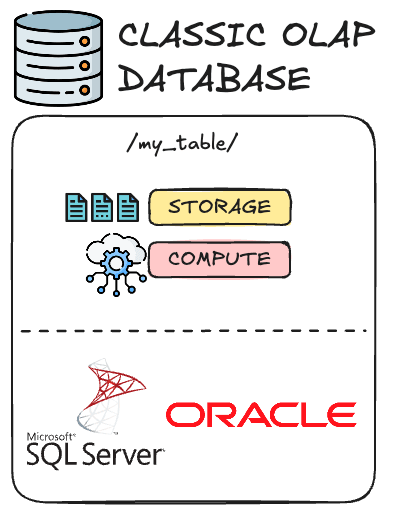
Originally, databases were used for data engineering (and still are). But there were two main challenges with traditional OLAP databases:
- **Vendor lock-in**: Data was often stored in proprietary formats, making migrations painful.
- **Scaling**: Traditional databases weren’t always built to scale storage independently from compute.
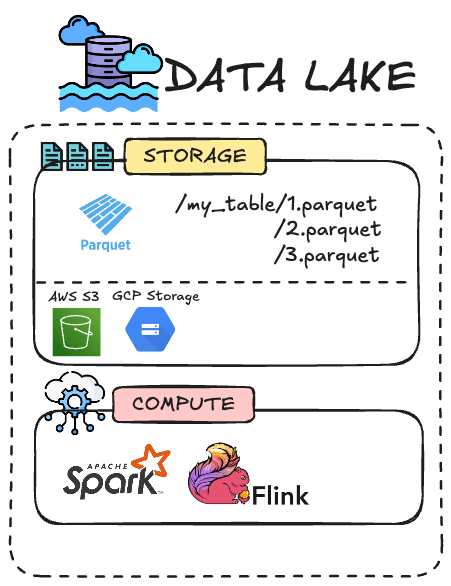
That’s where decoupling compute from storage started to make sense. Instead of relying on a database engine to store everything, engineers started storing analytical data as files—mainly in [open, columnar formats like **Parquet**](https://motherduck.com/learn/why-choose-parquet-table-file-format/)—on object storage (e.g., AWS S3, Google Cloud Storage, Azure Blob Storage).
These formats are designed for heavy analytical queries, such as aggregations across billions of rows—unlike transactional databases like Postgres, which are optimized for row-by-row updates. Today, Parquet is a general standard supported by all cloud data warehouses (MotherDuck, BigQuery, Redshift, Snowflake, etc.) and compute engines (Polars, Apache Spark, etc.).
This architecture is what we call a **data lake**: raw Parquet files on blob storage, queried by compute engines of your choice—like Apache Spark, Dask, or, of course, DuckDB.
But there's a trade-off.
You lose database-like guarantees:
- No **atomicity**: You can’t update a Parquet file in-place. They are immutable—you often have to rewrite the entire file.
- No **schema evolution**: It’s hard to add or remove columns without manually tracking changes.
- No **time travel**: You can’t easily query the state of data “as of yesterday.”
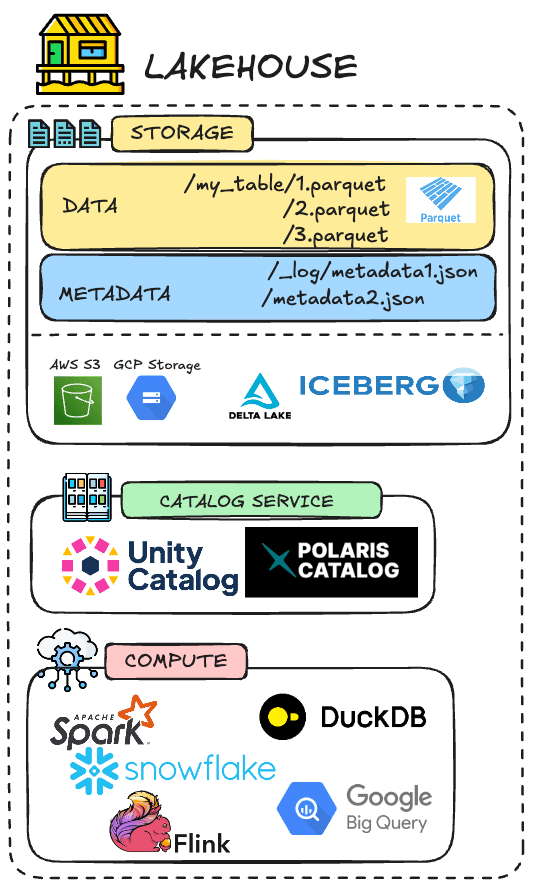
That’s where **table formats** come in. They sit on top of file formats like Parquet and add database-like features:
- Metadata tracking (usually in JSON or Avro)
- Snapshot isolation and time travel
- Schema evolution
- Partition pruning
These features are stored as separate metadata files in the same blob storage system.
However, this introduces new challenges:
- You generate **lots of small metadata files**, which are "expensive" to read over networks like S3.
- You often need an external **catalog** (like Unity or AWS Glue) to tell your query engine where the root folder of the table is and what versions exist.
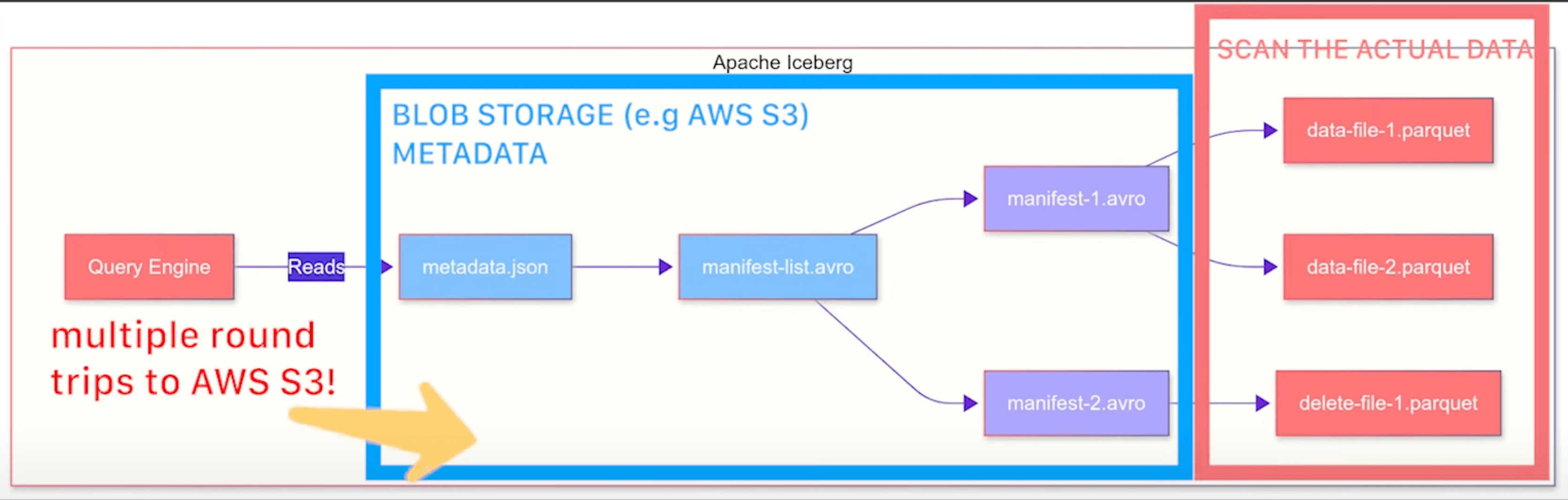
- Query engines must now perform **multiple round trips** just to resolve a query plan (see example below).
So while table formats brought huge improvements, they also introduced overhead and complexity—especially around metadata management.
## DuckLake: A New Table Format
Enter **DuckLake**—a brand-new table format developed by the creators of DuckDB.
Yes, it’s "yet another" table format—but DuckLake brings a fresh perspective.
First of all: **DuckLake is not tied to DuckDB**, despite the name.
> “DuckLake is not a DuckDB-specific format… it’s a convention of how to manage large tables on blob stores, in a sane way, using a database.” — [Hannes Mühleisen](https://youtu.be/zeonmOO9jm4?t=2186), co-creator of DuckDB
So while today the easiest way to use DuckLake is through DuckDB, it’s not a technical requirement.
Second, unlike Iceberg or Delta Lake—where metadata is stored as files on blob storage—**DuckLake stores metadata in a relational database**.
Now you see why that earlier context was useful—we're kind of returning to a database architecture, to some extent.
That catalog database can be:
- PostgreSQL or MySQL (preferred, especially for multi-user read/write)
- DuckDB (great for local use or playgrounds)
- SQLite (for multi-client local use)
You might wonder: if I can use DuckDB for the metastore, why would I use a transactional database like PostgreSQL?
Because these systems are designed to handle **small, frequent updates** with transactional guarantees. Metadata operations (like tracking versions, handling deletes, updating schemas) are small but frequent—and transactional databases are a great fit for that.
Also, **the metadata is tiny**—often less than 1% the size of the actual data. Storing it in a database avoids the overhead of scanning dozens of metadata files on blob storage.
While metadata is stored in a database, the data itself is still stored—like other table formats—as **Parquet** on the blob storage of your choice. Thanks to this architecture, DuckLake can be very fast.
Let’s take a quick example. If you want to query an Iceberg table, here are roughly the operations:
As you can see, there are a lot of round trips just to get the metadata before scanning the actual data. If you’re updating or reading a single row, that’s a huge overhead.
DuckLake flips the script. Since metadata lives in a database, a **single SQL query can resolve everything**—current snapshot, file list, schema, etc.—and you can then query the data. No more chasing dozens of files just to perform basic operations.
DuckLake supports nearly everything you’d expect from a modern lakehouse table format:
- ACID transactions across multiple tables
- Complex types like nested lists and structs
- Full schema evolution (add/remove/change column types)
- Snapshot isolation and time travel
You can check the full reference of features on the [documentation website](https://ducklake.select/).
In short, DuckLake architecture is:
- **Metadata**: Stored in SQL tables—on DuckDB, SQLite, but realistically Postgres or MySQL.
- **Data**: Still in Parquet, on your blob storage.

DuckLake is not just "yet another table format"—it rethinks the metadata layer entirely.
## Setting up DuckLake
Now that we’ve covered the background of table formats and introduced DuckLake, let’s get practical.
To run the next demo, you’ll need three components:
- Data storage: an **AWS S3 bucket** with read/write access.
- Metadata storage: a **PostgreSQL database**—we'll use a serverless free [Supabase](https://supabase.com/) database.
- Compute engine: any DuckDB client—we'll use the **DuckDB CLI**.
For the PostgreSQL database, Supabase is a great option. You can spin up a fully managed Postgres database in one minute. It has a generous free tier—just create an account, a project, and retrieve your connection parameters (IPv4-compatible).

You can install the [DuckDB CLI](https://duckdb.org/docs/installation/?version=stable&environment=cli&platform=macos&download_method=direct) with one command or through a package manager like `homebrew` on macOS.
```bash
curl https://install.duckdb.org | sh
```
## Creating your first DuckLake table
As a best practice, authenticate on AWS using:
```bash
aws sso login
```
Once your AWS credentials are refreshed, create a DuckDB secret:
```sql
CREATE OR REPLACE SECRET secret(
TYPE s3,
PROVIDER credential_chain
);
```
Also create a PostgreSQL secret using the connection information you retrieved from Supabase:
```sql
CREATE SECRET(
TYPE postgres,
HOST '',
PORT 6543,
DATABASE postgres,
USER '',
PASSWORD ''
);
```
Now install the `ducklake` and `postgres` DuckDB extensions:
```sql
INSTALL ducklake;
INSTALL postgres;
```
You can check the list of DuckDB extensions and their state (installed, loaded) using FROM duckdb_extension();.
Now create your DuckLake metastore using the `ATTACH` command:
```sql
ATTACH 'ducklake:postgres:dbname=postgres' AS mehdio_ducklake(DATA_PATH 's3://tmp-mehdio/ducklake/');
```
You can add the METADATA_SCHEMA parameter if you want to use a different schema than main.
Let's create our first DuckLake table from a `.csv` hosted on AWS S3. This table contains air quality data from cities worldwide:
```sql
CREATE TABLE who_ambient_air_quality_2024 AS
SELECT *
FROM 's3://us-prd-motherduck-open-datasets/who_ambient_air_quality/csv/who_ambient_air_quality_database_version_2024.csv';
```
Now inspect which files were created:
```sql
FROM glob('s3://tmp-mehdio/ducklake/*.parquet');
```
```
┌───────────────────────────────────────────────────────────────────────────────────────┐
│ file │
│ varchar │
├───────────────────────────────────────────────────────────────────────────────────────┤
│ s3://tmp-mehdio/ducklake/ducklake-019730f7-e78b-7021-ba24-e76a24cbfd53.parquet │
└───────────────────────────────────────────────────────────────────────────────────────┘
```
You should see some Parquet files were created. If your table is large, files will be split into multiple Parquet files. Here, our table is small.
You can also inspect snapshots:
```sql
FROM mehdio_ducklake.snapshots();
```
```
┌─────────────┬────────────────────────────┬────────────────┬────────────────────────────────────────────────────────────────────────────────┐
│ snapshot_id │ snapshot_time │ schema_version │ changes │
│ int64 │ timestamp with time zone │ int64 │ map(varchar, varchar[]) │
├─────────────┼────────────────────────────┼────────────────┼────────────────────────────────────────────────────────────────────────────────┤
│ 0 │ 2025-06-09 13:55:28.287+02 │ 0 │ {schemas_created=[main]} │
│ 1 │ 2025-06-09 14:02:51.595+02 │ 1 │ {tables_created=[main.who_ambient_air_quality_2024], tables_inserted_into=[1]} │
└─────────────┴────────────────────────────┴────────────────┴────────────────────────────────────────────────────────────────────────────────┘
```
And a first state of our data has been created. Now let's go to our Supabase UI through `Table editor`.
As we can see, a bunch of metadata tables has been created. For instance, we have also statistics about table and of course where the Parquet files are located. You can see the full schema definition of these tables on the [documentation](https://ducklake.select/docs/stable/specification/tables/overview).

You can also query these tables directly from the DuckDB client or the DuckDB UI. You can find them through SELECT database_name, table_name FROM duckdb_tables WHERE schema_name='public' and database_name LIKE '__ducklake_metadata_%'; , database name will follow the pattern _ducklake_metadata_<your_catalog_name>
Now let’s alter the table by adding a new column—say we want to add a two-letter country code (`iso2`) in addition to the existing three-letter code (`iso3`):
```sql
ALTER TABLE who_ambient_air_quality_2024 ADD COLUMN iso2 VARCHAR;
UPDATE who_ambient_air_quality_2024
SET iso2 = 'DE'
WHERE iso3 = 'DEU';
```
If we inspect the Parquet files again, you’ll see a `-delete` Parquet file was created to handle row-level deletes.
```
┌───────────────────────────────────────────────────────────────────────────────────────┐
│ file │
│ varchar │
├───────────────────────────────────────────────────────────────────────────────────────┤
│ s3://tmp-mehdio/ducklake/ducklake-019730f7-e78b-7021-ba24-e76a24cbfd53.parquet │
│ s3://tmp-mehdio/ducklake/ducklake-019730fb-8510-7b83-82a4-28f994559bb6-delete.parquet │
│ s3://tmp-mehdio/ducklake/ducklake-01975492-72af-76e1-998c-ec4237238dfb.parquet │
└───────────────────────────────────────────────────────────────────────────────────────┘
```
You can also check the new snapshot state:
```sql
FROM mehdio_ducklake.snapshots();
```
```bash
┌─────────────┬────────────────────────────┬────────────────┬────────────────────────────────────────────────────────────────────────────────┐
│ snapshot_id │ snapshot_time │ schema_version │ changes │
│ int64 │ timestamp with time zone │ int64 │ map(varchar, varchar[]) │
├─────────────┼────────────────────────────┼────────────────┼────────────────────────────────────────────────────────────────────────────────┤
│ 0 │ 2025-06-09 13:55:28.287+02 │ 0 │ {schemas_created=[main]} │
│ 1 │ 2025-06-09 14:02:51.595+02 │ 1 │ {tables_created=[main.who_ambient_air_quality_2024], tables_inserted_into=[1]} │
│ 2 │ 2025-06-09 14:07:19.849+02 │ 2 │ {tables_altered=[1]} │
│ 3 │ 2025-06-09 14:07:20.964+02 │ 2 │ {tables_inserted_into=[1], tables_deleted_from=[1]} │
└─────────────┴────────────────────────────┴────────────────┴────────────────────────────────────────────────────────────────────────────────┘
```
Now let’s test time travel with the `AT (VERSION => )` syntax:
```sql
SELECT iso2 FROM who_ambient_air_quality_2024 AT (VERSION => 1) WHERE iso2 IS NOT NULL;
```
This will return an error, as `iso2` did not exist in version 1.
But querying the latest snapshot will return the expected results:
```sql
SELECT iso2 FROM who_ambient_air_quality_2024 AT (VERSION => 3) WHERE iso2 IS NOT NULL;
```
## What do you want to see in DuckLake?
DuckLake is still very early in its lifecycle—so it’s a great time to get involved.
If there’s a feature you’d like to see, now is the perfect moment to give feedback. The DuckDB team is actively listening.
In the meantime—take care of your data lake…
…and I’ll see you in the next one!