
Okay, buckle up, fellow data wranglers! If you've ever found yourself staring at a tangled mess of spreadsheets, databases, and API outputs, desperately trying to answer a seemingly simple question from marketing like, "How did last quarter's campaign really impact sales across all regions and product lines?", then you've already felt the pain that a data warehouse is designed to soothe. As a cornerstone of the modern data stack, the data warehouse brings order to chaos. It's that all-too-common scenario where data exists somewhere, but getting it all to play nicely together feels like trying to herd cats. Or, perhaps more aptly for some of us, trying to get all your data ducks in a row when they're all speaking different dialects of quack.
In this article, we're going to share a perspective on what a data warehouse is. We're not just talking dry definitions here. We'll dive into:
- The fundamental concepts behind data warehousing
- The different types of data warehouses and when to use each
- How a data warehouse differs from your everyday database or that vast data lake everyone's talking about
- A peek under the hood at common data warehouse architecture and its key components
- The tangible benefits data warehouses deliver (and the headaches they can prevent!)
- Common use cases where a data warehouse truly shines
- Proven data warehouse design best practices for building reliable systems
- Some practical considerations for choosing a modern data warehouse solution
The aim here is to give you a solid, practical understanding of data warehouses. Why? Because knowing this stuff isn't just academic. It's about making your life as a data engineer, analyst, or tech professional easier, enabling your organization to make smarter decisions, and ultimately, helping you deliver more value.
Key Takeaways
- Definition: A data warehouse is a centralized repository that consolidates data from multiple sources for analysis and decision-making.
- Core Types: The main types of data warehouses include Enterprise Data Warehouses (EDW), Data Marts, and modern Cloud/Serverless Data Warehouses.
- Architecture: Most warehouses use an ELT/ETL process to move data into a storage layer optimized for OLAP (analytical) queries.
- Modern Approach: New serverless tools like MotherDuck allow startups to deploy data warehouses instantly without complex infrastructure.
What Exactly is a Data Warehouse? The Definition and Core Ideas
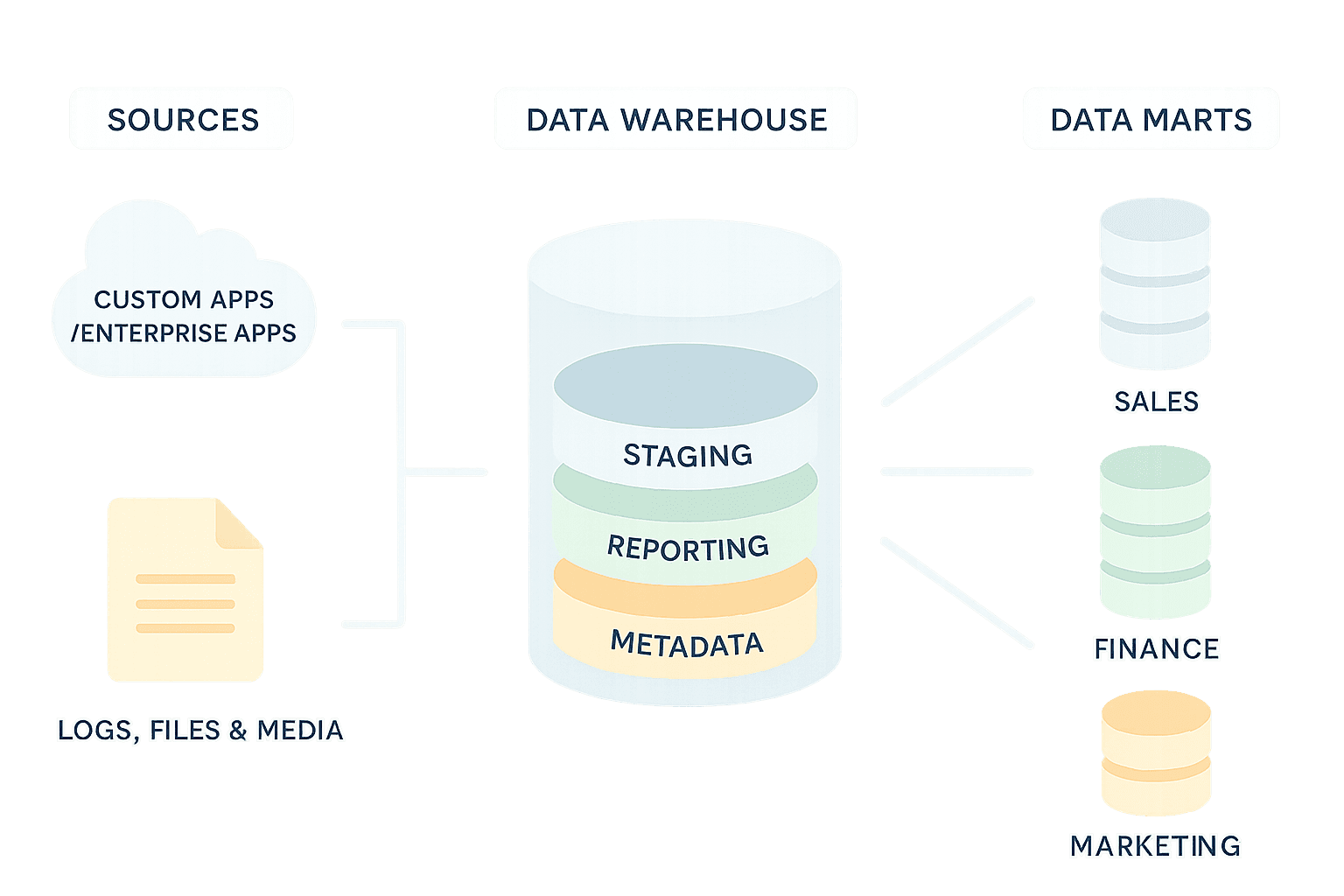
At its heart, a data warehouse (DWH) is a specialized type of data storage system designed specifically for analysis and reporting. The "godfather" of data warehousing, Bill Inmon, defined it as a "subject-oriented, integrated, time-variant, and non-volatile collection of data in support of management's decision-making process." That's a mouthful, so let's break it down into plain English:
Subject-Oriented: This means the data is organized around the major subjects of the business, like "customer," "product," "sales," or "employee." This is different from operational systems, which are typically application-oriented. For example, instead of having separate databases for your order entry system and your CRM, a data warehouse would integrate data about customers from both systems into a single, comprehensive view.
Integrated: This is a big one. Data warehouses pull data from many different, often heterogeneous, source systems. During this process, the data is cleaned up and made consistent. Think about things like standardizing date formats (is it MM/DD/YYYY or DD-MM-YY?), resolving inconsistent codes (e.g., 'CA', 'Calif.', 'California' all becoming 'California'), or ensuring common units of measure. This integration is crucial for providing a single version of the truth.
Time-Variant: Data in a warehouse has a time dimension. This means it keeps a historical record, allowing you to analyze trends and changes over time. You might look at sales figures for this quarter, last quarter, and the same quarter last year, all from the same place. Data is often captured as snapshots at different points in time.
Non-Volatile: Once data is loaded into the warehouse, it's generally not changed or deleted. New data is added periodically, but the old data remains as a historical record. This is very different from operational databases, where records are constantly updated, inserted, and deleted.
So, it's not just a bigger, faster database where you chuck everything. A data warehouse is purposefully architected for analytical querying and reporting. This often involves specific data modeling techniques, like star schemas or snowflake schemas, which are designed to make it easier and faster to query large amounts of data for analytical purposes. SQL is still very much the primary way you'll interact with the data, but the underlying structures are optimized for reading and aggregating data, rather than for the rapid, small transactions that operational databases handle.
Ultimately, a well-designed data warehouse – whether a traditional on-premise system or a modern data warehouse like MotherDuck – serves as the foundational layer for most business intelligence activities. It provides clean, consolidated, and historically rich data that powers dashboards, reports, and ad-hoc analyses, enabling organizations to gain deeper insights from their data.
Types of Data Warehouses
Not all data warehouses are created equal. Depending on your organization's size, needs, and architecture, different types of data warehouses serve different purposes. Understanding these distinctions helps you choose the right approach for your specific situation.
Enterprise Data Warehouse (EDW)
An Enterprise Data Warehouse is the granddaddy of them all – a comprehensive, organization-wide repository that integrates data from across the entire business. Think of it as the central nervous system for your company's data.
Key characteristics:
- Serves the entire organization, not just individual departments
- Integrates data from all business units and source systems
- Requires significant governance and data stewardship
- Provides the definitive "single source of truth"
- Typically the most complex and resource-intensive to build and maintain
EDWs are ideal for large organizations that need consistent, cross-functional analytics and reporting. If your CEO wants a dashboard that combines sales, marketing, finance, and operations data in one place, an EDW is what makes that possible.
Data Mart
A Data Mart is essentially a focused subset of a data warehouse, tailored for a specific department, business unit, or subject area. If an EDW is a department store, a data mart is a specialty boutique.
Key characteristics:
- Scoped to a specific business area (e.g., Sales, Marketing, Finance)
- Faster and cheaper to implement than a full EDW
- Can be "dependent" (fed from an EDW) or "independent" (built directly from source systems)
- Easier to manage and optimize for specific use cases
Data marts are perfect when a particular team needs quick access to analytics without waiting for a full enterprise implementation. A marketing team might have their own data mart for campaign analytics, while finance has one for financial reporting.
Operational Data Store (ODS)
An Operational Data Store bridges the gap between transactional systems and analytical warehouses. It's designed for operational reporting that requires more current data than a traditional warehouse provides.
Key characteristics:
- Contains near real-time or frequently refreshed data
- Stores current values rather than historical snapshots
- Supports operational decision-making and reporting
- Often serves as a staging area that feeds the EDW
An ODS is your go-to when you need to answer questions like "What orders are pending right now?" rather than "How did sales trend over the past quarter?"
Cloud Data Warehouse
Cloud data warehouses represent the evolution of the modern data warehouse, revolutionizing the industry by eliminating upfront hardware investment. Within this category, a new sub-type has emerged: the Serverless Data Warehouse.
Solutions like MotherDuck (powered by DuckDB) and Google BigQuery allow teams to run analytics without managing clusters or provisioning 'warehouse sizes.' This decoupling of compute and storage allows for:
- Hosted and managed infrastructure: No hardware to buy or maintain.
- Instant Elasticity: Scale from zero to massive compute instantly.
- Consumption-based pricing: You only pay for the queries you run, not for idle server time.
For most modern organizations, especially startups and mid-sized companies, cloud data warehouses offer the best combination of power, flexibility, and cost-effectiveness. You can start small and scale as your data grows, without massive upfront investments. For a detailed comparison of providers, see our data warehouse as a service guide.
On-Premise Data Warehouse
Traditional on-premise data warehouses are hosted in your own data centers on hardware you own and manage. While less common for new implementations, they're still prevalent in industries with strict regulatory requirements.
Key characteristics:
- Complete control over hardware, security, and data residency
- Higher upfront capital expenditure
- Fixed capacity requires careful planning
- Full responsibility for maintenance, upgrades, and scaling
On-premise solutions make sense when regulatory compliance demands complete data control, or when existing infrastructure investments need to be leveraged.
Quick Comparison: Types of Data Warehouses
| Data Warehouse Type | Best For | Implementation | Key Advantage |
|---|---|---|---|
| Enterprise (EDW) | Global organizations needing a single source of truth | Complex & Long | Centralized consistency across all departments |
| Data Mart | Individual departments (Sales, Marketing) | Fast | Agility and specific subject focus |
| Cloud DW | Modern teams needing scale (MotherDuck, Snowflake) | Fast & Scalable | Elasticity and zero infrastructure management |
| Operational (ODS) | Real-time tactical reporting | Medium | Up-to-the-minute data freshness |
| On-Premise | Highly regulated industries (Gov, Banking) | Resource Intensive | Total control over data sovereignty |
Many organizations end up with a hybrid approach – perhaps a cloud-based EDW that feeds departmental data marts, with an ODS handling time-sensitive operational reporting. The key is matching your architecture to your actual business needs rather than overengineering from the start.
Data Warehouse vs. The Alternatives: Clearing the Confusion
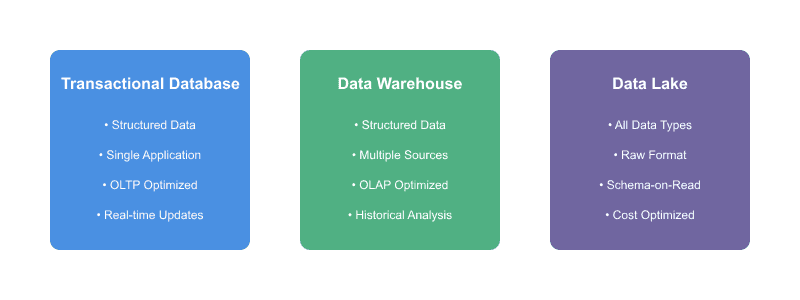
The term "data warehouse" is sometimes used interchangeably with other data systems, but there are some key distinctions. Understanding these differences is pretty important for making informed architectural decisions.
Data Warehouses vs. Operational Databases (OLTP)
This is probably the most fundamental distinction. Your day-to-day applications – your e-commerce platform, your CRM, your HR system – run on Operational Databases, often referred to as OLTP (Online Transaction Processing) systems.
-
Purpose: OLTP systems are built for speed and efficiency in handling a large number of concurrent, short transactions – think placing an order, updating a customer record, or recording a payment. Data warehouses, on the other hand, are designed for OLAP (Online Analytical Processing), which involves complex queries over large volumes of historical data to support analysis and decision-making.
-
Data Structure: OLTP databases are typically highly normalized. This means data is broken down into many small tables to reduce redundancy and improve data integrity for write operations (updates, inserts, deletes). Data warehouses often use denormalized structures, like star or snowflake schemas, where some redundancy is accepted to make analytical queries (which involve many joins and aggregations) run much faster.
-
Workload: OLTP systems handle many small, quick read/write operations and frequent updates. Data warehouses typically handle a smaller number of very complex, read-intensive queries, and data is usually loaded in large batches periodically.
-
Data Scope: OLTP databases usually contain current, up-to-the-minute detailed data for a specific application. Data warehouses store integrated, historical, and often summarized data from many different applications across the organization.
A team once tried to run their hefty month-end analytical reports directly against a live OLTP database. The production application slowed to an absolute crawl, users couldn't process orders, and the database administrators were not amused. It was a stark lesson: use the right tool for the right job. Trying to make an OLTP system do the heavy lifting of a DWH is usually a recipe for trouble.
Data Warehouses vs. Data Lakes
This is a more modern point of comparison, and one where there's often a bit of confusion. A data lake is a centralized repository that allows you to store all your structured and unstructured data at any scale.
-
Data Structure & Processing: The key difference lies in how and when data is structured. Data warehouses store data that has been cleaned, transformed, and structured before it's loaded (a "schema-on-write" approach). Data lakes, conversely, store data in its raw, native format (JSON, CSV, logs, images, videos, etc.). The structure is typically applied when the data is read for analysis ("schema-on-read").
-
Cost: Data lakes, often built on commodity storage like Amazon S3 or Azure Blob Storage, are generally more cost-effective for storing massive volumes of raw data, especially if you don't know yet how all of it will be used.
-
Agility vs. Governance: Data lakes offer great flexibility and agility for data scientists and analysts who want to explore raw data and experiment with different types of analysis. However, without strong governance, data lakes can turn into "data swamps" – disorganized, undocumented, and ultimately unusable repositories of data. It has happened; a lake becomes a dumping ground where data quality is questionable, and finding anything useful is a nightmare. Data warehouses, with their curated and governed nature, generally offer more reliable data for business reporting.
-
The Modern Blend: It's important to note that the lines are blurring. Many modern data architectures now utilize both data lakes and data warehouses in a complementary fashion. For instance, a data lake might serve as the initial landing zone for all raw data. Then, selected, valuable data is processed, structured, and loaded into a data warehouse for robust BI and analytics. Some data warehouses can now also query data directly in data lakes that store structured data in open table formats like Apache Parquet, Apache Iceberg, or Delta Lake. This hybrid approach, sometimes called a "lakehouse," aims to provide the benefits of both systems.
Peeking Under the Hood: Data Warehouse Architecture
While specific implementations can vary, most data warehouse architectures share a common set of layers and components. Think of it as a journey, your data takes from its source to the end-user's report.
Data Sources
This is where it all begins. Data can come from a multitude of places, including internal operational databases such as ERPs, CRMs, and billing systems. External sources provide another stream of information through third-party data providers and public datasets. Modern organizations also pull significant data from SaaS applications like Salesforce, HubSpot, and Google Analytics. Log files from web servers or applications contribute technical and usage data, while spreadsheets and flat files remain surprisingly common sources despite their limitations.
The operational databases that feed the warehouse are the systems of record for the business, and their reliability is paramount. This reliability is enforced by a strict set of guarantees for every transaction they process. For data engineers, it's critical to understand that this data integrity is typically enforced through ACID transactions, a foundational concept that ensures data is captured accurately before it ever reaches the warehouse.
Data Staging, Ingestion & Transformation (ETL/ELT)
This layer is responsible for getting data from the sources into the warehouse and making it usable. The process typically involves extraction, which pulls data from the source systems. The transformation phase is where the real heavy lifting happens. During cleaning, the system fixes errors, handles missing values, and standardizes formats. Integration combines data from different sources and resolves conflicts between them. Enrichment adds calculated fields and derives new attributes that provide additional business value. Finally, structuring applies the schema required by the data warehouse, often organizing data into fact and dimension tables.
The loading phase physically moves the transformed data into the data warehouse. There are two primary approaches to this process. ETL (Extract, Transform, Load) is the traditional method where data is transformed before it's loaded into the warehouse, often using a separate ETL tool or processing engine. ELT (Extract, Load, Transform) represents a more modern approach, especially popular with cloud data warehouses, where raw data is loaded into the warehouse first, often into a staging area. The powerful processing capabilities of the warehouse itself then perform the transformations. This approach can simplify ingestion and leverage the scalability of the data warehouse.
Data Storage (The Warehouse Itself)
This is the core relational database, or sometimes a specialized database engine, that stores the curated, historical data. Key characteristics often include columnar storage, where many modern data warehouses store data by columns rather than rows. This can significantly speed up analytical queries that typically only access a subset of columns but scan many rows. In fact, optimizing this data layout to reduce I/O is the most critical step in improving data warehouse performance, often having a greater impact than scaling compute or tuning SQL. Some data warehouses use Massively Parallel Processing (MPP) architectures, distributing data and query processing across multiple servers or nodes to handle large datasets and complex queries efficiently. As mentioned earlier, the schemas, like star or snowflake, and indexing strategies are geared towards fast query performance for analytical workloads, optimizing for read access.
Analytics Engine (OLAP Focus)
While the storage layer holds the data, the analytics engine provides the smarts for processing complex analytical queries. This is where OLAP (Online Analytical Processing) comes into play, enabling users to slice and dice data, drill down into details, roll up to summaries, and pivot across different dimensions.
Serving Layer (Access Tools)
This is how end-users interact with and derive value from the data warehouse. Business Intelligence (BI) tools like Tableau, Power BI, Looker, Qlik, or MicroStrategy provide user-friendly interfaces for creating reports, dashboards, and performing ad-hoc analysis. SQL clients serve data analysts and engineers who prefer to write SQL queries directly. Reporting tools generate paginated, operational reports for regular business needs. Sometimes, custom applications are built to directly query the data warehouse for specific analytical purposes.
Cross-Cutting Concerns
Beyond these core layers, several cross-cutting concerns are vital for a successful data warehouse. Metadata management encompasses "data about data," including business definitions for metrics and attributes, data lineage showing where data came from and how it was transformed, data models, and refresh schedules. Good metadata is crucial for users to understand, trust, and effectively use the data warehouse. If folks don't know what a field means or how fresh it is, they won't use it.
Data governance and security involve defining policies and procedures for data quality, data access controls, determining who can see what, data privacy, especially with sensitive information, and regulatory compliance. These aspects ensure the warehouse operates within legal and ethical boundaries while maintaining data integrity.
Monitoring and operations ensure the warehouse runs smoothly. Like any critical system, a data warehouse needs to be monitored for performance, uptime, and data loading success. This includes query performance tuning, capacity planning, and backup/recovery procedures to maintain system reliability and efficiency.
Why Bother? The Real-World Benefits of a Data Warehouse
Building and maintaining a data warehouse is a significant undertaking, so what's the payoff? The benefits are substantial and often transform how an organization operates.
-
A Single Source of Truth: This is arguably the most celebrated benefit. By integrating data from disparate systems and applying consistent definitions and business rules, the DWH becomes the authoritative source for key business metrics. No more endless debates because different departments are using different numbers pulled from different spreadsheets.
-
Informed, Faster Decision-Making: With access to consolidated, reliable, and historical data, business leaders and analysts can make decisions based on facts, not just gut feelings. Trends become clearer, anomalies are easier to spot, and the impact of past decisions can be accurately assessed.
-
Empowering Business Users (Self-Service BI): A well-designed DWH, coupled with user-friendly BI tools, allows business users (analysts, managers, etc.) to explore data, create their reports, and answer their questions without having to rely on IT or data engineering for every single request. This frees up engineers from the constant barrage of ad-hoc query requests, which is a huge win for everyone's productivity and sanity!
-
Improved Data Quality and Consistency: The very process of ETL/ELT forces an organization to confront and address data quality issues. By cleaning, validating, and standardizing data as it enters the warehouse, the overall quality and consistency of the organization's data assets improve dramatically.
-
Understanding Historical Trends and Patterns: The time-variant nature of a DWH is invaluable. Being able to look back over months or years of data allows for robust trend analysis, seasonality studies, and more accurate forecasting. This historical context is often missing in operational systems that only store current data.
-
Foundation for Advanced Analytics: Clean, well-structured, and integrated data is a prerequisite for more sophisticated analytical endeavors like data mining, predictive modeling, machine learning (ML), and artificial intelligence (AI). You can't build a reliable ML model on messy, inconsistent data. Or, as a colleague once quipped, "Trying to do AI on bad data is like trying to make a gourmet meal out of garbage. It just won't quack the way you want it to."
-
Enhanced Performance for Analytical Queries: Because data warehouses are specifically designed and optimized for complex analytical queries, they can return results much faster than trying to run similar queries on OLTP systems. This means analysts spend less time waiting and more time analyzing.
Common Use Cases: Where Data Warehouses Shine
Data warehouses are versatile, but they particularly excel in scenarios requiring integrated, historical data analysis. Here are a few common examples:
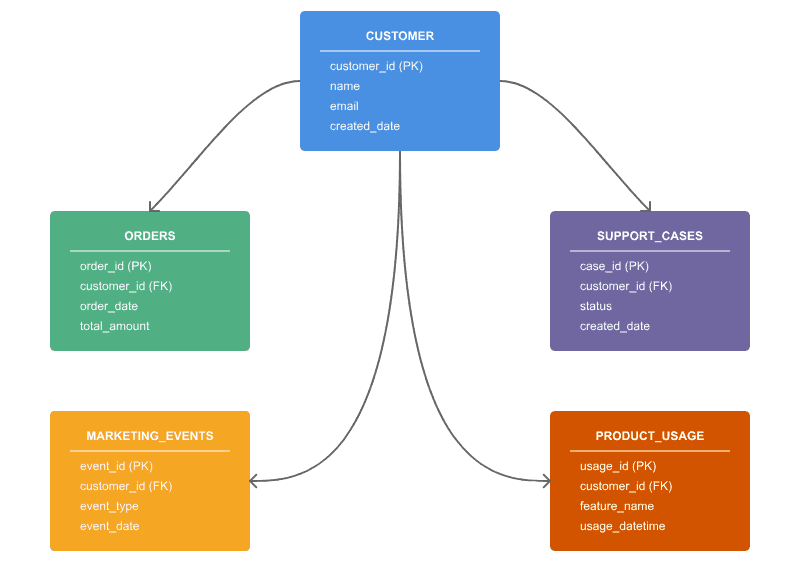
- Customer 360: This is a classic. Organizations strive to get a complete, unified view of their customers by integrating data from all touchpoints: sales transactions (from an e-commerce site or POS system), CRM interactions (calls, emails), marketing campaign responses, website activity logs, social media engagement, and customer service tickets. A DWH makes this possible, enabling better customer segmentation, personalized marketing, improved customer service, and churn prediction.
-
Sales and Marketing Analytics: Analyzing sales performance by product, region, channel, or salesperson over time. Measuring the effectiveness of marketing campaigns by linking campaign data with sales outcomes. Optimizing pricing strategies and understanding customer lifetime value.
-
Financial Reporting and Analysis: Consolidating financial data from various general ledgers, accounts payable/receivable systems, and other financial applications to produce accurate P&L statements, balance sheets, cash flow analyses, and regulatory reports. It also supports budgeting, forecasting, and variance analysis.
-
Supply Chain and Operations Optimization: Integrating data from inventory management, procurement, logistics, and manufacturing systems to analyze supply chain efficiency, identify bottlenecks, optimize inventory levels, reduce costs, and improve delivery times.
-
Healthcare Analytics: (Adhering to strict privacy regulations like HIPAA) Analyzing patient outcomes, treatment efficacy, hospital operational efficiency, resource utilization, and population health trends.
-
Retail Analytics: Performing basket analysis to understand which products are frequently bought together, analyzing store-by-store performance, optimizing product placement, managing inventory, and forecasting demand.
Example Snippet: Building Blocks of a Customer 360 in a DWH
While we can't draw you a pretty ERD diagram here, let's imagine some of the core tables you might find in a simplified Customer 360 model within a data warehouse using a star schema approach:
You'd likely have a central FactSales table. Each row might represent a line item on a sale, containing measures like SaleAmount, QuantitySold, DiscountAmount, and foreign keys pointing to various dimension tables.
Surrounding this fact table, you'd have dimension tables like:
DimCustomer: Contains attributes about customers likeCustomerID(primary key),CustomerName,Email,Address,Demographics,JoinDate.DimProduct: Attributes likeProductID(primary key),ProductName,Category,Brand,Supplier.DimDate: Attributes for each date likeDateKey(primary key),FullDate,DayOfWeek,Month,Quarter,Year. This allows for easy time-based analysis.DimStore(if applicable):StoreID(primary key),StoreName,City,Region.
You might also have another fact table, say FactWebActivity, with measures like PageViews, SessionDuration, and foreign keys to DimCustomer and DimDate, to track customer interactions on your website. The beauty of this structure is that these tables can be joined efficiently to answer complex questions like "What were the total sales of 'Product Category X' to 'Customers in Region Y' during 'Q3 Last Year'?"
Data Warehouse Design Best Practices
Building a data warehouse that actually works – one that's performant, maintainable, and trusted by users – requires more than just technical know-how. Whether you're implementing a traditional enterprise solution or a modern data warehouse as part of your modern data stack, these principles apply. It demands thoughtful design decisions made early and consistently applied. Here are battle-tested best practices that separate successful data warehouse implementations from costly failures.
Choose the Right Data Model
The foundation of any good data warehouse is its data model. For analytical workloads, dimensional modeling reigns supreme.
Star Schema vs. Snowflake Schema:
- Star Schema: Denormalized dimension tables directly connected to fact tables. Simpler queries, better performance, easier for business users to understand. This is the default choice for most use cases.
- Snowflake Schema: Normalized dimension tables that branch out. Reduces storage redundancy but adds query complexity. Use only when dimension tables are exceptionally large or frequently updated.
The general rule? Start with a star schema unless you have a compelling reason not to. You can read our complete guide to star schemas for implementation details.
Define Clear Grain and Facts
Before writing any code, answer these questions for each fact table:
- What does one row represent? (the grain) – e.g., one sales transaction, one daily snapshot, one click event
- What are the measurable facts? – quantities, amounts, counts, durations
- What dimensions provide context? – who, what, when, where, why
Getting the grain wrong is one of the most common and costly mistakes. Too granular and you'll have performance issues; too aggregated and you'll lack analytical flexibility.
Implement Slowly Changing Dimensions (SCD)
Business data changes over time. A customer moves to a new city. A product gets reclassified. How you handle these changes affects your ability to do historical analysis.
Common SCD Types:
- Type 1: Overwrite old values. Simple but loses history.
- Type 2: Add new rows with effective dates. Preserves full history but increases complexity and storage.
- Type 3: Add columns for previous values. Tracks limited history with minimal overhead.
For most business-critical dimensions (customers, products), Type 2 is worth the investment. For reference data that rarely changes meaningfully (country codes, currencies), Type 1 is often sufficient.
Establish Consistent Naming Conventions
Nothing erodes trust in a data warehouse faster than inconsistent naming. Establish conventions early and enforce them ruthlessly.
Recommended patterns:
- Prefix fact tables with
fact_orfct_, dimensions withdim_ - Use snake_case consistently:
customer_id, notCustomerIDorcustomerId - Be explicit:
order_created_atbeatscreatedortimestamp - Avoid abbreviations that aren't universally understood
Document your conventions and make them part of code review checklists.
Design for Query Performance
Your data warehouse exists to answer questions quickly. Design with query patterns in mind:
Partitioning: Divide large tables by date or another frequently-filtered column. Most queries filter by time, making date partitioning almost universally beneficial.
Clustering/Sort Keys: Order data within partitions by commonly-filtered or joined columns. This dramatically improves scan efficiency in columnar databases.
Pre-aggregation: For frequently-run summary queries, consider maintaining aggregate tables. A daily sales summary table can answer "monthly revenue by region" queries orders of magnitude faster than scanning transaction-level data.
Build Incremental Pipelines
Full table rebuilds are simple to implement but don't scale. As your data grows, incremental processing becomes essential.
Incremental patterns:
- Append-only: New records are added; nothing is updated. Simplest pattern, works for event data.
- Merge/Upsert: New records are inserted; existing records are updated based on a key. Required for dimension tables and mutable facts.
- Partition replacement: Rebuild only affected partitions (e.g., reprocess just today's data).
Design your pipelines incrementally from the start. Retrofitting is painful.
Implement Data Quality Checks
Bad data in means bad decisions out. Build quality checks into your pipelines, not as an afterthought.
Essential checks:
- Freshness: Is data arriving on schedule?
- Volume: Are row counts within expected ranges?
- Uniqueness: Are primary keys actually unique?
- Referential integrity: Do all foreign keys have matching parents?
- Business rules: Are values within valid ranges? Are required fields populated?
Tools like dbt tests, Great Expectations, or even simple SQL assertions can automate these checks. Fail loudly when checks don't pass – it's better to delay a report than to publish wrong numbers.
Document Everything
A data warehouse without documentation is a liability waiting to happen. At minimum, document:
- Business definitions: What does "active customer" actually mean?
- Data lineage: Where did this data come from? How was it transformed?
- Refresh schedules: When is data updated? What's the expected latency?
- Known limitations: What edge cases exist? What data quality issues are known?
Modern tools like dbt make documentation a natural part of the development workflow. Use them.
Plan for Evolution
Your data warehouse will change. New sources will be added. Business definitions will evolve. Requirements will shift.
Design for change:
- Use version control for all code and schema definitions
- Implement CI/CD for testing and deployment
- Maintain backward compatibility when possible
- Communicate breaking changes well in advance
- Keep transformation logic in code, not in database procedures that are hard to track
The best data warehouses aren't the ones that are perfect on day one – they're the ones that can adapt gracefully as the business evolves.
Choosing a Modern Data Warehouse: Key Considerations
If you're looking to implement a new data warehouse or migrate an existing one, the landscape has evolved significantly. The modern data stack has emerged as the dominant paradigm, with cloud-based solutions and modern data warehouses now leading the way. Here are some factors to consider:
-
The Cloud Advantage – Scalability & Elasticity: Modern cloud data warehouses (like MotherDuck, Snowflake, Google BigQuery, Amazon Redshift, and Azure Synapse Analytics) offer incredible scalability. You can often scale your compute resources and storage resources independently and usually pay only for what you use. This is a world away from the old on-premise days of having to procure and install massive, expensive hardware upfront, often overprovisioning "just in case."
-
Performance and Concurrency: Evaluate how well the solution handles your expected query complexity and the number of concurrent users. Look for features like columnar storage, MPP architecture, intelligent caching, and workload management.
-
Data Ingestion and Integration Capabilities: How easily can you get data into the warehouse? Look for robust connectors to a wide variety of data sources, including databases, SaaS applications, streaming platforms (like Kafka), and cloud storage. Support for ingesting and querying semi-structured data (JSON, Avro, Parquet, ORC) directly is also increasingly important. Some modern DWHs are even getting better at handling less structured data or integrating seamlessly with data lake environments.
-
Ease of Use and Management: Consider the learning curve for your team and the administrative overhead. How good is its SQL dialect and compatibility? Does it offer a user-friendly interface for monitoring and management? How much tuning and optimization will be required from your team?
-
Ecosystem and Tooling Integration: Does it integrate well with your existing (or planned) BI tools, data science platforms, and ETL/ELT services? A strong ecosystem can save a lot of development effort.
-
Security and Governance Features: This is non-negotiable. Ensure the platform offers robust security controls, including encryption at rest and in transit, fine-grained access control, auditing capabilities, and certifications for relevant compliance standards (SOC 2, HIPAA, GDPR, etc.).
-
Real-time or Near Real-time Capabilities: If your use cases demand fresh data (e.g., for operational dashboards or fraud detection), assess the DWH's ability to handle streaming data ingestion and provide low-latency query results. This often requires a two-tier architecture where a lean data warehouse serves as a fast backend for live data applications.
-
Cost Model and Predictability: Understand the pricing structure thoroughly. Is it based on storage, compute, queries, or a combination? Try to estimate costs based on your expected usage patterns. Look for transparency and predictability. For many startups and smaller teams, the pricing models of traditional warehouses can impose a significant 'big data tax' due to high idle costs and operational overhead.
-
Vendor Lock-in vs. Openness: Consider how tied you'll be to a specific vendor's ecosystem. Solutions that embrace open standards and open data formats might offer more flexibility down the road. For instance, the ability to easily export data or use complementary tools like DuckDB for local analytics or experimentation, or even newer platforms like MotherDuck which leverage DuckDB for serverless analytics, can be a practical plus for some teams wanting to avoid being boxed in.
The advice is not to just chase the shiniest new toy. Thoroughly evaluate solutions against your specific business requirements, your team's existing skill set, your budget, and your long-term data strategy. Run proof-of-concepts with your data and use cases.
Wrapping It Up
So, there you have it – a fairly deep dive into the world of data warehouses, from foundational concepts to modern data warehouse solutions. They're far more than just colossal databases; they are carefully architected systems designed to turn mountains of disparate raw data into a consistent, reliable, and powerful engine for insight and decision-making.
Understanding what a data warehouse is, why it's different, how it works, and what it can do is crucial for anyone serious about leveraging data effectively. It's a journey to get a truly effective DWH up and running, involving careful planning, design, and ongoing maintenance. But when done right, the clarity and power it brings to an organization are well worth the effort. Hopefully, this article has demystified the concept a bit and given you a clearer picture of how a data warehouse can help your organization really make its data take flight.
As you embark on that journey, choosing the right platform can be the difference between complexity and clarity. MotherDuck combines the power of DuckDB with the simplicity of a modern, collaborative cloud experience—designed for speed, ease, and scalability. Whether you're just starting or looking to modernize your stack, we invite you to explore how MotherDuck can help you turn data into decisions faster. Get started today and unlock the full potential of Your analytics.
Start using MotherDuck now!
FAQS
What is a data warehouse in simple terms?
A data warehouse (DWH) is a centralized repository that collects and stores integrated data from multiple sources across an organization. Unlike operational databases that handle day-to-day transactions, a data warehouse is specifically designed for analytical queries and business intelligence reporting. It provides a "single source of truth" that enables data-driven decision making.
What are the 4 key characteristics of a data warehouse?
According to Bill Inmon, the father of data warehousing, a data warehouse has four defining characteristics:
- Subject-oriented - Organized around key business subjects like customers, products, and sales rather than applications
- Integrated - Consolidates data from disparate sources into a consistent format
- Time-variant - Maintains historical data to enable trend analysis over time
- Non-volatile - Data is stable and does not change once loaded, with new data added without modifying existing records
What is the difference between a database and a data warehouse?
Databases (OLTP systems) are optimized for fast transactional operations—inserts, updates, and deletes for day-to-day business operations. Data warehouses (OLAP systems) are optimized for complex analytical queries across large datasets. Databases prioritize write speed and data integrity; data warehouses prioritize read performance and query flexibility for reporting and analytics.
What is the difference between a data warehouse and a data lake?
A data warehouse stores structured, processed data with predefined schemas (schema-on-write), making it ready for immediate analysis. A data lake stores raw data in any format—structured, semi-structured, or unstructured—with schemas applied when reading (schema-on-read). Data warehouses excel at business intelligence; data lakes are better for data science and machine learning workloads.
How much does a data warehouse cost?
Data warehouse costs vary significantly based on data volume, query complexity, and provider. Traditional on-premise solutions require substantial upfront investment. Cloud data warehouses like MotherDuck offer pay-as-you-go pricing starting from free tiers, with costs scaling based on storage and compute usage. Modern serverless options can reduce costs by 10x compared to legacy platforms like Snowflake or BigQuery for many workloads.
What are examples of data warehouse use cases?
Common data warehouse use cases include:
- Customer 360 views - Unifying customer data across touchpoints
- Sales and revenue analytics - Tracking performance metrics and forecasting
- Financial reporting - Consolidating data for regulatory compliance
- Supply chain optimization - Analyzing inventory and logistics data
- Marketing attribution - Measuring campaign effectiveness across channels
What is an enterprise data warehouse (EDW)?
An enterprise data warehouse is an organization-wide data warehouse that serves as the central repository for all business data. Unlike departmental data marts that serve specific teams, an EDW integrates data across the entire enterprise, ensuring consistency and enabling cross-functional analysis. It typically requires more governance but provides a unified view of organizational data.
How do you build a data warehouse?
Building a data warehouse involves these key steps:
- Define requirements - Identify business questions and data sources
- Design the schema - Choose dimensional modeling like star or snowflake schema
- Set up ETL/ELT pipelines - Extract, transform, and load data from sources
- Choose storage - Select cloud providers like MotherDuck or Snowflake, or on-premise
- Implement data quality - Add validation and monitoring
- Connect BI tools - Enable reporting through Tableau, Looker, etc.
What are the 3 main types of data warehouses?
While there are many variations, the three primary architectures are Enterprise Data Warehouse (EDW) for centralized organizational data, Data Marts for department-specific subsets, and Operational Data Stores (ODS) for near real-time reporting. Modern classifications also distinguish between Cloud (Serverless) and On-Premise deployments.
What is the difference between a Database and a Data Warehouse?
A database (OLTP) is optimized for capturing data transactions quickly (recording a sale), while a data warehouse (OLAP) is optimized for analyzing massive amounts of historical data (analyzing sales trends over 5 years).
When should I choose a Data Mart over an Enterprise Data Warehouse?
A Data Mart is ideal when a specific department, like Marketing or Sales, needs fast, tailored analytics and cannot wait for a lengthy, complex enterprise-wide implementation. An EDW is necessary when the entire organization requires a single, consistent source of truth that integrates data from all business units.
Is MotherDuck a data warehouse?
Yes, MotherDuck is a modern, serverless cloud data warehouse built on top of DuckDB. It is designed to make analytical data processing easy, fast, and cost-effective for teams of all sizes.

Additional Resources
Docs
Data Warehousing with MotherDuck
Docs
Data Lake vs Data Warehouse vs Lakehouse
Docs
Star Schema Guide: Data Warehouse Modeling Explained
Docs
Modern Data Warehouse Use Cases: Dashboards & Live Apps
Docs
The True Costs of Snowflake, BigQuery, and Redshift
Docs
Enterprise Data Warehouse: Architecture & How to Build One
Docs
What is OLAP? A Guide to Cubes, Queries & Why It Matters
Blog
Stop Paying the Complexity Tax
Blog
The Open Lakehouse Stack: DuckDB and the Rise of Table Formats
Blog
Getting Started with DuckLake: A New Table Format
Video
LLMs Meet Data Warehouses: Reliable AI Agents for Business Analytics
Video
Can DuckDB Replace Your Data Stack?
Video
DuckDB At Scale
Video
Preparing Your Data Warehouse for AI