Git for Data Applied: Comparing Git-like Tools That Separate Metadata from Data
2026/02/24 - 19 min read
BYContinuing from Part 1, where we learned what git for data is, how the architecture and use cases work, how you can achieve git-like functionality with different approaches, and how the key is to avoid moving data as much as possible to keep state that can be referenced and rolled back to, but at the same time saving cost by not duplicating all data every time you create a new branch.
Now it's time to see what Git-like tools for data are out there, and how they actually work in practice. Part 2 dives into the tools and implementations. We'll examine LakeFS, Dolt, Nessie, MotherDuck, Bauplan, and more, exploring how they work under the hood. Each tool takes a different approach to the same fundamental challenge: enabling Git-like workflows without copying petabytes of data.
The key insight from Part 1 was that all these tools separate metadata from data, using techniques like copy-on-write and pointer manipulation. But the devil is in the details. Some tools version entire data lakes, others focus on databases. Some support full merge workflows, others prioritize instant forking. Understanding these trade-offs will help you choose the right solution for your stack.
There will be gaps, and implementations are changing fast, so take it with a grain of salt. But this should give you a good overview of what's out there, and help you invest more time in the ones that fit your use case best.
Let's get into it.
Git-like Tools: Overview
There are many tools out there, some of which have been used for years, and others are rather new. We compare them and see what each of them has to offer.
Comparison Overview
The overview below serves as a summary. We will go into more detail, with each tool getting one short chapter with a showcase of features and application use cases.
| Tool | Storage Type | Primary Use Case | Branching | Cloning | Merging | Snapshot/Time Travel | Rollback |
|---|---|---|---|---|---|---|---|
| LakeFS | Data Lake | Version control for data lakes | Full | Via branching (zero-copy) | Yes | Yes | Yes |
| Dolt | Database (SQL) | Versioned SQL database | Full | Yes (copy-on-write) | Yes | Yes | Yes |
| Nessie | Data Lake | Catalog-level versioning | Full | Yes (zero-copy) | Yes | Yes | Yes |
| Bauplan | Data Lake | Versioned pipelines | Data-level | Yes (zero-copy) | Yes | Yes | Yes |
| MotherDuck | Data Warehouse | Serverless data warehouse | No branching | Zero-copy clones (differential storage) | No | Configurable (named snapshots indefinitely) | Yes |
| DuckLake | Data Lake | SQL-native lakehouse | No | Via snapshots (zero-copy) | No | Yes (unlimited snapshots) | Yes |
| Neon | Database (SQL) | Branching SQL database | Full | Yes (copy-on-write) | No | Yes | Yes |
It's by no means complete, but it shows the most dominant players.
Further analysis of the OSS ecosystem of git for data tools and their GitHub activity tells us how healthy the repos are, as of February 2026:
| Tool | Stars | Forks | Open Issues | Contributors | Language |
|---|---|---|---|---|---|
| Neon | 21,006 | 890 | 3,040 | 159 | Rust |
| Dolt | 19,692 | 615 | 490 | 125 | Go |
| lakeFS | 5,130 | 427 | 438 | 114 | Go |
| DuckLake | 2,438 | 140 | 79 | 35 | C++ |
| Nessie | 1,406 | 171 | 156 | 159 | Java |
And community responsiveness based on ossinsight.io, latest available month - click on link below to get a deeper insight in each repository:
| Tool | PR Merge Time (p50) | Issue First Response (p50) | Total Commits | Total PR Creators |
|---|---|---|---|---|
| Neon | - | - | 71,756 | 100 |
| Dolt | ~0.5 hours | ~40 hours | 31,807 | 99 |
| lakeFS | ~6 hours | ~23 hours | 24,956 | 178 |
| DuckLake | ~45 hours | ~55 hours | 351 | 27 |
| Nessie | ~750 hours | <1 hour (bot-triaged) | 13,464 | 77 |
Note: All data from GitHub API, Feb 2026. Github Activity Chart. See also GitHub Star History
Dolt stands out with the fastest PR merge times (~30 min median). lakeFS leads in total PR creators (178), reflecting a broad contributor base. Nessie's near-instant issue response reflects automated triage.
NOTE: How Do They Work?While Git versions code through file snapshots and diffs, data tools must handle actual data, if possible, without copying entire datasets. Each tool solves this challenge differently, but they share a common approach: separating metadata from data.
Instead of duplicating data, they track pointers and references, enabling instant branching/cloning and zero-copy operations.
 What usually happens without tools like this Testing in Production
Find more insight about the architecture and behind the scenes in Part 1, Branch, Test, Deploy: A Git-Inspired Approach for Data.
Git-like Tools: Break down
Let's get started with the tools and see their features and how they work, categorized into three categories: data lake based, transactional and relational databases, and analytical databases.
Data Lake Versioning (Object Storage)
Data lake versioned tools sit between the compute engine and the object storage (S3, GCS, Azure Blob), leaving you free to query with whatever engine you prefer: Trino, Spark, DuckDB, etc.
LakeFS
LakeFS is one of the first tools to bring git-like versioning to object-storage-based data lakes. Its core approach is a metadata layer over object storage with immutable data and logical-to-physical address mapping on top of an object store such as a data lake, hence "lake" as part of the name.
It segregates data data/ with random physical addresses from its metadata _lakefs/, which includes range files, meta-range files, and commit information.
When you upload allstar_games_stats.csv to branch main, lakeFS generates a random physical address like s3://bucket/data/gp0n1l7d77pn0cke6jjg/cg6p50nd77pn0cke6jk0. This ensures immutability and files are never overwritten.
LakeFS operates as an S3-compatible gateway, intercepting read/write operations and managing versioning transparently. Applications interact with it like normal object storage while getting full Git semantics underneath.
The system implements a layered architecture:
- Graveler: Core versioning engine managing branches, commits, and merges
- Storage Adapter: Interfaces with S3/GCS/Azure
- Hooks: Pre-merge and post-commit validation
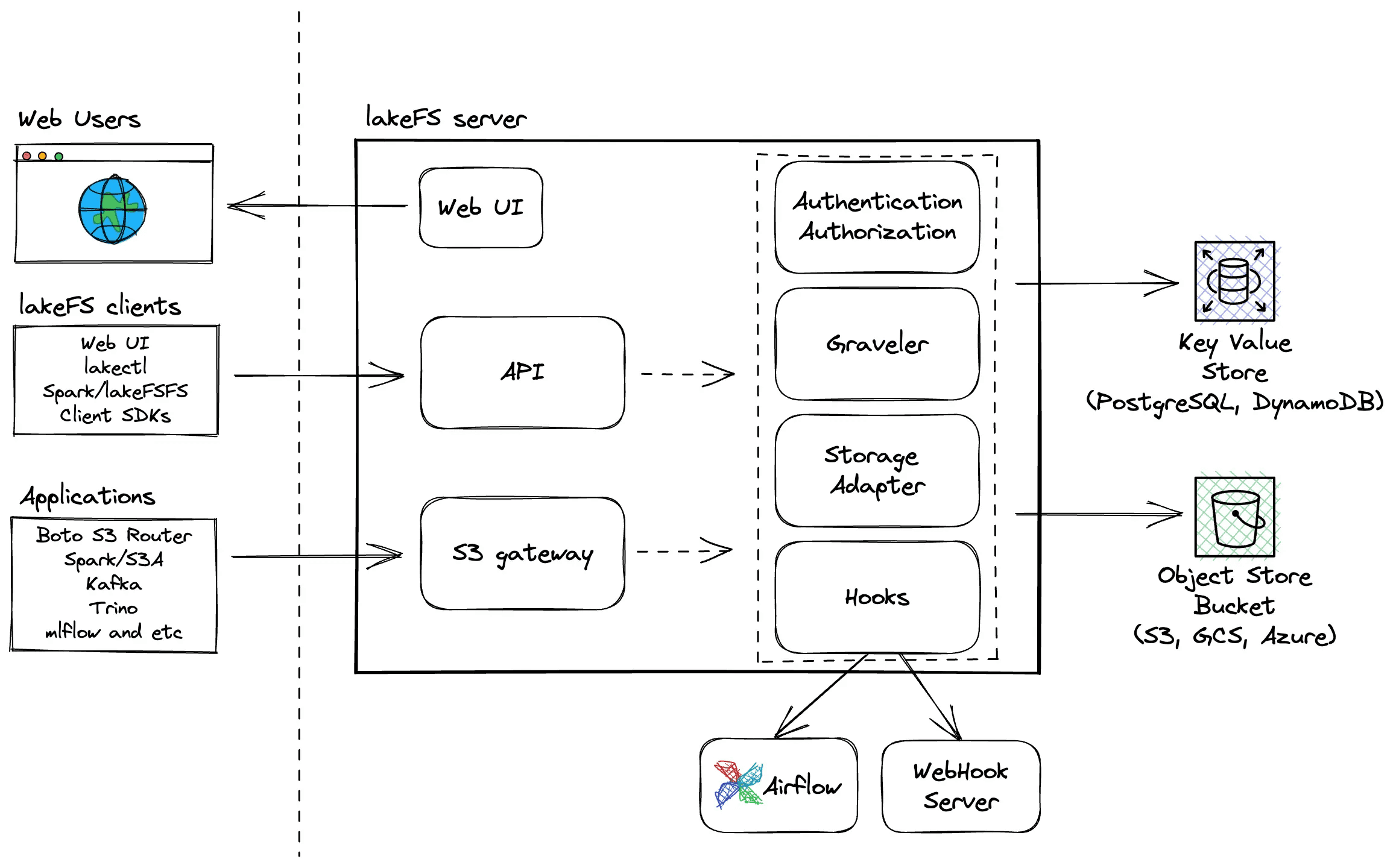
LakeFS Architecture overview
Creating a branch from the CLI is as simple as this:
Copy code
lakectl branch create lakefs://quickstart/denmark-lakes --source lakefs://quickstart/main
The UI supports creating pull requests, or branches, literally like GitHub but for data.
 LakeFS interface, here an example of a Pull Requests
Check out their GitHub repo, documentation, or a practical example of Implementing a Write-Audit-Publish (WAP) Pattern for much more information.
Nessie
Nessie came out of Dremio and is another early adopter that has been doing this for a long time. Its core approach is a transactional catalog with Git-like versioning for Apache Iceberg and Delta Lake tables.
Rather than versioning data files, Nessie versions the catalog metadata, the registry of tables and their locations.
This separation enables zero-copy branching where branches share table metadata pointers, multi-table transactions with atomic commits across multiple tables, and Git semantics such as branch, tag, merge, and cherry-pick operations.
Nessie leverages the immutability of modern table formats with Iceberg:
- Iceberg snapshots are immutable: Each table change creates new metadata.
- Nessie tracks which snapshot each branch points to.
- Branching copies pointers, not data or metadata files.
- Merging updates pointers to replay changes from source to target.
Example workflow:
Copy code
# Create branch
catalog.create_branch('experiment', 'main')
# Modify table on experiment branch
spark.sql("INSERT INTO catalog.experiment.orders VALUES (...)")
# This creates new Iceberg snapshot, Nessie updates experiment pointer
# Main branch unchanged - still points to original snapshot
spark.sql("SELECT * FROM catalog.main.orders") # Original data
Nessie runs as a REST service with pluggable backends including metadata storage such as PostgreSQL, DynamoDB, or RocksDB, data lake integration that works with any Iceberg-compatible engine (Spark, Trino, Dremio), and version control with a Git-like commit graph with branches and tags.
Nessie doesn't touch your data files. It's a lightweight coordination layer that brings Git semantics to your lakehouse by versioning the catalog. This makes it complementary to tools like lakeFS (which versions data) and ideal for multi-table transactional workflows. Read more on GitHub.
Bauplan
Similar to LakeFS, Bauplan calls itself the programmable data lake and is a code-native platform for versioned pipelines, built on Apache Iceberg and initially optimized for ML. It's not open source. Bauplan is built on a Python-first serverless lakehouse and is rather new.
Bauplan treats your data lake as a Git repository where:
- Data branches are first-class citizens, not just pipeline configs.
- Every pipeline execution is a commit with full lineage.
- All tables use Apache Iceberg format (Delta Lake compatible).
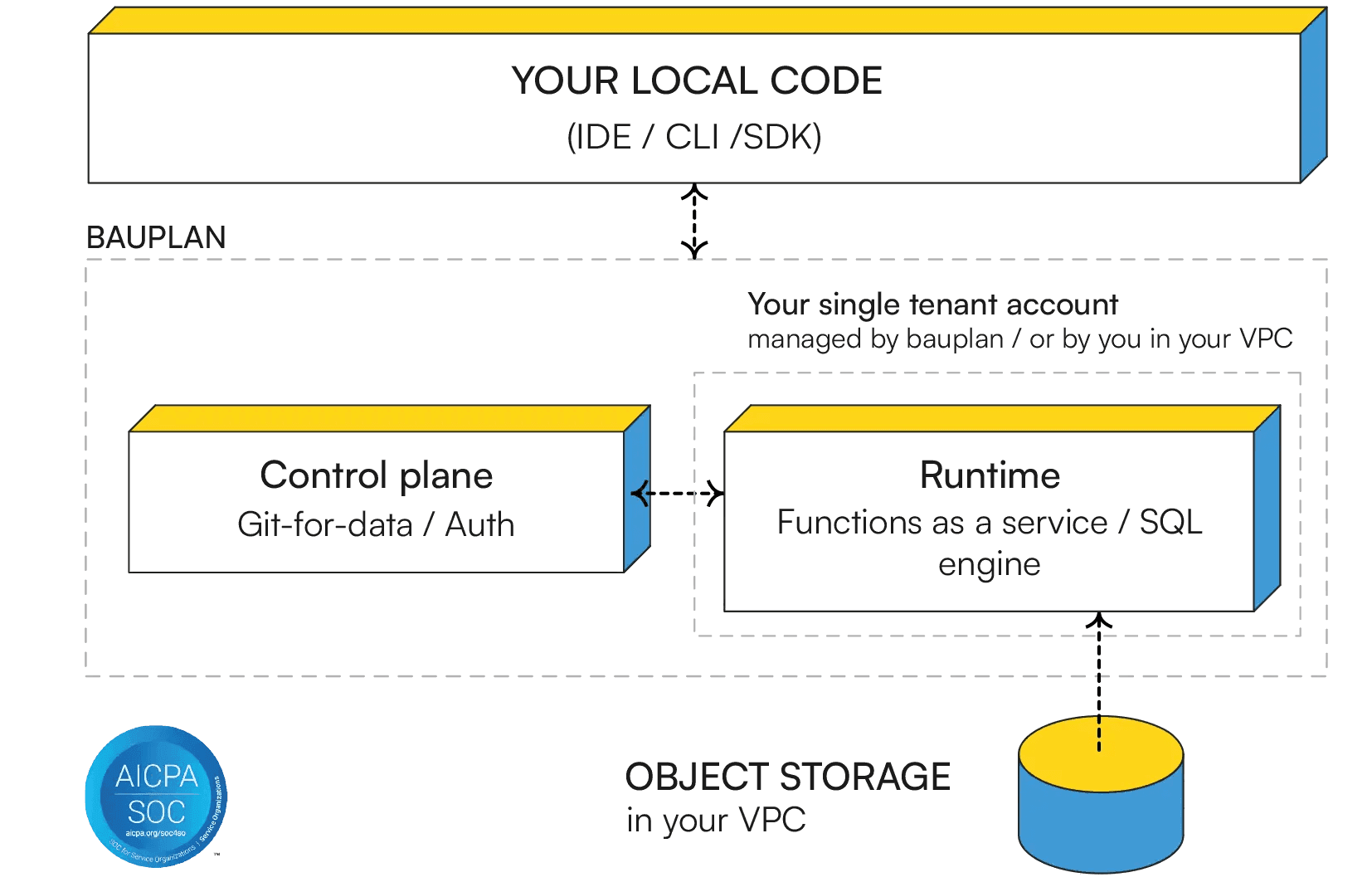
Architectural overview from Bauplan Website
Creating an isolated branch with new snapshots of Iceberg tables from the CLI is as simple as this:
Copy code
client.create_branch('experiment') # Instant, zero data copying
It supports merging verified using Alloy model checking:
Copy code
client.merge_branch(source='experiment', target='main')
The way it works is that it integrates a commit's changes into another branch and uses Alloy, a lightweight model checker, to stress-test the core logic behind merging (also used for checking branching and commits).
The merge operation tries to detect conflicts at the table level, performs three-way merges for compatible changes, and creates merge commits preserving lineage. Find more info on Git-for-Data Semantics: Safe Branching & Merging at Scale or their implementation of the WAP pattern.
Bauplan brings Git's full semantic model with branch, merge, commit, and revert to lakehouse data while maintaining compatibility with standard Iceberg tables accessible from MotherDuck, Snowflake, Databricks, or Trino.
HINT: Software Modeling with AlloyI haven't heard of Alloy before, but it's used not to model data, but for software modeling. It's used for a wide range of applications from finding holes in security mechanisms to designing telephone switching networks. And now for git for data with Bauplan.
NOTE: New Whitepaper OutAfter this article was written, Bauplan released a new whitepaper on Building a Correct-by-Design Lakehouse that researches around pipeline boundaries with Git-like data versioning for review and reproducibility, and transactional runs that guarantee pipeline-level atomicity.
Transactional and OLTP Databases
These are row-oriented, ACID-compliant databases where Git-like versioning applies mostly to application data where we need to keep user records, orders, and schemas.
Supabase, Neon and Dolt are interesting because these are not data lakes, not based on object storage, and not analytical databases, but relational databases.
Supabase
Supabase's core approach is full instance branching. Each branch is a completely isolated Postgres database with the entire Supabase stack (Auth, Storage, Realtime, Edge Functions).
Supabase branches create separate environments that spin off from your main project, allowing you to test changes like new configurations, database schemas, or features without affecting production.
It works by creating a Git branch and opening a pull request. Supabase automatically launches a Preview Branch and runs migrations from the repository's migrations directory. Each branch gets a dedicated Postgres instance with a unique connection string and APIs, isolating them from production and other branches.
Creating a branch via GitHub integration:
Copy code
# Automatic with GitHub integration enabled
git checkout -b feature/new-reports
git push origin feature/new-reports
# Supabase automatically creates preview branch when PR is opened
Or via the CLI:
Copy code
supabase branches create feature-branch --project-ref your-project
When merging, migrations in the repository's migrations folder run incrementally on each commit, allowing you to verify schema changes on existing seed data. When you merge the PR, those migrations automatically apply to production.
As each branch is a new Postgres instance created from scratch, the approach is conceptually simple but requires branches to be seeded (manually populated with test data since production data isn't copied) with data since they start empty. Each branch incurs its own compute and storage costs. Read more on Branching Supabase Docs.
Ideal for full-stack development where you need the entire backend stack (database + auth + storage + functions) to test features end-to-end.
Neon
Neon is a serverless Postgres platform (now part of Databricks) whose core approach is copy-on-write storage-level branching. Unlike Supabase which spins up a full new instance, Neon branches at the storage layer, making them instant regardless of database size and including the actual data.
Each branch is a new timeline in Neon's custom storage engine. No data is physically copied. The branch simply starts from a pointer to the parent's state at a specific LSN (log sequence number). Pages only diverge when writes happen, so you're billed only for the delta.
Copy code
# Create a branch from the CLI
neon branches create --name feature/user-auth
# Branch from a specific point in time
neon branches create --name recovery --parent 2025-01-15T10:00:00Z
Neon also supports snapshots (named, immutable point-in-time saves, like git tags) and rollback via finalize_restore: true, which restores a snapshot onto the active branch in-place while preserving the stable connection string. There's no reconfiguration needed. For safe experimentation, finalize_restore: false creates a temporary preview branch instead.
The key limitation: Neon has no merge support. Branches diverge but can't be reconciled automatically. Changes are applied back to production using standard migration tools.
Ideal for database-focused workflows where you want instant, full-data branches with production-like data out of the box, and don't need the full backend stack.
Dolt: Git + MySQL
Dolt is a SQL database that you can fork, clone, branch, merge, push, and pull just like a Git repository. It's a MySQL-compatible database and is fully open-source. Dolt's core approach is a SQL database where every row is versioned, combining Git's commit graph with MySQL's query interface.
Dolt stores data in a content-addressed graph using Prolly Trees, a novel data structure that enables cell-level version history, efficient structural sharing between versions, and fast diffs and merges.
Every database operation can be committed with:
Copy code
INSERT INTO employees VALUES (1, 'Alice', 50000);
SELECT DOLT_COMMIT('-am', 'Add Alice to payroll');
The commit creates a snapshot of the entire database state at that moment, stored in the commit graph just like Git. Unlike traditional databases, you can diff any two versions:
Copy code
-- See what changed between commits
SELECT * FROM DOLT_DIFF('main', 'feature-branch', 'employees');
-- Show cell-level changes
SELECT * FROM DOLT_COMMIT_DIFF_employees WHERE from_commit='abc123' AND to_commit='def456';
This enables cell-level audit trails with diffs showing which rows were added/deleted/modified, which cells changed with their before/after values, and who made the change via commit metadata.
Dolt implements Git commands almost literally. You can run dolt with any of these commands: branch feature-123, checkout feature-123, add ., commit -m "Add new customers", push origin feature-123, checkout main, merge feature-123.
You can even push/pull to DoltHub (like GitHub for databases) or run Dolt as a MySQL replica for existing applications.
Dolt uses copy-on-write with structural sharing where unchanged rows are shared between branches via pointers, and modified rows create new leaf nodes in the Prolly Tree.
This means cloning isn't "free" like with lakeFS, but it provides true database semantics with ACID transactions.
There's much more. Read more on their GitHub.
NOTE: Worth notingDoltgreSQL, the Postgres-compatible version of Dolt, reached Beta in 2025 and is available on Hosted Dolt. If your stack is Postgres-based, DoltgreSQL brings the same Git-like versioning semantics without requiring a MySQL migration.
Analytical Databases & Warehouses
These tools are OLAP-style and analytical-style databases optimized for read-heavy analytical queries.
MotherDuck
MotherDuck, as a cloud data warehouse, implements versioning differently from dedicated Git-for-data tools, prioritizing operational convenience over full version control semantics. With the addition of named snapshots, it gets even closer to Git-like semantics.
It offers two types of snapshots. Automatic snapshots: Created continuously in the background (roughly every minute when no writes are active). These are governed by SNAPSHOT_RETENTION_DAYS. These are configurable up to 90 days on the Business plan, defaulting to 7 days. They provide point-in-time recovery without any manual intervention.
And named snapshots that you create explicitly with CREATE SNAPSHOT. These are not subject to garbage collection as they persist indefinitely, even if the source database is deleted. Think of them as Git tags for your database, a permanent bookmark of a known-good state you can always return to.
The git analogy maps well:
CREATE SNAPSHOT→git tag: bookmark a known-good stateCREATE DATABASE ... FROM→git checkout -b: isolated environment from a snapshotALTER DATABASE SET SNAPSHOT TO→git reset --hard: roll back to a previous stateUNDROP DATABASE→ recovering a deleted branch
Combined with zero-copy cloning and database sharing, this enables practical git-like workflows. While MotherDuck doesn't support Git-style merging, COPY FROM DATABASE (OVERWRITE) acts as a replace, somewhat like a merge without conflict resolution. Combined with snapshots and zero-copy clones, this gives you a practical branch-modify-promote workflow:
Copy code
-- 1. Snapshot production before changes (persists indefinitely)
CREATE SNAPSHOT 'pre_release_v2' OF production;
-- 2. Clone from that named snapshot to an isolated dev database (instant, zero-copy)
CREATE DATABASE dev_branch FROM production (SNAPSHOT_NAME 'pre_release_v2');
-- Or clone from a point in time: (SNAPSHOT_TIME '2026-01-28 08:00:00')
-- 3. Make and validate changes on dev_branch
-- ... run transforms, test queries ...
-- 4. Promote: overwrite production with dev_branch (instant, metadata-only)
COPY FROM DATABASE dev_branch (OVERWRITE) TO production;
-- 5. If something goes wrong, restore from snapshot
ALTER DATABASE production SET SNAPSHOT TO (SNAPSHOT_NAME 'pre_release_v2');
This operates purely at the metadata layer and is nearly instantaneous. It's not a true merge (it's a full replacement, not a diff-based reconciliation), but for many data workflows where you want to validate changes in isolation before promoting them, it covers the key use case.
EXAMPLE: Deep DiveIf you want to know even more about how to use named snapshots and generally rolling back to a certain time, this blog More Control, Less Hassle: Self-Serve Recovery with Point-in-Time Restore goes into more details.
DuckLake
DuckLake is the open lakehouse format that uses a SQL database as its metadata catalog instead of JSON/Avro manifest files. DuckLake is relatively new (with 1.0 around the corner and its first release in May 2025), so you could use other mature open table formats like Apache Iceberg, Delta Lake or Apache Hudi.
But DuckLake has its relevancy for git-like workflows because:
- Snapshots are Git commits: Every DuckLake change creates a snapshot with author, commit message, and changeset tracking. This is the closest to actual Git semantics in the data lake world.
- SQL-native metadata: Uses DuckDB/PostgreSQL/MySQL as catalog, so metadata operations are standard SQL transactions. No manifest file scanning or compaction storms like Iceberg.
- Millions of snapshots: Snapshots are just a few rows in the catalog DB. No need to proactively prune snapshots (a major operational burden with Iceberg).
- Time travel + change feed: Query any table at any version, track insertions/deletions between versions.
With MotherDuck (fully managed):
Copy code
-- Fully managed DuckLake on MotherDuck
CREATE DATABASE my_lake (TYPE DUCKLAKE);
-- Or bring your own S3 bucket
CREATE DATABASE my_lake (TYPE DUCKLAKE, DATA_PATH 's3://my-bucket/lake/');
See valuable examples and DuckLake workflows in DuckLake workshop.
Related Data Engineering Git-like Workflows
Besides storage for data, which is the most important part and at the same time the hardest as we need to deal with state, it's not the full picture. We have DataOps to handle the full picture.
Data pipelines and their code also need to be deployed on a clone or branch, so how do we do this? One example is orchestration.
Orchestration: Dagster Branch Deployments
If we look at the full picture of the data engineering lifecycle, we need more than just storing data in a git-like manner. To support the full lifecycle, it would be best to run everything in a git-like style to roll back or switch branches. It's great to see that orchestrator tools like Dagster and others also have this functionality included.
Meaning branching does not only apply to the data, but also to data pipelines, and we can set a run automatically. Dagster is doing that with their cloud solution, integrating GitHub workflows with PRs and actions.
Dagster's core approach is lightweight staging environments created automatically with every pull request that branch both code and data. Branch deployments deploy your branch on Dagster+ as a separate deployment. This only works if your underlying technology supports cloning. For example, as we've seen, one of the above tools that supports cloning will allow Dagster inside the deployment to clone relevant data into that new branch deployment.
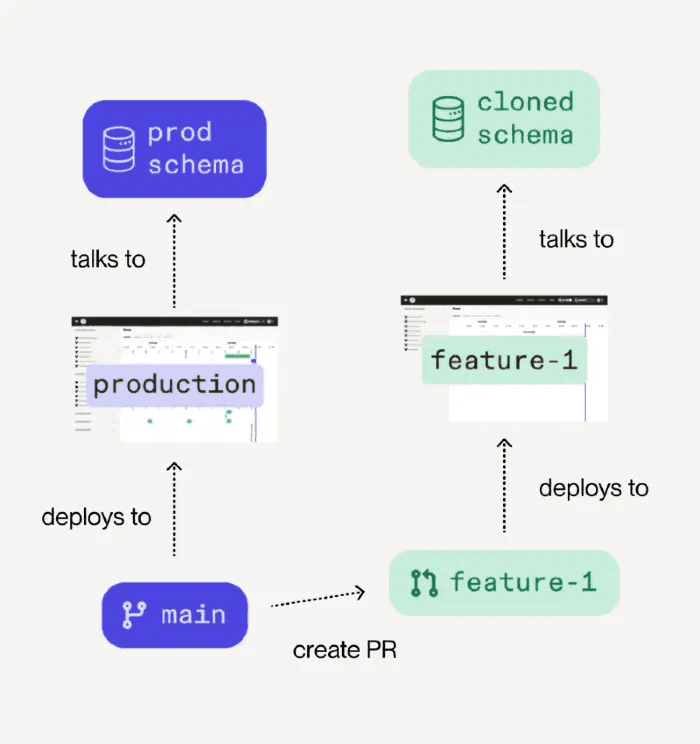
Branch deployment workflow showing how code branches deploy to cloned schema
On PR creation, it will automatically create a staging environment with a branch, launch jobs to configure the test environment including cloned data(base), and allow parameterized pipelines to test. If the tests pass, you can approve the PR, and it merges and automatically deploys to production with the right CI/CD pipeline.
Orchestrators and other data stack tools depend on cloning support and features such as branching for a true isolated environment. As Nick Schrock noted in the Data Engineering Podcast, this is similar to the challenge with Apache Spark where testing locally is nearly impossible. Branch deployments solve this by branching the entire environment.
This is extremely powerful as it replaces the need to copy data locally or set up complex staging environments. You get a true production-like test environment that's automatically created and destroyed with your git workflow. Read more on Dagster Branch Deployments.
AI Agents: A Branch for Testing
Lastly, this also works well in the realm of AI agents that help us test based on a branch or snapshot. This is similar to git worktree for small git repos with code where basically each branch is a separate folder and we can work and change different branches simultaneously without breaking any of the other branches or data.
Once we have a working branch with data included in isolation, we can send off an agent autonomously, and let it open a PR to review. This way we have a clear gateway before it goes to production, we can test it on that branch, including its data, and merge when all looks good.
Based on its own fork, we can avoid collisions, instantly roll back or delete a branch and start again, have perfect consistency as data is frozen and locked for the agent to work on, and clean debugging as no other ETL data pipelines interfere.
Conclusion
So where does this leave us? In Part 1, we established that Git for data is fundamentally harder than versioning code because we're managing state at massive scale. We learned about the efficiency spectrum, from metadata pointers to full copies, and why zero-copy operations matter.
Now, having explored the actual tools and their approaches to git-like workflows (LakeFS, Dolt, Nessie, MotherDuck, and others in production today), we know a little more about how it all works. Each tool makes different trade-offs, but they all solve the same core problem: how do you version data without copying petabytes.
The answer, to me: separate metadata from data. Whether it's LakeFS's random physical addresses, Dolt's Prolly Trees, Nessie's catalog pointers, MotherDuck's zero-copy clones, or Neon's branching feature, they all use clever tricks to make branching instant. Some focus on data lakes, others on databases. Some support full merge workflows, others prioritize instant forking. Your choice depends on your stack:
- LakeFS and Nessie excel at data lake branching with zero-copy efficiency
- Dolt brings true Git semantics to SQL databases
- MotherDuck offers named snapshots and zero-copy clones for cloud data warehousing, with DuckLake adding SQL-native time travel
- Bauplan focuses on versioned pipelines and ML experiment reproducibility
- Neon and Supabase provide branch/fork-based workflows for isolated testing
The ecosystem is still evolving. Maturity varies across tools, with different workarounds to limitations that best fit data in a git-like workflow. Some trade merge capabilities for instant forking. Others require infrastructure changes. The key is picking what fits your workflow and scale.
Start small. You don't need to instrument your entire stack overnight. Look at your recent production incidents: which pipelines caused them? Those are your highest-risk areas. Add branching there first. Test changes on prod-like data before deploying. Build confidence through small wins, then expand.
We want to bring the same confidence we have with code versioning to the stateful world of data. And with tools like Dagster's branch deployments and emerging AI agent workflows, we're seeing Git-like patterns extend beyond just data storage into the full data engineering lifecycle.
Git-like workflows are becoming table stakes. Maybe not today or tomorrow, but with the right tools and changes in workflow we can achieve significantly better change management, testing on production data, fast rollbacks, isolated experiments, and most importantly, peace of mind when deploying changes.
That's the promise. What's your experience? Have you tried it? Do you run any of the above in production? I'm curious to hear more.
Appendix
While I was writing this article back in November 2025, Tigris was an interesting database contender with Supabase-like features such as forked buckets and zero clone. But at the time of this publishing, the GitHub repo got archived, and therefore removed from the comparison in this article.
Start using MotherDuck now!