If you've spent any time in the modern data world, you've probably heard the term "data lakehouse" thrown around. It promises the best of both worlds: the flexibility of a data lake with the reliability of a data warehouse. But what does that actually mean in practice? And more importantly, how do you build one without drowning in complexity?
In this guide, we'll cut through the marketing hype and explain:
- What a data lakehouse actually is
- Data lake vs. data lakehouse vs. data warehouse
- The architecture that makes it work
- The medallion architecture pattern
- Open table formats explained
- The challenges with traditional approaches
- A simpler path forward with DuckLake
- How to get started
What is a Data Lakehouse?
A data lakehouse is a data management architecture that combines the low-cost, flexible storage of a data lake with the data management features and query performance of a data warehouse.
The core idea is simple: store your data in open file formats (like Parquet) on cheap object storage (like S3), but layer on database-like capabilities—ACID transactions, schema enforcement, time travel, and fast queries—that make the data actually usable for analytics.
Think of it as having your cake and eating it too: the economics of a data lake with the reliability of a data warehouse.
Key characteristics of a data lakehouse:
- Open file formats: Data stored as Parquet, ORC, or similar columnar formats
- Object storage: S3, Google Cloud Storage, or Azure Blob Storage as the foundation
- ACID transactions: Reliable, atomic operations across your data
- Schema enforcement: Structure and validation without sacrificing flexibility
- Time travel: Query historical versions of your data
- Direct BI access: Connect analytics tools without data movement
Data Lake vs. Data Lakehouse vs. Data Warehouse
To understand why lakehouses emerged, you need to understand what came before.
Data Warehouses: Reliable but Expensive
Traditional data warehouses excel at structured analytics. They provide:
- Strong schema enforcement
- ACID transactions
- Fast query performance
- Mature tooling for BI
But they come with trade-offs: proprietary formats, expensive storage, limited support for unstructured data, and vendor lock-in.
Data Lakes: Cheap but Chaotic
Data lakes swung the pendulum the other way. Dump everything into S3 in whatever format you want—structured, semi-structured, unstructured. Storage is cheap, and you have complete flexibility.
The problem? Data lakes quickly became "data swamps." Without transactions, schema management, or data quality controls, they turned into unreliable dumping grounds. Running a query meant hoping the data was still there and hadn't been corrupted by a concurrent write.
Data Lakehouses: The Convergence
The lakehouse architecture emerged to solve this tension. Keep the cheap, flexible storage of the lake. Add the reliability and performance features of the warehouse. Use open formats to avoid lock-in.
| Feature | Data Warehouse | Data Lake | Data Lakehouse |
|---|---|---|---|
| Storage cost | High | Low | Low |
| Data formats | Proprietary | Open | Open |
| ACID transactions | ✓ | ✗ | ✓ |
| Schema enforcement | ✓ | ✗ | ✓ |
| Unstructured data | ✗ | ✓ | ✓ |
| Time travel | Sometimes | ✗ | ✓ |
| Vendor lock-in | High | Low | Low |
Data Lakehouse Architecture
A modern data lakehouse has three core layers:
1. Storage Layer
The foundation is object storage—S3, Google Cloud Storage, or Azure Blob Storage. Data lives as immutable files in open columnar formats like Parquet, which provides excellent compression and fast analytical queries.
Why object storage? It's incredibly cheap (fractions of a cent per GB), infinitely scalable, and durable. You're not paying for expensive managed database storage—you're using commodity cloud storage.
2. Table Format Layer
Raw files on object storage aren't enough. You need a table format that adds database-like capabilities on top:
- Transaction logs: Track every change for ACID guarantees
- Metadata management: Know which files contain which data
- Schema evolution: Add columns without rewriting everything
- Time travel: Access any previous version of your data
- Partition pruning: Skip irrelevant files during queries
This is where formats like Apache Iceberg, Delta Lake, and DuckLake come in. They turn a collection of files into something that behaves like a proper database table.
3. Compute Layer
The query engine that actually reads and processes your data. Because lakehouses use open formats, you can use multiple engines—DuckDB for local and cloud development, Spark for heavy batch processing, MotherDuck or Trino for large-scale queries—all against the same underlying data.
This separation of storage and compute is powerful: scale them independently, pay only for what you use, and avoid vendor lock-in.
The Medallion Architecture Pattern
Many lakehouses organize data using the medallion architecture (also called multi-hop architecture), a design pattern that divides data into three quality layers:
- Bronze (Raw): Landing zone for raw, unprocessed data exactly as it arrives from source systems. No transformations, just ingestion.
- Silver (Cleaned): Validated, deduplicated, and conformed data. Schema enforcement happens here, along with basic cleaning and standardization.
- Gold (Curated): Business-level aggregates, feature tables, and analytics-ready datasets optimized for specific use cases.
This pattern provides clear data lineage, enables incremental processing at each layer, and makes it easy to reprocess data when business logic changes. With DuckLake, you can implement medallion architecture using separate schemas or databases for each layer, with full ACID transactions ensuring consistency as data flows through the pipeline.
Open Table Formats Explained
At the heart of every data lakehouse is an open table format—a specification that adds database capabilities to files sitting on object storage.
What makes a table format "open"?
- Uses standard file formats (Parquet, ORC) that any engine can read
- Specification is publicly documented
- No vendor lock-in; switch compute engines freely
- Community-driven development
The major open table formats:
| Format | Backed By | Strengths | Considerations |
|---|---|---|---|
| Apache Iceberg | Apple, Netflix, Snowflake | Wide ecosystem support, hidden partitioning | Complex metadata management |
| Delta Lake | Databricks | Tight Spark integration, Z-ordering | Historically Databricks-centric |
| Apache Hudi | Uber | Record-level updates, CDC support | Steeper learning curve |
| DuckLake | DuckDB creators | SQL-based metadata, simplicity | Newer, growing ecosystem |
DuckLake takes a fundamentally different approach by storing metadata in a SQL database rather than files, eliminating the complexity that plagues other formats.
The Complexity Problem
Here's the dirty secret of the lakehouse movement: traditional table formats are complex. Really complex.
The Metadata File Explosion
Formats like Apache Iceberg were designed to avoid requiring a database. Noble goal, but the implementation creates its own headaches.
To query an Iceberg table, your engine must:
- Query a REST catalog to find the current metadata file
- Read the
metadata.jsonfile from object storage - Parse manifest lists pointing to manifest files
- Read multiple manifest files to find actual data files
- Finally read the data
That's potentially dozens of round trips to object storage before you read a single row of data. Each round trip adds latency. Each metadata file adds complexity.
As tables grow, so does the metadata. Large Iceberg tables can have thousands of manifest files. Compaction jobs become necessary just to keep metadata manageable. You're running infrastructure to manage your infrastructure.
The "Small Files" Problem
Streaming data into a traditional lakehouse creates another headache: small files. Each micro-batch creates new Parquet files. Thousands of tiny files tank query performance. So you need compaction jobs to merge them. More infrastructure, more complexity, more things that can break.
The Concurrency Challenge
File-based locking mechanisms in traditional formats create bottlenecks. When multiple writers try to commit simultaneously, conflict resolution gets messy. Optimistic concurrency control with file-based manifests wasn't designed for high-throughput concurrent writes.
DuckLake: A Simpler Lakehouse
What if there was a simpler way? What if, instead of encoding metadata into thousands of files, you just... used a database?
That's the insight behind DuckLake, an open table format created by the founders of DuckDB. It delivers the same lakehouse benefits—ACID transactions, time travel, schema evolution, partition pruning—but with radically simpler architecture.
The Key Innovation: SQL-Based Metadata
DuckLake stores all metadata in a standard SQL database instead of files on object storage. Finding which files to read for a query becomes a fast, indexed SQL lookup instead of a slow scan through manifest files.

The difference? Milliseconds versus seconds. A quick indexed lookup versus sequential file reads across the network.
Why This Matters
10-100x faster metadata operations: Database indexes beat file scans. Every time.
No small file problem: DuckLake's data inlining feature stores tiny inserts directly in the metadata database. No micro-Parquet files cluttering your storage. When data accumulates, flush it to Parquet when it makes sense.
Simpler concurrency: Database transactions handle concurrent writes naturally. PostgreSQL can handle thousands of transactions per second—more than enough for even aggressive multi-writer scenarios.
No compaction jobs: Without metadata file proliferation, you don't need constant compaction to keep things manageable.
True ACID across tables: Cross-table transactions are just... transactions. The database handles it.
DuckLake Architecture
DuckLake has three components:
- Data files: Standard Parquet files on object storage (S3, GCS, Azure)
- Metadata catalog: A SQL database (PostgreSQL, MySQL, SQLite, DuckDB, or MotherDuck)
- Compute: DuckDB as the reference implementation, with Spark support coming
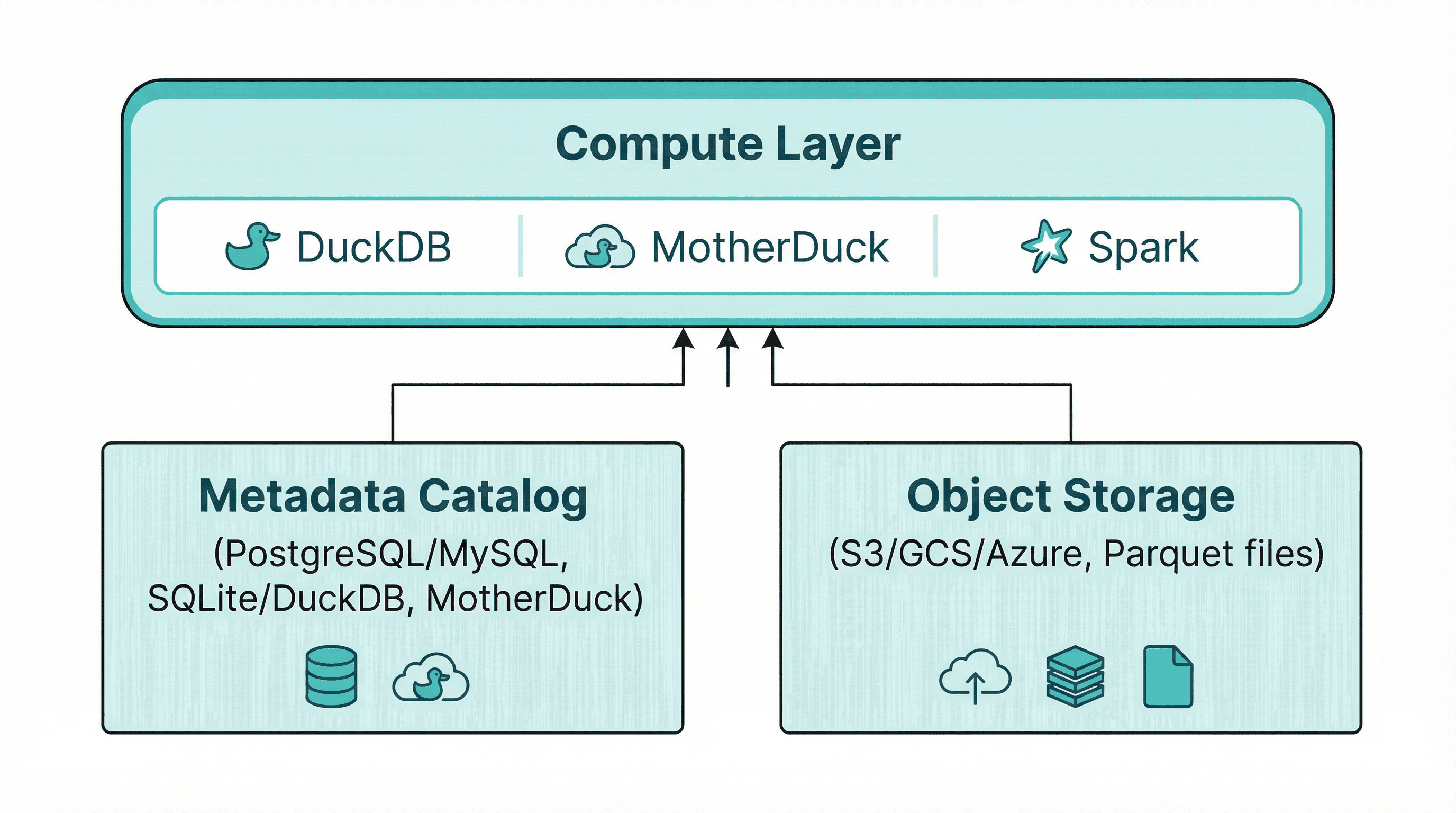
The metadata database stores schemas, file pointers, partition information, statistics, and transaction history. The actual data stays in Parquet files on cheap object storage. Compute engines query the catalog to find relevant files, then read directly from storage.
Iceberg vs. Delta Lake vs. DuckLake: How to Choose
Choosing between open table formats? Here's how they compare:
| Feature | DuckLake | Apache Iceberg | Delta Lake |
|---|---|---|---|
| Metadata storage | SQL database | Files on object storage | Files on object storage |
| Metadata lookup | Single indexed query | Multiple file reads | Multiple file reads |
| Small file handling | Data inlining | Compaction required | Compaction required |
| Cross-table transactions | Native | Limited | Limited |
| Catalog requirement | Built-in | Separate REST catalog | Unity Catalog or similar |
| License | MIT | Apache 2.0 | Apache 2.0 |
| Complexity | Low | High | Medium |
| Best for | Simplicity-focused teams, DuckDB users | Multi-engine environments | Spark/Databricks shops |
When to choose Iceberg: You need maximum ecosystem compatibility and are comfortable managing catalog infrastructure. Iceberg has the broadest engine support.
When to choose Delta Lake: You're heavily invested in Databricks or Spark, and want tight integration with that ecosystem.
When to choose DuckLake: You want lakehouse benefits without operational complexity. Ideal for teams using DuckDB/MotherDuck who value simplicity over ecosystem breadth.
Getting Started with DuckLake
Option 1: Fully Managed with MotherDuck
The fastest path to a working lakehouse. One command:
Copy code
CREATE DATABASE my_lakehouse (TYPE DUCKLAKE);
That's it. MotherDuck manages both the metadata catalog and object storage. Start creating tables immediately:
Copy code
USE my_lakehouse;
CREATE TABLE events (
event_id UUID,
user_id INTEGER,
event_type VARCHAR,
properties JSON,
created_at TIMESTAMP
);
INSERT INTO events VALUES
(gen_random_uuid(), 1, 'page_view', '{"page": "/home"}', now()),
(gen_random_uuid(), 2, 'purchase', '{"amount": 99.99}', now());
Your data is stored as Parquet files with full ACID guarantees, time travel, and all the lakehouse benefits—without managing any infrastructure.
Option 2: Bring Your Own Storage
Want to use your own S3 bucket? Connect it to MotherDuck:
Copy code
CREATE DATABASE my_lakehouse (
TYPE DUCKLAKE,
DATA_PATH 's3://my-bucket/lakehouse/'
);
MotherDuck manages the metadata catalog while your data stays in your bucket. Full control over data residency with managed simplicity.
Option 3: Fully Self-Managed
Run everything yourself with DuckDB and PostgreSQL:
Copy code
-- Install the extension
INSTALL ducklake;
LOAD ducklake;
-- Create a DuckLake backed by PostgreSQL
ATTACH 'ducklake:postgres:host=localhost dbname=lakehouse_catalog'
AS my_lake (DATA_PATH 's3://my-bucket/data/');
-- Start using it
CREATE TABLE my_lake.events (...);
Use PostgreSQL for production multi-writer scenarios, or SQLite/DuckDB for local development.
When to Use a Data Lakehouse
A lakehouse architecture makes sense when you need:
- Cost-effective storage at scale: Petabytes of data without petabyte pricing
- Open formats: Avoid vendor lock-in, use multiple query engines
- ACID transactions: Reliability for analytics workloads
- Schema flexibility: Evolve schemas without painful migrations
- Time travel: Query historical data states for debugging or compliance
Ideal Use Cases
- Analytics platforms: Central repository for business intelligence
- ML feature stores: Versioned, reproducible training data
- Event streaming: Land streaming data with transactional guarantees
- Data sharing: Open formats enable cross-organization collaboration
- Hybrid architectures: Bridge operational and analytical workloads
When to Consider Alternatives
- Pure OLTP workloads: Use a transactional database instead
- Real-time point lookups: Lakehouses optimize for analytical scans, not single-row fetches
- Tiny datasets: If your data fits in memory, a lakehouse is overkill
The Bottom Line
The data lakehouse represents a genuine architectural advancement—combining the economics of data lakes with the reliability of data warehouses. But traditional implementations brought significant complexity.
DuckLake offers a simpler path. By storing metadata in a SQL database rather than files, it eliminates the operational overhead that plagued earlier approaches. You get the same benefits—ACID transactions, time travel, schema evolution, open formats—without the compaction jobs, manifest file explosions, and catalog server complexity.
Whether you choose MotherDuck's fully managed offering or run DuckLake yourself with PostgreSQL, you're building on an architecture that scales from laptop to petabytes without scaling complexity along with it.
Ready to try it? Sign up for MotherDuck and create your first DuckLake database in seconds.
Start using MotherDuck now!
FAQS
What is the difference between a data lake and a data lakehouse?
A data lake is raw storage for files in any format on object storage like S3, without built-in data management features. A data lakehouse adds database-like capabilities on top—ACID transactions, schema enforcement, time travel, and query optimization—while keeping data in open formats on cheap object storage. Think of a lakehouse as a data lake with guardrails and structure.
Is a data lakehouse better than a data warehouse?
It depends on your needs. Data lakehouses offer lower storage costs, open formats, and flexibility for unstructured data. Traditional data warehouses often provide better out-of-the-box performance for structured analytics and simpler operations. Many organizations use both: a lakehouse for large-scale storage and a warehouse (or MotherDuck) for fast analytical queries.
What is the medallion architecture?
The medallion architecture (also called multi-hop architecture) is a design pattern for organizing data in a lakehouse into three layers: Bronze (raw, unprocessed data), Silver (cleaned and validated data), and Gold (business-level aggregates ready for analytics). This pattern provides clear data lineage and makes incremental processing straightforward.
What is an open table format?
An open table format is a specification that adds database capabilities (ACID transactions, schema evolution, time travel) to files stored on object storage. Popular open table formats include Apache Iceberg, Delta Lake, Apache Hudi, and DuckLake. They're 'open' because they use standard file formats like Parquet and don't lock you into a specific vendor.
How does Iceberg compare to Delta Lake?
Both Apache Iceberg and Delta Lake are open table formats providing ACID transactions and time travel for data on object storage. Iceberg has broader multi-engine support and hidden partitioning, while Delta Lake has tighter Spark integration and is popular in Databricks environments. DuckLake takes a different approach by storing metadata in a SQL database for simpler operations and faster metadata lookups.
What is DuckLake?
DuckLake is an open table format created by the founders of DuckDB. Unlike Iceberg or Delta Lake which store metadata as files, DuckLake stores metadata in a SQL database (PostgreSQL, MySQL, or MotherDuck). This makes metadata operations 10-100x faster and eliminates the need for compaction jobs and catalog servers.
Can I migrate from Iceberg to DuckLake?
Yes. DuckLake writes data files compatible with Iceberg format, enabling metadata-only migrations without moving data. You can point DuckLake at existing Parquet files and build the catalog from there. Migration tools are in development to make this even easier.
What databases can DuckLake use for metadata?
DuckLake supports PostgreSQL, MySQL, SQLite, DuckDB, and MotherDuck as metadata catalog databases. For production multi-writer scenarios, PostgreSQL or MotherDuck are recommended. SQLite or local DuckDB work well for development and single-user scenarios.
Is DuckLake open source?
Yes. DuckLake is released under the MIT license, one of the most permissive open source licenses. The specification is fully open, and while DuckDB provides the reference implementation, any database or query engine can implement the format.
How much does a data lakehouse cost?
Storage costs are minimal—object storage runs fractions of a cent per GB per month. Compute costs depend on your query volume and engine choice. With MotherDuck, you can start free and scale to petabytes. Self-managed options using DuckDB with PostgreSQL can run for under $10/month for small to medium workloads.
