TL;DR: Learn how to create a zero-cost dbt development environment by combining MotherDuck, DuckDB, and a cloud IDE like Paradime. This "local-in-the-cloud" workflow eliminates expensive cloud data warehouse compute costs during development by running transformations on a local DuckDB instance and pushing only final, materialized tables to a shared MotherDuck database for collaboration.
"Our CFO required us to shut down our development environment on our cloud data warehouse entirely."
When Ryan Boyd from MotherDuck heard this feedback from an analytics leader at a conference, it highlighted a painful, growing trend. Development and experimentation on traditional cloud data warehouses can lead to unpredictable and escalating costs.
Teams are often charged for compute and storage resources separately, and a flurry of experimental queries by analysts can cause costs to skyrocket unexpectedly. Teams must deal with slow, costly queries or, in the worst case, have their development workflows completely halted. This kills productivity and innovation.
You can actually get the power and convenience of a cloud-based IDE combined with the speed and cost-efficiency of local development. By combining Paradime, a cloud-based IDE, with DuckDB, the in-process analytical database, and MotherDuck, you can build a powerful, collaborative, and virtually free dbt development workflow.
This guide walks you through building a "local-in-the-cloud" pipeline that costs you zero in warehouse compute.
What is a "Local-in-the-Cloud" dbt Workflow?
As Kostav from Paradime explains, most of the data in a warehouse is "stale" and not needed for day-to-day development [05:43]. Instead of running queries against a multi-terabyte production warehouse, you can work on a smaller, relevant subset of "fresh" data.
Start by performing a low-cost export from your primary warehouse (like Snowflake or BigQuery) to cloud object storage like S3. From within your Paradime workspace, you then pull a targeted subset of that data into a temporary, local DuckDB file.
All dbt transformations run against this local file, using the Paradime VM's compute at no extra warehouse cost. Finally, you push only the finished, materialized tables to a shared MotherDuck database, making them instantly available for team collaboration.
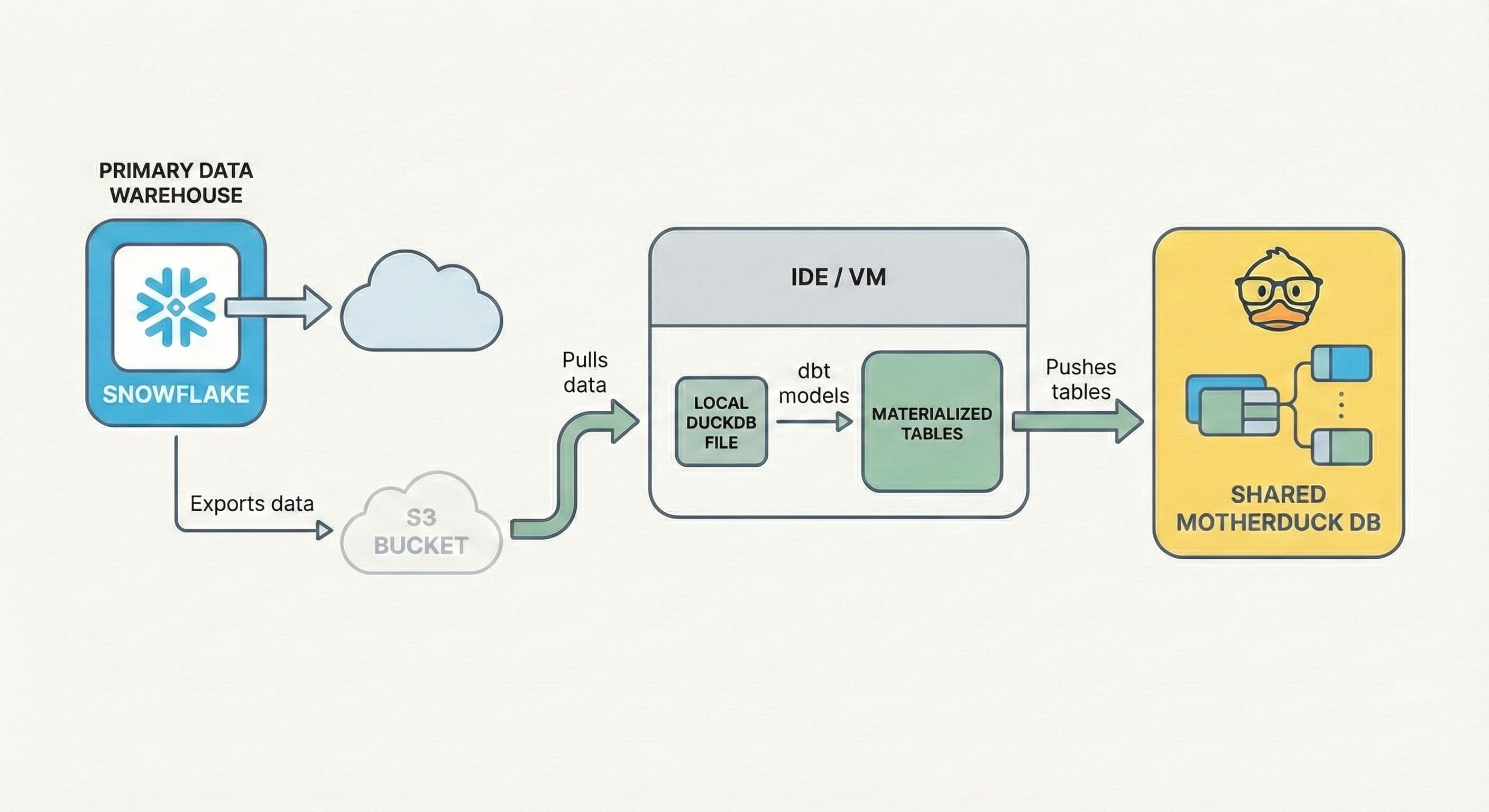
Kostav describes Paradime as an "M1 machine in the cloud" [09:20]. You get the speed and isolation of a high-performance local setup without maintaining toolchains, managing dependencies, or risking downloading sensitive data to your personal laptop [10:58].
Step-by-Step Tutorial: How to Build a Zero-Cost dbt Pipeline
This tutorial follows Kostav's demonstration [15:53 - 25:47] to build a complete dbt pipeline using NBA player data.
Step 1: Configure Your Paradime Environment
Inside Paradime, configure your connections and environment variables.
First, set up two dbt targets in your account settings: one for your local DuckDB development and another for your remote MotherDuck instance. This configuration allows you to easily switch between running models locally and deploying to the cloud.
Then, in your profile settings, add your MOTHERDUCK_TOKEN and your AWS credentials (AWS_ACCESS_KEY_ID, AWS_SECRET_ACCESS_KEY, etc.). Paradime securely stores these credentials for terminal use.
Step 2: Hydrate Your Local DuckDB Instance from S3
Use the DuckDB CLI directly in the Paradime terminal to create a local database and populate it with data from public S3 buckets.
Launch the CLI and create a new local database file. This command creates local_nba.db right in your Paradime file system.
Copy code
duckdb local_nba.db
Next, use DuckDB's read_csv_auto function to pull data directly from S3 into local tables. No aws s3 cp needed.
Copy code
-- DUCKDB SQL
CREATE TABLE players AS SELECT * FROM read_csv_auto('s3://paradime-nba-data/players.csv');
CREATE TABLE teams AS SELECT * FROM read_csv_auto('s3://paradime-nba-data/teams.csv');
-- ... and so on for all your source files.
In seconds, you've staged all the necessary data from cloud storage into a hyper-fast local database file, ready for dbt.
Step 3: Run and Validate dbt Models
Run your dbt models just as you always would.
Copy code
dbt run
The run completes in just a few seconds. This entire transformation process used zero warehouse compute. It all happened on the Paradime VM, which the platform includes.
Kostav showcased Harlequin [19:41] for in-terminal data exploration. By running harlequin local_nba.db, you get a full-featured SQL IDE right in your terminal. You can browse schemas, write queries with auto-completion, and instantly validate the output of your dbt models.
Step 4: Push Results to MotherDuck
Once you've validated your models, it's time to share your work. MotherDuck's hybrid execution model makes it simple to push data from a local DuckDB instance to a cloud-hosted MotherDuck database.
From within the DuckDB CLI, connect to MotherDuck.
Copy code
-- DUCKDB SQL
.open md:
Next, ATTACH your local database file, giving it an alias so you can query it alongside your cloud databases.
Copy code
-- DUCKDB SQL
ATTACH 'local_nba.db' AS local_db;
Finally, use a single command to create a new database in MotherDuck directly from your local file's contents.
Copy code
-- DUCKDB SQL
CREATE DATABASE nba_data_export FROM local_db;
This command efficiently uploads your final tables to MotherDuck. Kostav pointed out how this approach works with your dbt materialization strategy [24:17]. If you materialize staging models as views and final models as tables, only the clean, final tables get pushed to MotherDuck, keeping your collaborative space tidy.
Step 5: Share Your Work with MotherDuck
Make your new dataset available to your team. As Ryan suggested [26:20], MotherDuck has a simple sharing mechanism built-in.
Copy code
-- MOTHERDUCK SQL
CREATE SHARE nba_data_export_share FROM DATABASE nba_data_export;
This command generates a secure URL. You can send this URL to a teammate, and they can instantly attach your shared database to their own MotherDuck environment to query and use your data.
What Are the Benefits of This dbt Workflow?
Compute happens on the Paradime VM instead of a costly warehouse, resulting in near-zero development costs. Running dbt against a targeted subset of data on a local DuckDB instance is orders of magnitude faster than querying a massive cloud warehouse.
You'll use the same DuckDB SQL engine from local development to cloud collaboration in MotherDuck, eliminating the painful process of translating SQL dialects between different environments.
This workflow enhances security and governance. All data transfer and processing happens within a secure, managed cloud environment, preventing sensitive data from ever landing on a personal laptop.
Conclusion & Next Steps
By combining Paradime, DuckDB, and MotherDuck, we've created a modern analytics development stack that's faster, more secure, and dramatically more cost-effective. You can finally give your developers the powerful, unconstrained environment they need to do their best work without giving your CFO a heart attack.
Ready to try it yourself?
- Sign up for a free MotherDuck account
- Check out Paradime and their free trial.
Frequently Asked Questions
What is the total cost of this dbt development workflow?
The warehouse compute cost is zero. The workflow uses the compute included with your cloud IDE (like Paradime) for dbt transformations and MotherDuck's free tier for collaboration, making the development process virtually free.
Can I use a different cloud IDE instead of Paradime?
Yes. The principles of this workflow (pulling a subset of data from object storage into a local DuckDB file for transformation) can be applied in any cloud-based development environment that can run DuckDB and the dbt-duckdb adapter.
How does this workflow improve security compared to local development?
All data processing and transfer occurs within a secure, managed cloud environment. Sensitive data is pulled from your cloud storage to the IDE's VM and then pushed to MotherDuck, never needing to be downloaded to a personal laptop, which reduces security risks.
Is MotherDuck compatible with other dbt adapters?
MotherDuck uses the dbt-duckdb adapter. Because DuckDB can read directly from many different file types (like CSV, Parquet) and sources, you can easily pull data from various systems into your workflow. Your dbt projects connect to MotherDuck as they would to any DuckDB database.
Transcript
0:01hi everyone it's Ryan Boyd here from mother duck and I'm here with Cav from Paradigm and we're super excited to talk to you today about how you can use duck DB and mother duck along with Paradigm to basically make your Cloud development cost zero in your DBT pipeline so um I
0:22am going to give a quick overview of mother duck and then Cav is going to give a quick overview of par Paradigm and then we're going to dive into Cav's uh you examples showing you how you can use uh duck DB in your Paradigm uh DBT
0:42development and it's a really awesome set of different scenarios that you can use um it's all based off of some work he's he's published a little bit ago but uh we'll get some extra insights here as he goes through it live so uh I'm going to switch over to some slides
1:03and talk quickly about what is duck DB um so this is the the tagline that duck DB uses on their website a lightweight inprocess SQL analytics engine um and
1:16you know we say that is taking uh the data World by storm certainly if you listen to the Twitter verse um there are quite a few people that are super excited about duck DB you can essentially think of it as is the SQL light for analytics it's a really powerful SQL engine using much of the postgress syntax um to do analytics on your data
1:40um regardless of where the data sits locally in the cloud things like that now mother duck takes it and says uh we're going to build a serverless duck DB based data warehouse um so that you can do your analytics in a way that scales and provides the collabor collaboration that you would expect of a cloud service uh we are currently
2:03in open Beta And you can try us out for free uh but I do want to jump into a couple uh distinctive things about mother duck um one thing is that each user gets their own compute their own ducking uh this is very different compared to the tency model of traditional data warehouses where all the users are fighting for the compute
2:27uh in mother duck everyone gets their own duct CB engine working on the same data warehouse data um you know and the other thing that's really awesome about uh mother duck as a a data warehouse uh is that you can use it in a hybrid mode um so in
2:47the hybrid mode uh you can use duck DB
2:53locally together with mother duck and the cloud where parts of your queries execute on both sides of the pipe um and this can be really useful to get high-speed local analytics by materializing some data locally and pushing it into the cloud it's also really useful during a development to production workflow uh which COV is going to get
3:15into so why don't we give the mic over here to Cav and uh learn about Paradigm and then learn about how the two uh work together absolutely thanks Ryan and thanks uh super excited to be here um I think I'm KAS I'm one of the co-founders of Paradigm and um the best way to explain Paradigm is it is the operating
3:39system for analytics and what we mean by that is that it is a DBT native cross-platform um uh workspace where
3:49teams can get uh all their analytics work done that that can include your uh DBT development on the cloud productionizing your DVD pipelines on the cloud and then uh finally uh realtime intelligence to measure how your pipelines are working how your team is working so that you can actually measure improve cost uh performance uh
4:15and productivity of your team so ultimately it connects to your uh DBT repository um on git repo and it connects to a cloud dare warehouse now traditionally it would be a snow lake or a big query which would be a cloud data warehouse that you'd connect to but with mother duck what happens is that you actually can connect to mother duck as
4:38well from uh within Paradigm so ultimately Paradigm provides you that um that uh I prefer to call it like your uh M1 your local M1 machine in the cloud so that you can do all your uh analytics from anywhere you want uh whenever you want and you are no longer limited by which software which operating system what Hardware you are running you have
5:02everything available in the browser from where you can do um anything you want what is super exciting here is though that when you kind of doing this uh the DBT development with the technology that we have today with docdb and mother dock you're able to do that without uh consuming any Cloud compute which means that all your development that happens
5:26within Paradigm is essentially free of cost so that's that's pretty exciting stuff and it's pretty Cutting Edge stuff that we can um we'll going to dive into uh as we go through uh the next uh next uh few steps so uh very quickly um uh solution overview uh What uh we thought we' kind of go into um if you go on to uh the
5:51next slide is what does uh I mean uh I think I think we've heard this plenty of times when you we are always extracting loads and loads of data into our warehouses but hardly probably 90% of it nobody uses I mean if you take the simple case like let's say you are ingesting millions of transactions into your
6:12snowflake Warehouse or your bigquery Warehouse ultimately when you are reporting on things you're probably reporting on uh from a day-to-day analytic standpoint you are most interested in seven last seven days last 14 last 28 nobody asks you more than last 90 days really um it's only when you have like machine learning use cases and those sort of stuff where you need
6:34to have long training Windows that you need large amounts of data so a lot of the data that is actually sitting in your Cloud Warehouse is not used and you do not really need to use it so a
6:48interesting pattern that can develop on the back of that is why not then extract parts of that data that is actually usable and needs to be used on a day-to-day for day-to-day Analytics into a Json park or a CSV file in an S3 or um or a Google Cloud Storage bucket and if you can if you look at the
7:08pricing on snowflake if you extract into same region you don't pay any um uh it's Z so for $0 you can actually extract the data you need into um into csvs the second piece there is that you can then extract that data push that data into modok so it's available for everyone to use within the local storage or you can
7:33also because paradig comes with ddb and the entire ddb tool chain under the hood you can pull that data into your Paradigm uh environment in a local ddb and work with it and then um and that means that you have like multiple options now where you actually consume that data from and uh and that means that you are only working
7:56with data that is super interesting uh um super relevant and uh it's not um
8:04it's not stale data that you are working with and that means you always have fresh data that you are working with every day and this extract and load could be like a nightly job that somebody um from a data engineering perspective is built and and it sort of runs and if you're an analytics engine you don't really have to think or worry
8:22about it so if you're a data engineer you just build this Pipeline and then uh then the analytics team essentially work works of um uh S3 uh CSV or parket files
8:34in um in S3 or other buckets or in mother duck and what then happens is that you work on small data what that means is that you can now directly load these CSV files into a paradigm workspace which already has the do DB tool chain built into it and then you do all your analytics work within the Paradigm
9:02workspace there is no uh no setup needed there is no maintenance needed there is no Warehouse compute needed and we're going to go through a quick demo going to go through a demo of how that looks like and once you kind of processed that data there could be intermediate views and all of that that you don't really
9:19need to store what you ultimately do is you can push that data back into mother Dock and now that data set that process data set becomes available for anyone else to pull from whether it is in their local machine whether it is within their uh Paradigm workspaces ultimately what then happens is that data becomes available and no
9:42comput is consumed in the process um a pretty uh useful use case is let's say when you are working with a lot of event data so event data there's like huge amount of S3 files that are being dumped um daily and you don't really need to work through all the event files and you need a certain amount of high
10:02level processing to be done before you can consume that event data so that event data can be directly loaded into the parad workspace run a few uh data pipelines on it push it into mother Dock and now that becomes uh accessible across the organization um as many analytics Engineers uh you have and then they can work on the back of
10:24that so as I was saying I kind of like to think of it as uh your local M1 in the cloud um because ultimately if you
10:35were not using Paradigm you would have to probably manually install every part of the tool chain on your local laptop now if that's a Macbook it's a Windows it's a Linux everything has their own quirks so if you're kind of doing it for yourself that's great but if you have to make it scale across um even 10 more than 10
10:56people it becomes quite painful as uh uh upgrades become uh painful um installing all parts of it on all different kinds of operating system becomes painful and also something to be born in mind that when you are um if you are downloading CSV files and Etc onto your local machines somewhere there is a security impli implication of this because you
11:21are able to now have CSV files with data in the clear that is running and that is in your local laptop so what then Paradigm does is that what we have is a browser the browser is our entry point now the browser underneath the browser there is a web server and underneath that web server there is a Linux um Linux
11:45VM now that VM has a terminal and a
11:49persistent file system and then all the mother do and dark DB tool chain are pre-loaded within that VM what that means is that every everybody who is on um on Paradigm has
12:03the same setup there is zero setup needed whoever is trying to roll out uh ddb within the organization and it's now accessible from anywhere on any machine it doesn't really depend on what Hardware you are running on your uh on your laptop so it becomes Hardware agnostic and it also becomes as a uh inherently secure because all the data
12:26is now going from S3 into to um into your secure workspace on Paradigm and uh and back and forth so um that's and that's where it's uh all the data is moving now if you are let's say a fully if you have a massive security conscious organization you can now set up let's say a private link between paradigms uh
12:49VPC and your VPC and then any of the S3
12:54traffic never even hits the internet so that that means all the data transfer to your Paradigm workspace from S3 is now secure and there is no local machine and things like that involved so I um so from that perspective it just becomes really cool in the sense that you can roll this out and um it becomes uh
13:15accessible across um uh across any machine on any
13:26browser cool I think I am um going to
13:31jump into a quick demo of uh of how this actually works in practice so what you're seeing uh right now is uh home screen uh of Paradigm um we have uh DBT
13:441.7.4 running on this and uh what we will do is we will go directly to the editor but before we do that what we've done is um we have something called account settings this is where you set up all your Warehouse Connections in here what we've done is that we've have two different connections one is uh mother duck
14:07connection that is actually pointing to a local duck DB and we have another mother duck connection that is pointing to uh uh mother duck instance in on mother duck so so that we can choose whichever Target we want and we can run all our DBT models against whichever Target we want
14:31and then um separately what we've done is that um in our profile settings what we have is that we have the mother dock token that you can get so that you can open the portal to Mother dock which I'll show in a bit and then you have your AWS access key uh secret and region already as environment variables because
14:54then that is something we can use uh we will use to pull uh data from S3
15:06buckets awesome so the code editor is essentially the place uh where uh all the work happens so I've taken the data set that we use recently for our uh NBA data challenge so um uh so we had that data set uh about NBA players and what
15:29we are trying to do first is that you can see I have no file here we're going to create a local. DB file and we are going to pull in data that I already have in an S3 bucket so in an S3 bucket
15:43I have C if you're able to increase the font size a little bit that might be helpful for some of the viewers yeah I think thank you good point so what happens is that I have this data set in um S3 I have um of varing
16:05different sizes from 1.2 megabytes to 208 megabytes um and this is a CSV file that is already there in um in um in our S3 bucket now what you're going to do is we're going to pull this data into our local um local DB so the way we go about it is we have the ddb CLI available in
16:26our terminal and then as we know we can just
16:32attach a local NBA TB so this is basically going to create and now you can see that now we have a ddb file being created in our workspace with the right ahead logs as well now we want to use this for all our
16:52uh analysis for the time being so and if I do show databases we have local NBA now as one of the databases now what we going to next do is we're going to pull in data from all our CSV files that are in S3 so I can just create select all of that and now all that is doing is
17:16pulling all the data into um the local dub uh instance some data is pretty large so the 200 this is the 208 megabyte file uh but it will um keep pulling it uh so it will take some time um and then it's done
17:38and and then that's the last file so now
17:42we have loaded all the data from S3 into uh local. so if you do show tables you can see we have all the tables now um in the um uh in our local
17:56um uh in our local d be now let's say I want to run uh so uh
18:03we have a set of DBT models that uh we
18:08have created so we have the sources where you can see that the reference the database I'm referring to is the local NBA which is a local nba. DB so I'm not referencing anything in the cloud it's all local and uh the DBT project yl is standard um and then all the DV files
18:29are pretty standard there is um we are we have the normal SQL um can close this one we don't need that uh but these are all standard DBT data pipeline uh DBT models that we are all very familiar with now what we're going to do is that we're going to do a full DBT run so we are going to do a full DBT run and
18:56what that is going to do is going to run on the local uh. DB so now it is starting to run it's using and and it's done so all the models is run and done now and and no
19:13Warehouse compute anywhere was used in the process we loaded a bunch of files from S3 we did all the DBT runs that we wanted to do and we have everything uh done locally on a file system if you are if you want even you can push the whole DB as a file into GitHub and then the file is actually uh version
19:38controlled if you wanted to and then what I find personally quite
19:45interesting is that if I actually need to look at the data what that uh data looks like we have Harley quen available in the terminal so we put Harley Quinn we go to the local NBA DB
19:59and now we have the query uh the we can see what
20:06that data set looks like in the terminal so we have so we can see the terminal UI now if I want to run run a query and it comes with
20:20um we have the whole data set available here in the hin if you if the screen is turning out to be a bit too much um we can toggle maximized on and now we have we have the query editor as our single View and now we have the main um where
20:37all the source data was located but here we can see that we also created lot of intermediate staging and finally all of these Warehouse models now if you want to see okay what were the um uh who were the Players whose total points were greater than maybe six uh 7 100 so we have Auto completion and say 600 and we run this
21:09query and we can see to the data is already available locally and we are able to analyze all that data to make sure that um all our models are producing the results that we wanted it to so assume let's assume that we are qu of happy with all the data and the results and we get out of top maximized
21:29off and we quit this and what we now want to do is we want to push this data back into mother Tu so it becomes available to everyone else who wants to pull this so we can open again ddb um actually I'm just going to make the screen a little bigger so we can open drdb and then with a
21:53single command because we had the mother do token this now over opens the portal into mother do what then happens is that you do show all databases and we have Lads of duck referenced uh databases in our mother duck account so we have flying duck and all of that um but you can see now we
22:19have a full portal open uh open to the
22:24uh uh uh open here now what I can do is
22:28is I can attach the local database you just created so I'll just copy
22:40path and if you do show all
22:47databases now we have the we have mother duck databases we also have our local duck DB database and let's say we want to use
22:58the local NBA database for now and we
23:02want to push the data that we have here into M to do that it's just one command
23:08this is like create database let's say uh NBA data
23:20export and uh what you do is from there you you create that from current
23:33database which in our case is local NBA and if you do this all is doing now it's all the data is now going into um uh going into mother
23:52do done now if we do show all databases
24:01you will see NBA data export is available now if you go into mother
24:09dock if I
24:14refresh we have the NBA data export what is also pretty cool is that there is nothing in the intermediate and staging uh schemas only the materialized schemas has been uploaded Ed um uh into mother duck which means all the uh all the intermediate work that we did as part of our um of our development is nowhere it's gone um we
24:42don't have to manage with that that's because in our DBT project here we said intermediates are materialized to views sources are materialized to VI is the warehouses are materialized to table so only the tables have been put and and in the whole process we didn't spend single Warehouse compute by the way and that's that's that's what I find
25:07um a significant pretty significant that you are able to pull the data from um uh from a cloud storage and you push the process you do
25:18the processing um within local file system and you push the process data um
25:26uh to mother duck to be available to anybody else so now I can pretty much
25:33exit and if
25:38I if I look at the look at my file I can just remove local nbb done work done and um uh and um yeah
25:52and uh and we can carry on and all the files all the data that has to be processed is already processed and uh work that has to be done is done um um
26:03yeah that's uh that's how and I find it like pretty uh pretty amazing we can actually do this and we can um we can work uh locally with data pulled from the cloud and then P pushed back into the cloud that's awesome um you know one thing I want to add here is that you know once you once you have the data
26:27pushed into into mother duck uh you can then actually do something called creating a share in mother duck and share that data out it's basically a URL uh that you can get and uh you give that URL to other folks on your team and they can attach that and access that data all from within their mother dark
26:49accounts yeah is going to show you now how that works exactly so um so I think the command is uh create share
27:11forgetting so you say let's say create share uh NBA data export from NBA data so you can call it create share NBA data export
27:38share that's it and this URL you can give it out to anyone who wants to use this data and you can pull the share within their interface that could be on um on Paradigm could be on the local machine and this data is now available
27:55uh organization wide yeah so you can use this sort of just as your development workflow if you want uh and as ability to share uh your data if you want or um you know we've seen a lot of people being really excited about duck DB and mother duck because you can have the exact same SQL engine running both
28:17locally locally in this case uh as as well as you know in your as your cloud data warehouse so using mother duck as your cloud data warehouse it really uses vanilla duck DB under the cover covers um so that means you really don't have to worry about translation uh of your SQL uh which a lot of people do between
28:37their their development and their production environments uh because they use different databases in each yeah exactly so there was and there was something um I was playing around with the uh at some point is uh let's say in my sources y if I change the schema all I need to do is let's say I have the NBA
28:59historical data loaded here it's the same data right and if I change my
29:05schema here to NBA
29:10historical and everything else Remains the Same and I have a different Target for this let's say remote so if I if I do DBT run Das Dash Target
29:26remote this is all running against uh mother duck
29:34now because um so yeah so this is uh this is all running against uh against mother duck um in the CL with no change just we change the DAT if the database name was the same just by changing the target you would be in a in a different environment so um it just such a quick
29:57flip so we have a question that showed up uh
30:03ironically showed up inside streamyard here um but I don't see it on LinkedIn
30:10uh the question was from Gabrielle asking does mother duck play nicely uh with DBT defer um and I actually don't quite know
30:22the answer to that one um I would have to research and get back to you I'm not sure if you cost up have have experience with that I don't as well I think I also
30:33have to uh research on that because
30:37ultimately it comes down to the duck DB adapter because ultimately under underneath we are running um it's running on the DBT ddb adapter um and as
30:49you can see here it's like registered adapter is uh on uh on 1.7.0 so if the
30:55adapter supports it there is nothing else here that is going on because we are also create uh it's also creating the target files it's creating the Manifest Json so all the standard files that you normally create and need for defer you can yeah so let's let's uh we can research it to get back to you for sure
31:16but um that actually reminds me is I should give a shout out to Josh wills and in building the the duck DB DBT adapter yeah and I already gave a shout out to Ted on Harley Quinn because I think I love Harley Quinn I I I love Harley Quinn I mean like I could never imagine that you could actually put like
31:33a terminal UI in the cloud in a terminal in the cloud so I I absolutely love Harley Quinn totally um all right well if other folks have any questions uh you can feel free to ask them of us in the comment section um and we'll still stay on here a little bit for those folks who are live to to ask any questions um but you
31:59know meanwhile we'll just chitchat here and uh have fun talking to each other um
32:05but uh yeah I mean Costa this is this is really this is really great and I love how kind of you know the the development paradigms that we're used to have been brought to data engineering um and uh
32:22you know that covers everything from this like having your your test and your production environments to um you know to the um you know just the nature of of the way that you're able to Define uh your data environments uh in code nowadays and it's that's exciting um and
32:43the the the zero cost thing uh is is funny because typically I um you know
32:51wouldn't think that people have to worry about the costs in their development environment but as I've talked to more more people using other cloud data warehouses um it's it's surprising I I talked to someone at KS conference last year who uh was basically said their CFO
33:10required them to shut down their development environment uh on their cloud data warehouse entirely and I'm like wait what the CFO obviously does not understand how how coding works um and how the development environment probably saves a lot of money in the end uh and they were just looking at the Hard costs but you know the great thing
33:32is is is Technologies like this and um
33:37remind me custa what is what is the uh SQL translator um SQL glot SQL glot yeah SQL glot things like SQL glot you know make things a lot easier for those folks who want to use a local environment that's different than in production yeah Absol absolutely I mean like um I have heard uh stories of of like you can only
33:59use a certain compute size in development and then when people are running queries they're waiting three hours for the query to run before they can they can actually see the result of their work which is it is Impractical uh you know um and and that's that's where I think um I think the sort of new ways of thinking okay how can I architect the
34:25development environment so that it is super accessible but also it is um it doesn't block you or stop you from getting your day-to-day work done you
34:40know yeah absolutely um well uh Gabriel
34:45chimed in and said that uh he'll he'll uh talk to Josh but um you know we we can talk to him too and get back to back to you Gabriel um all right well are there there's no other questions uh I don't see any over here in YouTube um and just double checking uh and I don't see any more in uh LinkedIn so uh it's
35:11great talking with you folks as always and thanks Cav for coming on and showing us what you what you folks have built and um you know really exciting to hear how other people in the community end up using this um you know maybe to spite their CFOs but don't exactly exactly yeah super excited to be here uh it was uh thanks for having me
35:34and uh yeah uh for everyone watching this um yeah I mean give us a shout out if you have new ideas on how we can uh can further uh improve or make things uh
35:46um uh even better but yeah super excited and uh we are pretty excited and py to see um how we can uh p push the
35:58boundaries of uh what analytics engineering can accomplish here awesome and uh you got you gotta thank thank you here from Gabriel as well um all right have a great day everyone uh or evening depending on where you're at and uh we'll see you next time thanks
36:22everyone
FAQS
How can you reduce dbt development warehouse costs to zero using DuckDB?
By using DuckDB as your local development database with dbt, you can run your entire dbt pipeline without consuming any cloud warehouse compute. The workflow is: extract relevant data from S3 into a local DuckDB file, run dbt run against that local database, and push the processed results to MotherDuck for production sharing. Since DuckDB is free and runs locally, the entire development cycle (loading, transforming, and testing data) costs nothing in warehouse compute.
How do you push data from a local DuckDB file to MotherDuck?
After processing data locally in DuckDB, you push it to MotherDuck by opening the DuckDB CLI, connecting to MotherDuck using md: with your token, attaching your local database, and running CREATE DATABASE my_export FROM CURRENT_DATABASE. This uploads all materialized tables to MotherDuck while leaving intermediate views behind. You can then create a MotherDuck share from this database, giving a URL that anyone in your organization can use to access the data.
What is the workflow for using DuckDB locally and MotherDuck in production with dbt?
The key insight is that DuckDB and MotherDuck use the exact same SQL engine, so there is zero translation needed between development and production. In your dbt sources.yml, point to a local DuckDB database for development. When ready for production, change the dbt target to remote (pointing to MotherDuck) by switching one environment variable or updating the database reference. The same SQL models run identically in both environments, so you can trust that local tests match production behavior.
What is Paradigm and how does it work with DuckDB and MotherDuck?
Paradigm is a dbt-native, cross-platform workspace that provides a browser-based development environment with the full DuckDB tool chain pre-installed. It acts like a cloud-based local machine where every team member has the same setup with zero configuration. You can pull CSV/Parquet data from S3 into a local DuckDB database within Paradigm, run dbt models, test results using tools like Harlequin (a terminal UI for DuckDB), and push processed data to MotherDuck, all without consuming any cloud warehouse compute.

Related Videos

2026-01-13
The MCP Sessions Vol. 1: Sports Analytics
Watch us dive into NFL playoff odds and PGA Tour stats using using MotherDuck's MCP server with Claude. See how to analyze data, build visualizations, and iterate on insights in real-time using natural language queries and DuckDB.
AI, ML and LLMs
SQL
MotherDuck Features
Tutorial
BI & Visualization
Ecosystem

2025-12-10
Watch Me Deploy a DuckLake to Production with MotherDuck!
In this video, Hoyt Emerson will show you the fastest way to get DuckLake into production using MotherDuck's beta implementation. If you've been following his DuckLake series, this is the next step you've been waiting for!
YouTube
Data Pipelines
Tutorial
MotherDuck Features
SQL
Ecosystem
2025-11-05
The Unbearable Bigness of Small Data
MotherDuck CEO Jordan Tigani shares why we built our data warehouse for small data first, not big data. Learn about designing for the bottom left quadrant, hypertenancy, and why scale doesn't define importance.
Talk
MotherDuck Features
Ecosystem
SQL
BI & Visualization
AI, ML and LLMs