What is MCP? A Data Person's Guide to Agentic Analytics
2026/03/06 - 8 min read
BYAI has gotten really good. But if you're a developer, you're probably still the bottleneck. You copy-paste code, SQL queries, deployment errors — then the AI suggests fixes and actions: "run this", "deploy that", "get me the logs." You dutifully copy-paste back and forth like a well-trained monkey.
There's no real added value from you in this loop.
The AI is smart enough to run these things itself. Do a deployment. Check the logs. Query the database. Iterate until it works.
And that's exactly what MCP enables. In this post, we'll cover what MCP is, how the protocol works, how to set it up, and — the fun part — we'll walk through a demo where I query millions of HackerNews posts, summarize the discussions, and create an actionable report in Notion. All in one prompt with two MCPs.
Let's go.
And as always, if you're too lazy to read, I also made a video for this.
What is MCP?
MCP — Model Context Protocol — is a standard that lets AI tools connect to external services. But let me make that concrete.
Example: Notion
Say you want the AI to search and summarize all Notion pages related to a topic. Typically, you'd search yourself, then copy-paste the content and say "Give me a one-pager summary."
With the Notion MCP, the AI can read your documents directly and even create new ones. No downloading, no copy-paste. You just say "summarize all work that has been done on topic X" and it does it.
Example: databases
Same story with databases. The AI writes you a query, you run it, it fails, you copy the error back, get a fix, run it again...
With MCP, the AI can run the query itself, see it failed, fix it, and keep iterating until it works. You are avoiding copy-paste and the AI can now act on tools directly based on the output, see what's happening, and keep trying until it succeeds.
That feedback loop is the superpower.
The MCP standard
MCP was created by Anthropic(the folks behind Claude) in November 2024. The idea was simple: every AI tool was building its own integration. Its own Slack integration, its own GitHub integration, Its own everything.
MCP says: let's make a standard. The community (or, mostly, the service owner — like Notion for the Notion MCP) builds one MCP server. Now Claude, ChatGPT, Cursor, Copilot — any AI tool can use it. Build once, works everywhere.
And in December 2025, Anthropic donated MCP to the Linux Foundation's new Agentic AI Foundation — the same foundation that stewards Kubernetes and PyTorch. OpenAI, Google, Microsoft, and AWS all joined as founding members.
This is signal that it's becoming now the industry standard.
The Protocol: Tools, Resources, Prompts
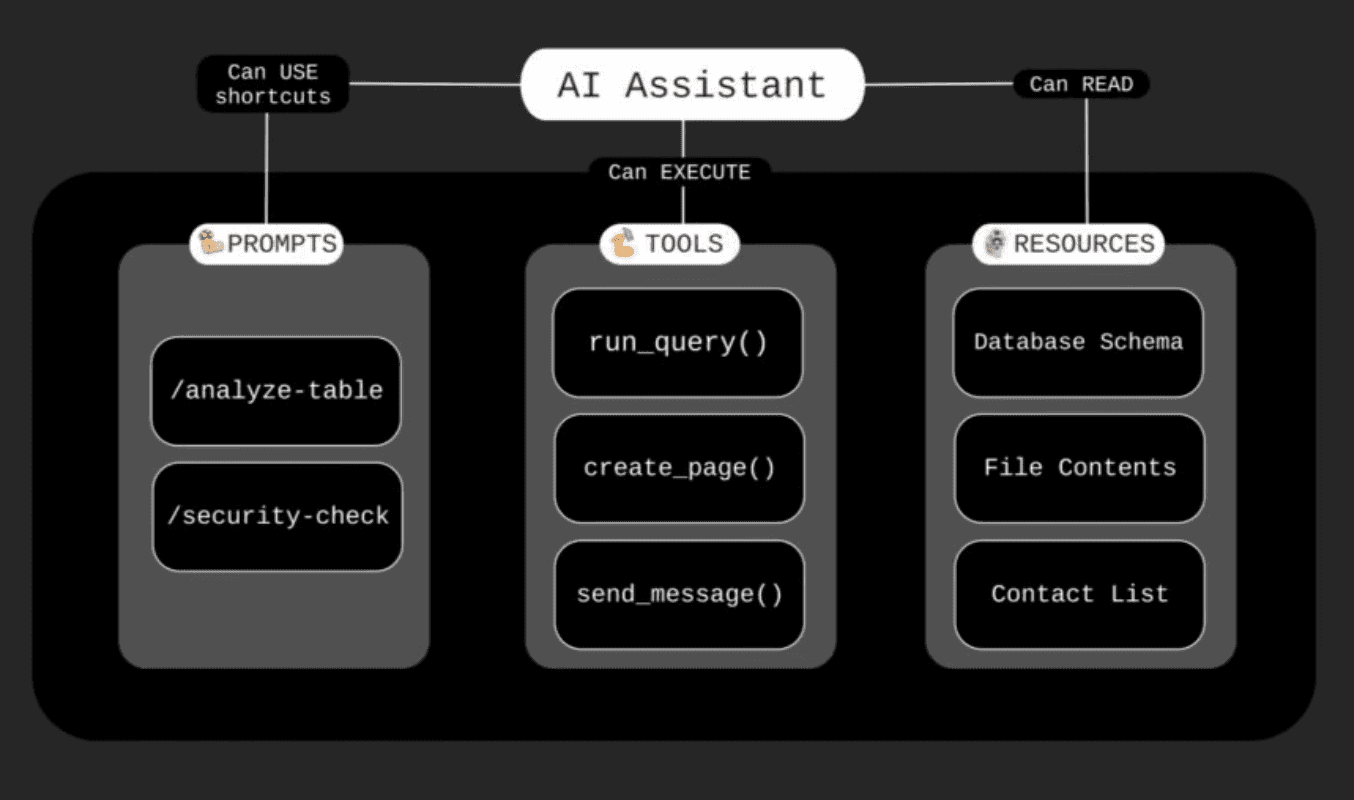
When you install an MCP server, you're giving your AI access to specific capabilities. Instead of just writing back text, it gets superpowers. These come in three flavors, and you'll see them when you authorize a connection.
Tools : actions the AI can take
Tools are actions. The GitHub MCP server has tools like create_pull_request, merge_branch, add_comment. A database MCP has query — it can execute SQL directly. Notion has create_page, update_block.
When the AI needs to do something, it calls a tool.
Resources : data the AI can read
Resources are read-only context. A filesystem MCP exposes your files as resources. A database MCP might expose your schema. A CRM might expose your contacts list.
The AI can see them, but can't modify through resources — that's what tools are for.
Prompts : shortcuts and templates
Think of these as slash commands. A database MCP might offer a /analyze-table prompt that automatically structures how the AI examines your data. A code review MCP might have /security-check. Instead of you writing detailed instructions every time, you pick a pre-made template.
Honestly, most MCP servers focus on tools. Prompts are nice-to-have, not essential. But now you know what you're looking at when you authorize a connection.
Remote vs Local MCP Servers
Here's where people get confused. There are two types of MCP servers: remote and local.
Remote MCP Servers
Remote servers run in the cloud. MotherDuck runs theirs. Notion runs theirs. Linear, Slack, Asana — they all host their own MCP servers.
You connect via HTTPS, authenticate with OAuth — the familiar "Sign in with Google" flow — and you're done. No installation, no config files.
In Claude, these are called "Connectors." In ChatGPT, they're called "Apps" now.
Yeah… don't ask me why they couldn't just call it MCP. Maybe for folks who have no idea what MCP is.
But you're not one of those. Not anymore. Anyway.
Local MCP Servers
Local servers run on your machine. When you configure one, you're basically starting a small server locally that translates the AI's requests into actions on your system.
The filesystem MCP, for example, runs on your computer and lets the AI read and write files in folders you specify.
The technical difference: local servers communicate through "stdio" — text pipes between processes. Remote servers use HTTP.
Security note : don't install random MCP
Don't install local MCP servers that aren't open-sourced or aren't backed by the main company of the product.
A local MCP runs code on your machine with your permissions. If it's from a random GitHub repo with no stars and no company behind it — skip it. Stick to official servers or well-known open-source projects you can actually inspect.
Remote servers from approved directories are generally safer since they've been vetted by the platform.
Approval Modes
One more thing worth understanding: when an MCP server takes actions, your AI client typically lets you choose between allowing actions automatically (faster, no interruption) or always asking for approval before each action (slower, but you stay in control).
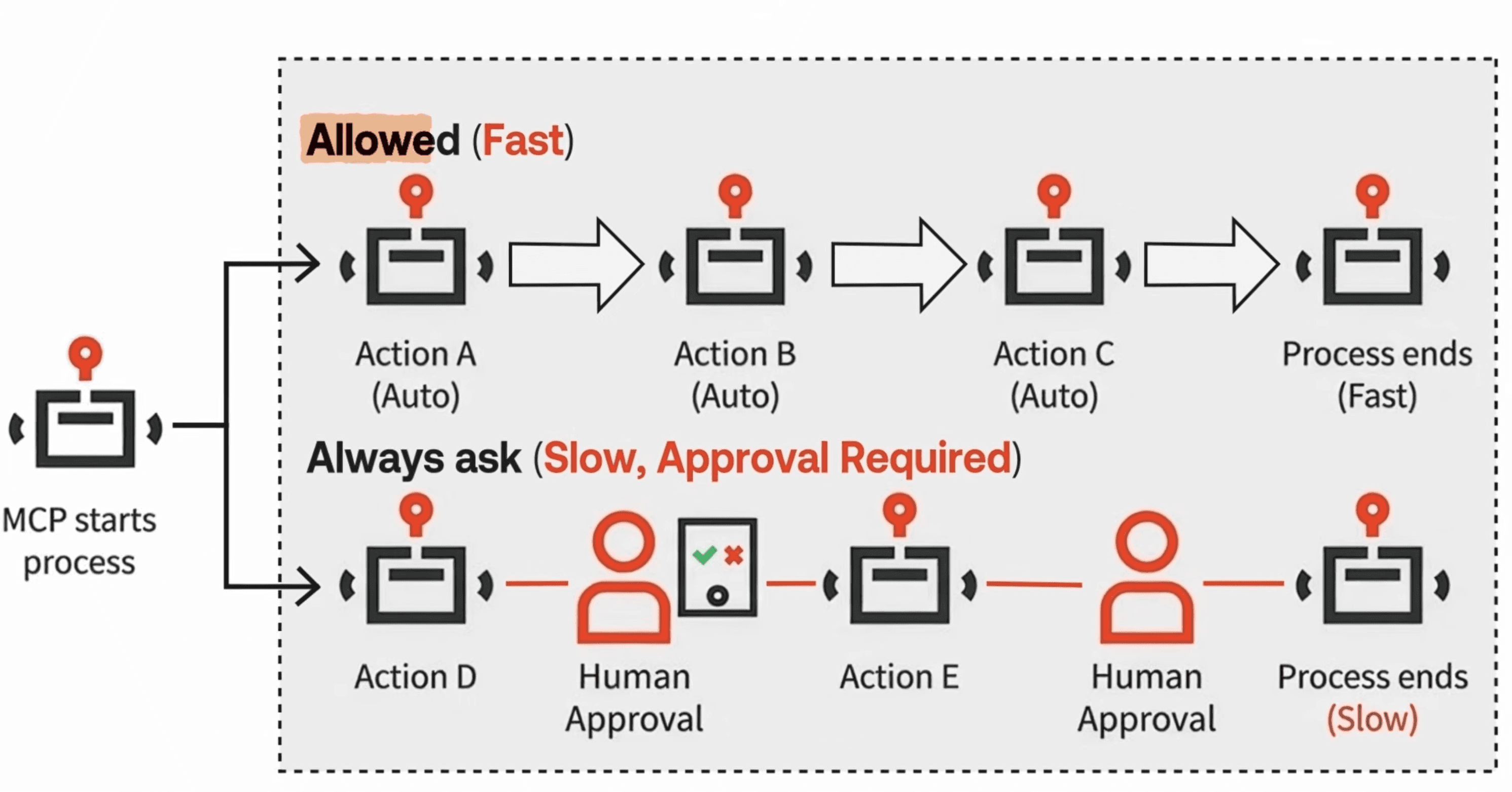 For read-only operations like querying a database, auto-allow is usually fine. For write operations like creating pages or sending messages, you might want to keep the approval step — at least until you trust the setup.
How to set up MCP servers
There are two ways to add MCP servers. Let me show both.
Way 1: The approved directory (Remote MCP)
For remote servers, the easiest path is through the approved directory. These are servers that have been reviewed and trusted by the AI platform.
In Claude: Settings → Connectors → Browse the directory → Find MotherDuck → Click Connect → OAuth → Done.
Standard authorization flow. You're granting the AI permission to use that service on your behalf. Same for Notion — Browse → Connect → Authorize. Now you have both MotherDuck and Notion connected.
Way 2: JSON Configuration (Remote or Local)
The second way is through a JSON configuration file. This works for both remote servers that aren't in the directory and local servers.
Remote server via config will look like this:
Copy code
{
"mcpServers": {
"some-remote-api": {
"command": "npx",
"args": ["mcp-remote", "https://mcp.some-service.com/sse"]
}
}
}
For remote servers not in the directory, you use mcp-remote to proxy to their HTTPS endpoint.
Local server example:
Copy code
{
"mcpServers": {
"filesystem": {
"command": "npx",
"args": ["-y", "@modelcontextprotocol/server-filesystem", "/Users/mehdi/Projects"]
}
}
}
As you can see for local servers, you're running the server directly. This one starts a filesystem server that can access my Projects folder.
Requirements: For local servers, you need either Node.js with npm (for JavaScript servers) or Python with uv (for Python servers). Most MCP servers are built in one of these two. Check mcp.so — there are over 17,000 servers listed, mostly JavaScript and Python.
Config file locations for Claude Desktop:
| Platform | Path |
|---|---|
| Mac | ~/Library/Application Support/Claude/claude_desktop_config.json |
| Windows | %APPDATA%\Claude\claude_desktop_config.json |
Save, restart the app completely, and look for the hammer icon 🔨 — that means tools are loaded.
The Magic demo with two MCPs
Alright, let's see what this actually enables.
I work in DevRel at MotherDuck. Part of my job is tracking what people say about us and DuckDB on HackerNews. Normally: search HN, open threads, read hundreds of comments, take notes, copy everything to a doc. Hours.
Let's do it in one prompt.
I've connected two MCP servers: MotherDuck — which has the public dataset with the entire HackerNews history, 50 million+ posts — and Notion for creating documents and collaborating with the team.
Here's the prompt:
Copy code
Find all HackerNews posts mentioning "DuckDB" or "MotherDuck" from 2024, sorted by score. For each top discussion: 1. Summarize what people are talking about 2. Highlight comments that are questions or misconceptions we should respond to Create a Notion page called "HN Community Intel" with this analysis.
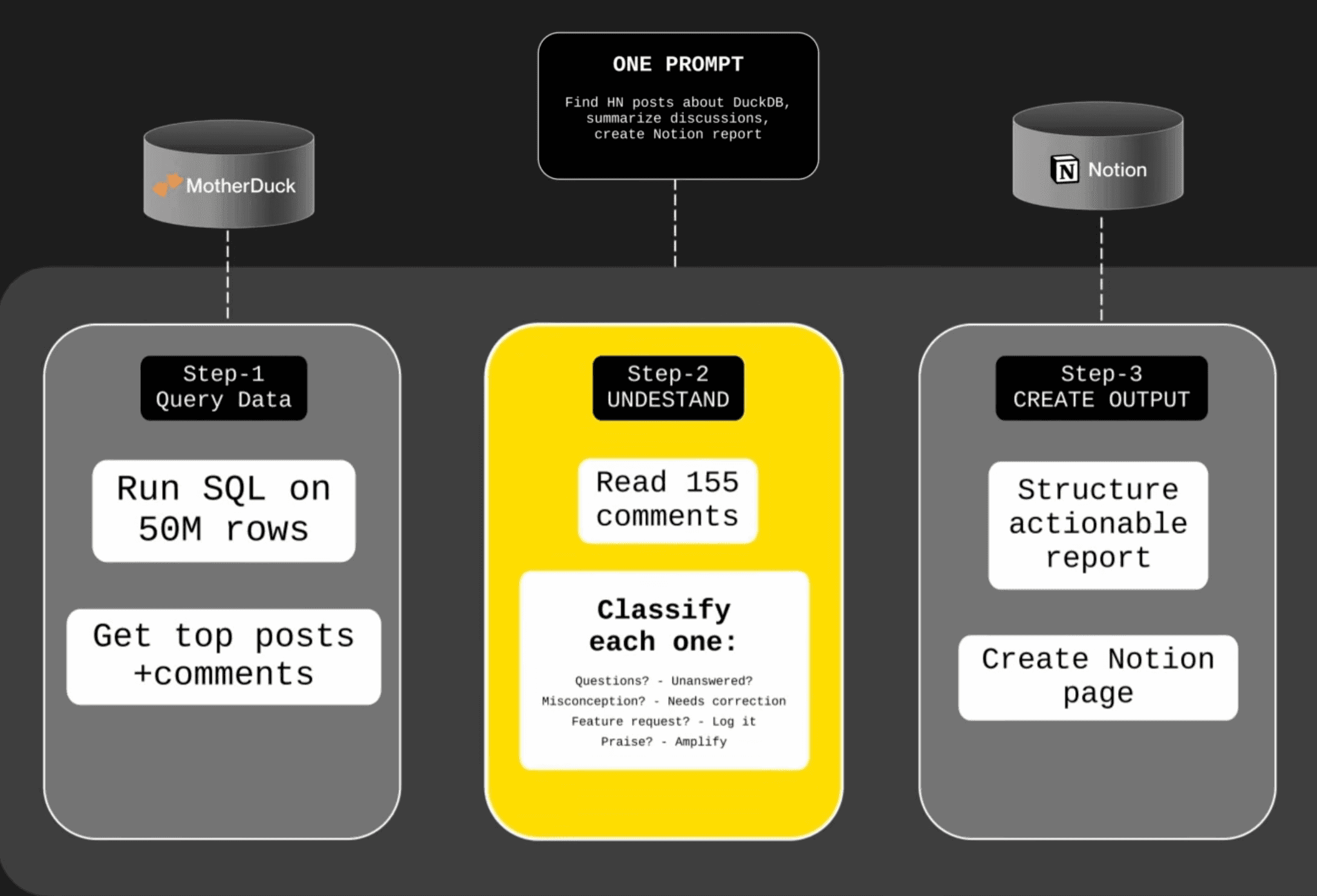
What happens in the loop of this single prompt ?
Step 1 — Query Data. It calls MotherDuck. Running SQL across 50 million rows of HackerNews data. Finds posts mentioning DuckDB. Gets the top discussions. Pulls the comments.
Step 2 — Understand. Here's where the LLM does its thing. It's not just moving data — it's reading these comments and understanding them:
- "This one is a question about S3 caching — unanswered."
- "This one is a misconception about scale — we should correct it."
- "This one is a feature request for delta tables."
- "This one is praise — we could amplify it."
Step 3 — Create Output. It calls Notion to create a structured report.
The Result
Here's what the Notion page looks like:
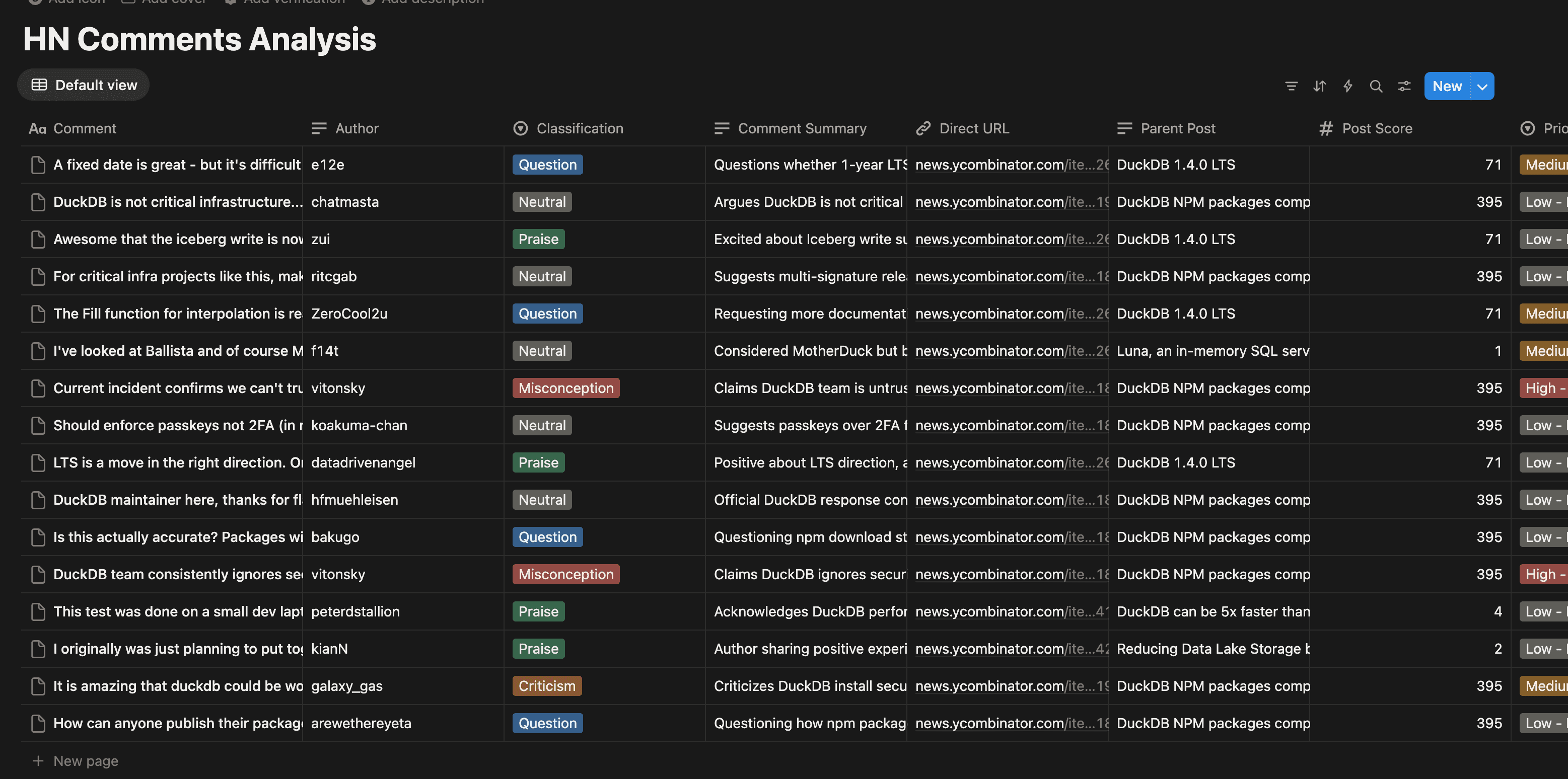
One prompt. Two MCP servers. And I have an actionable report telling me exactly which HackerNews comments need my attention today.
It isn't just "AI is querying the data for me". It read hundreds of comments, understood them, decided which ones matter, and created a document I can share with my team.
That's the MCP promise: AI that doesn't just suggest things : AI that does things.
Getting Started
Start with one connector. Try the MotherDuck MCP for analytics. Notion for docs. Linear for projects. GitHub for code.
Then chain them together and see the magic happening.
Now get out of here and go build something.
Start using MotherDuck now!