Building an Obsidian RAG with DuckDB and MotherDuck
2026/02/05 - 21 min read
BYI always wanted a personal knowledge assistant based on my notes. One that uses Obsidian's backlinks and connections to surface ideas I've forgotten or never thought to link together.
So I built one. A RAG system that runs locally with DuckDB as a vector database, then syncs to MotherDuck for a serverless web app running entirely in the browser via WASM. Think of it like J.A.R.V.I.S1 for your markdown files: search about a topic, and it shows connected notes up to two hops away, semantically similar content, and hidden connections between ideas that share no direct links.
In this article, I walk through how I built this and how it works, from using DuckDB's vector extension locally to serving embeddings through MotherDuck's WASM client. Along the way, you'll see how data engineering skills can make use of lots of note-markdown files. If you want to dive straight into the code, it's all on GitHub at Obsidian-note-taking-assistant, and you can try the web app on my public notes at Explore RAG.
For building the web app I used Claude Code and it came together in a few hours using the plan mode. This approach is powerful for any data engineer building pipelines or related work, especially when you have a clear vision of what you want. The big productivity boost wasn't only the model getting smarter, in my opinion, but something else, more on that in the article.
This is how it looks. Let's talk about how I built it and some behind the scenes.
Vision & Why I Built This
I have 8963 local notes (according to find . -type f -name '*.md' | wc -l) in my Obsidian vault, some are very long, and there are more images and PDFs connected. Wouldn't it be nice to have an insight from my own thinking a while back, or some quotes I forgot2, or things you didn't think of?
The requirements that I set myself were to use Obsidian backlinks as these are already curated and well structured as a graph-like organization. I wanted to see notes that are multiple hops away and hard to see without a tool. I wanted to search non-obvious neighbors or similarities and also show me hidden connections that would be interesting, both locally and online. These are especially helpful in the brainstorming and initial phase when starting an article or a note, giving me new ideas on existing notes I have written once in my life.
Examples could look like this:
Show me my notes on Functional Data Engineering that relate to my current article (one or two hops)
Notes that are relevant from my vault. Or related ideas
Highlight any disagreements between the notes
Give me all notes I took on these matters and related, and give me the source note from my Obsidian vault
Such a tool is especially helpful during brainstorming when writing my articles, or when I journal some ideas or when solving a hard problem. All of this should be local, but also available as a web app, so I can share it with you and connect it to my public second brain.
Starting Position
With Obsidian, there are many Obsidian plugins such as Graph Analysis, Obsidian Smart Connections and many more, that let you do similar things. But some require to hook up a public AI provider, don't work very well anymore, or don't do exactly what I wanted.
The easiest would be to use Claude Code or any other agents, as it's just Markdown files, but again, then you give away all your sensitive, potentially insightful notes and thoughts. That's why I wanted to build an Obsidian knowledge assistant that is trained based on my data. I started with a simple Retrieval-Augmented Generation (RAG) system that uses DuckDB for storing vectors. I used Vector Similarity Search Extension for storing vectors and did a couple of tests with Claude Code.
I shared it online and got helpful feedback to use a specific model bge-m3 and integrated it as much as possible with the help of agents. I added the above requirements that it should use Obsidian native links and train based on my vault.
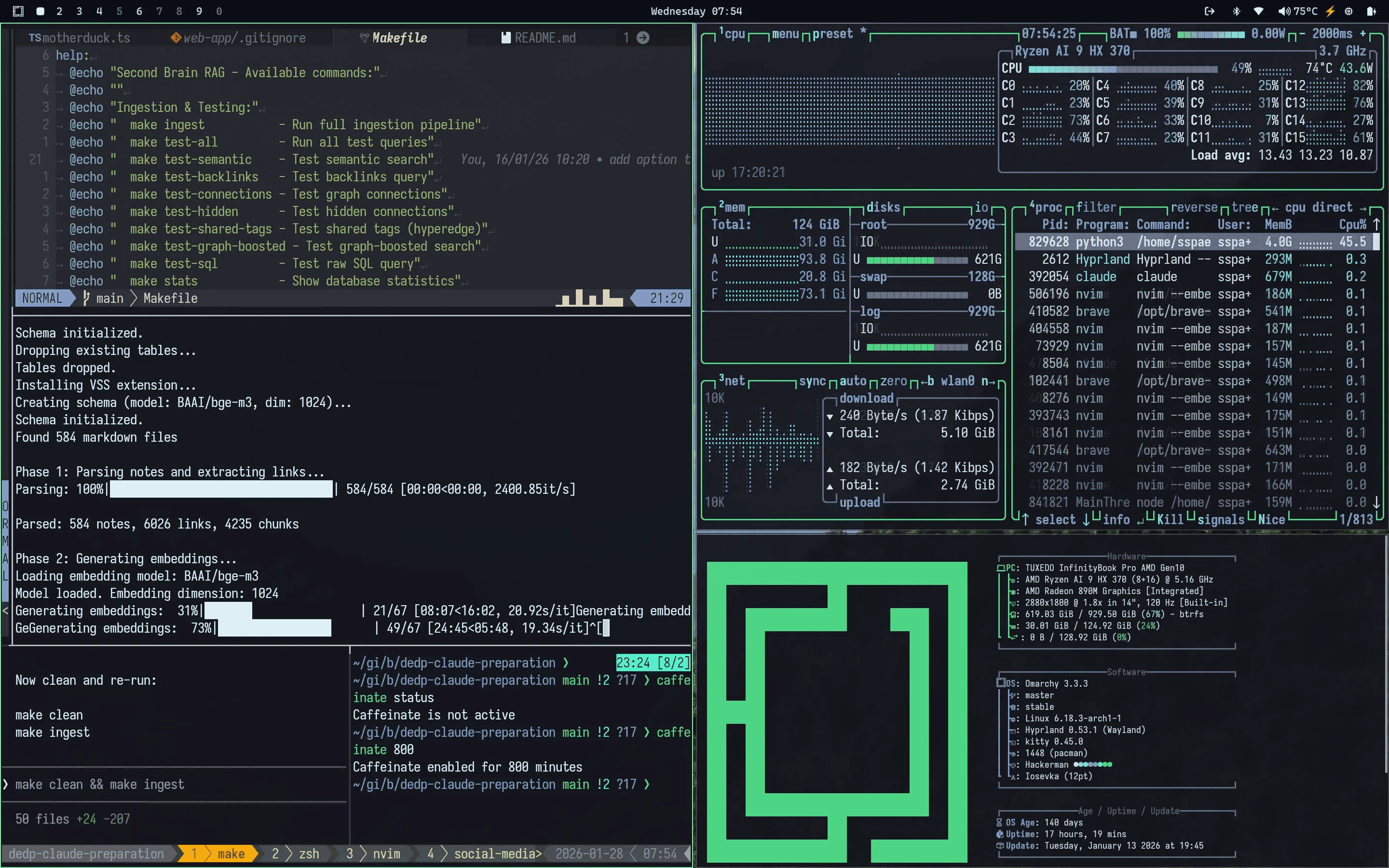
This was my first round. Building a job that creates chunks and ingests them into DuckDB with the vector extension Vector Similarity Search Extension.
I used two different modes, as the above takes more time to generate embeddings. I could run the BGE-M3 overnight and it was done after ~2 hours, not on all my notes, but on my public notes, which are 584.
Local-First
I started with the local-first approach because I want to be independent, and also I have sensitive or valuable notes that I don't just want to give away or upload to the cloud.
But there are also other reasons why you might want to use a local model. Some say:
A.I. research done by a cloud service will hallucinate because you have no control over the weights or limits of the LLM. This is why anyone who wants to do A.I. should run their projects locally including Deep Research. Bsky
Additionally, a local model with lots of your own context to research with will be better suited for your use case. It doesn't mean that it does not hallucinate, but what I find most useful is that suggestions and ideas are based on my own notes, which I sometimes have forgotten, or if new ideas, they are combined based on my research.
Web App
I added a web app that uploads the generated embeddings to MotherDuck and uses DuckDB WASM to serve in the client (web browser), so I could share the findings easily with anyone interested in my second brain notes.
This went really well, and I share all the details at the end of this article, with some lessons learned and how you can do it for yourself too.
Knowledge Assistant: Building a RAG for Data Engineers
Now let's get to the building part. As initially explained, this article converts data engineering knowledge into a searchable tool. Hopefully finding new insights, related topics, and learning something new.
This is now done on top of my public (mostly) data engineering notes, but we might add code snippets, interesting quotes, etc. To me, all of these might just be text files, and mostly markdown, that's why this system based on text files is so powerful. We can use it as context to help us more.
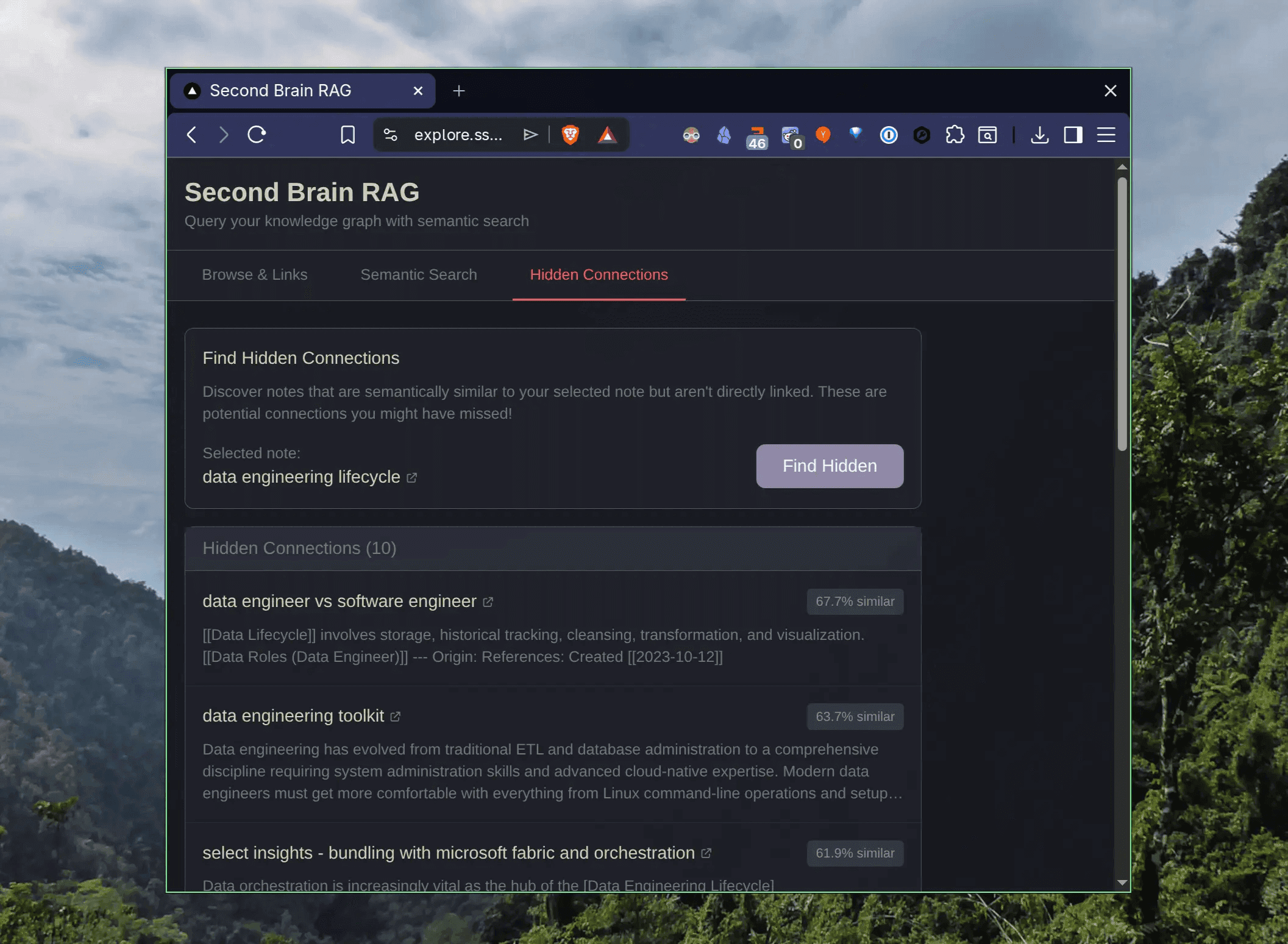
The outcome and connected web app looks like this:
What We Built: Retrieval Without the LLM
A Retrieval-Augmented Generation (RAG) system that is trained on our notes that we have (we use Markdown). More specifically: Obsidian Markdown, that has the advantage of links and backlinks that give us additional clues we can use.
RAG in particular is a technique that can provide more accurate results to queries than a generative large language model on its own because RAG uses knowledge external to data already contained in the Large Language Models (LLMs).
So what we built is only the Retrieval and Augmented part. We don't use an LLM yet, only retrieval of relevant and hidden notes based on a search. Specifically notes, code snippets as parts of notes, and other relevant ideas.
Architecture with Embed Model, MotherDuck and Next.js
First I had to split my notes into separate chunks and connect relevant links. This is done through an embedding model that converts text into numerical vectors, so we can compare meaning rather than just keywords.
This runs locally and two models can be used: all-MiniLM-L6-v2 (384 dimensions, fast for testing) and BAAI/bge-m3 (1024 dimensions, production quality). This is the top-level Python code in the GitHub repo. It provides a CLI and DuckDB database where we can search semantically, discover hidden notes, or traverse connected notes up to two hops away.
The chunking is markdown-aware: it respects heading boundaries, preserves code blocks intact, and splits on paragraph breaks. Each chunk stays around 512 characters and carries its heading context along. Before embedding, I prepend the note title and section heading to each chunk (e.g., "Title: DuckDB | Section: Installation | actual content...").
This acts as a semantic anchor and noticeably improves retrieval quality.
Disclaimer: I don't have deep expertise in building RAG systems and semantic search, so this is built on the best of my knowledge and what helps me most in my daily work.
The ingestion pipeline creates these tables with relevant information:
- notes: Note metadata, content, frontmatter
- links: Wikilink graph edges
- chunks: Chunked content for RAG retrieval
- embeddings: 1024-dim vectors (BAAI/bge-m3)
- hyperedges: Multiway relations (tags, folders)
- hyperedge_members: Note membership in hyperedges
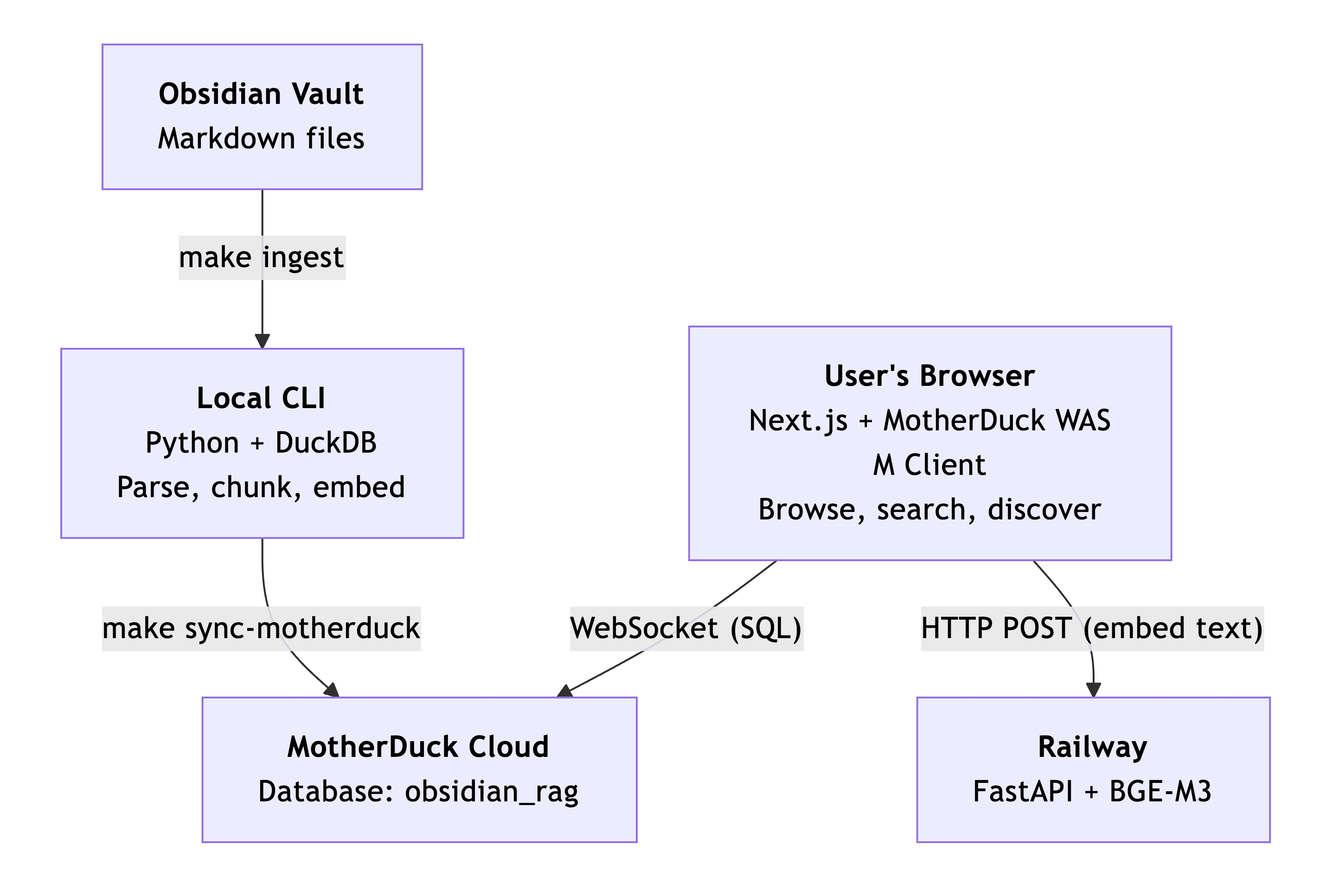
The second part is a web app served via a Next.js UI and a MotherDuck WASM client that connects directly to the MotherDuck cloud database from the browser.
This means no database server to set up or maintain. I added a FastAPI service on Railway to serve the BGE-M3 embedding model, which avoids API costs from Hugging Face (and also makes it reliable, since Hugging Face's inference API kept timing out with the BGE-M3 model).
The architecture uses mostly serverless components:
Semantic search matches meaning, not keywords. When I search for "how to model data in a warehouse," I want notes about dimensional modeling or dbt transformations to show up, even if they never use those exact words.
The BGE-M3 model converts each chunk into a 1024-dimensional vector, and we rank results by cosine similarity between the query and stored embeddings. Locally, DuckDB's VSS extension handles this with an HNSW index.
In the web app, MotherDuck's WASM client doesn't have VSS, so I compute cosine similarity manually with DuckDB's list functions. I was surprised how well DuckDB handles this without a dedicated vector database, one file for relational data and vectors together.
The "graph-boosted search" mode multiplies similarity by 1.2x for notes that are also graph-connected. Simple, but it surfaces better results because your link structure encodes intent that embeddings alone miss.
And the hidden connections feature, finding semantically close notes with no direct wikilink, turned out to be the most useful discovery tool.
It found links between notes I'd written months apart and never thought to connect.
Running It on Your Own Vault
As we constantly add and improve our "second brain", this is very powerful, so we can just rerun the ingestion and we get the update.
This is built on my data, but you can use the provided GitHub repo and run the local make ingest job to run it on your own Obsidian vault or Markdown files. You'll get the same UI and CLI to ask questions about your notes out of the box.
The results are tailored to our interests, needs, and even notes, as we are the ones who wrote the notes down. Or if you took a lot of highlights via web clippers ReadWise read-it-later, Obsidian Webclipper, also from other authors, but still snippets that you chose to store.
To run it on your own notes, clone the repo, set VAULT_PATH in the .env file to your Obsidian vault (or any folder of Markdown files), and run make ingest.
The ingestion parses all .md files, chunks them, generates embeddings with the BGE-M3 model, and stores everything in a local DuckDB file. From there you have the full CLI with semantic search, backlinks, connections, and hidden link discovery.
If you want the web UI too, sync to MotherDuck with make sync-motherduck and deploy the Next.js app.
The Final Result
The result of this exercise is two parts with sub-components like this:
- Ingestion pipeline: A local job that parses Obsidian markdown, chunks it, and generates embeddings using the BGE-M3 model. Run make ingest and the local DuckDB file is ready to query.
- Web app at explore.ssp.sh, composed of three services:
- Frontend on Vercel: Next.js app with MotherDuck WASM client running DuckDB queries directly in the browser.
- Database on MotherDuck: Cloud-hosted DuckDB, synced from local via make sync-motherduck. No server to manage.
- Embedding microservice on Railway: A FastAPI endpoint that hosts the BGE-M3 model and converts search queries into vectors on demand. The browser sends your search text, gets back a 1024-dim embedding, and uses it to query MotherDuck for similar chunks. This avoids running a ~1.8GB model in the browser and sidesteps Hugging Face API rate limits.
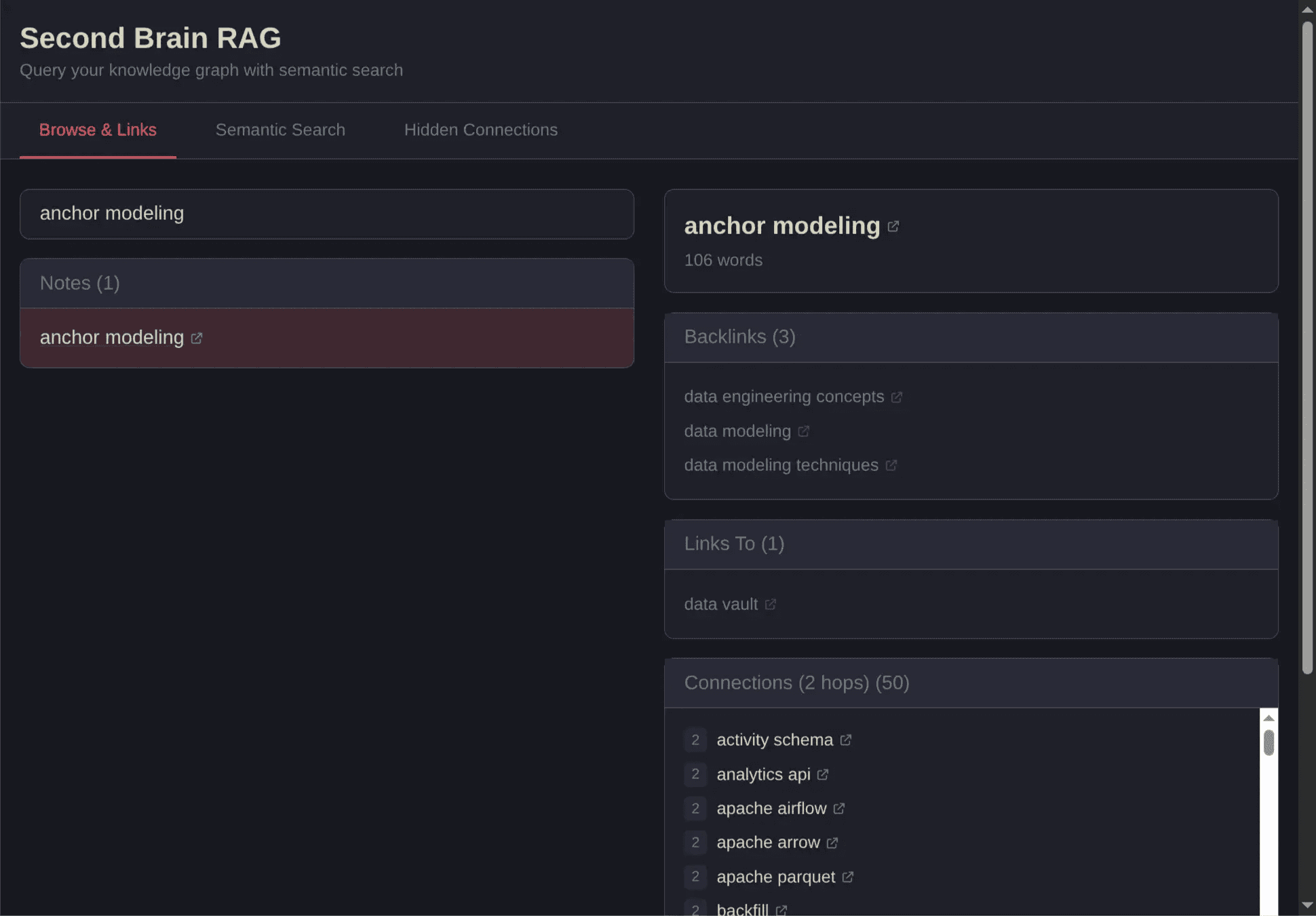
Here you can see backlinks and hops that go over two notes. The hops are interesting as we don't see this easily on a graph, or it's harder to showcase. That's why I added them besides the normal backlinks and outgoing links.
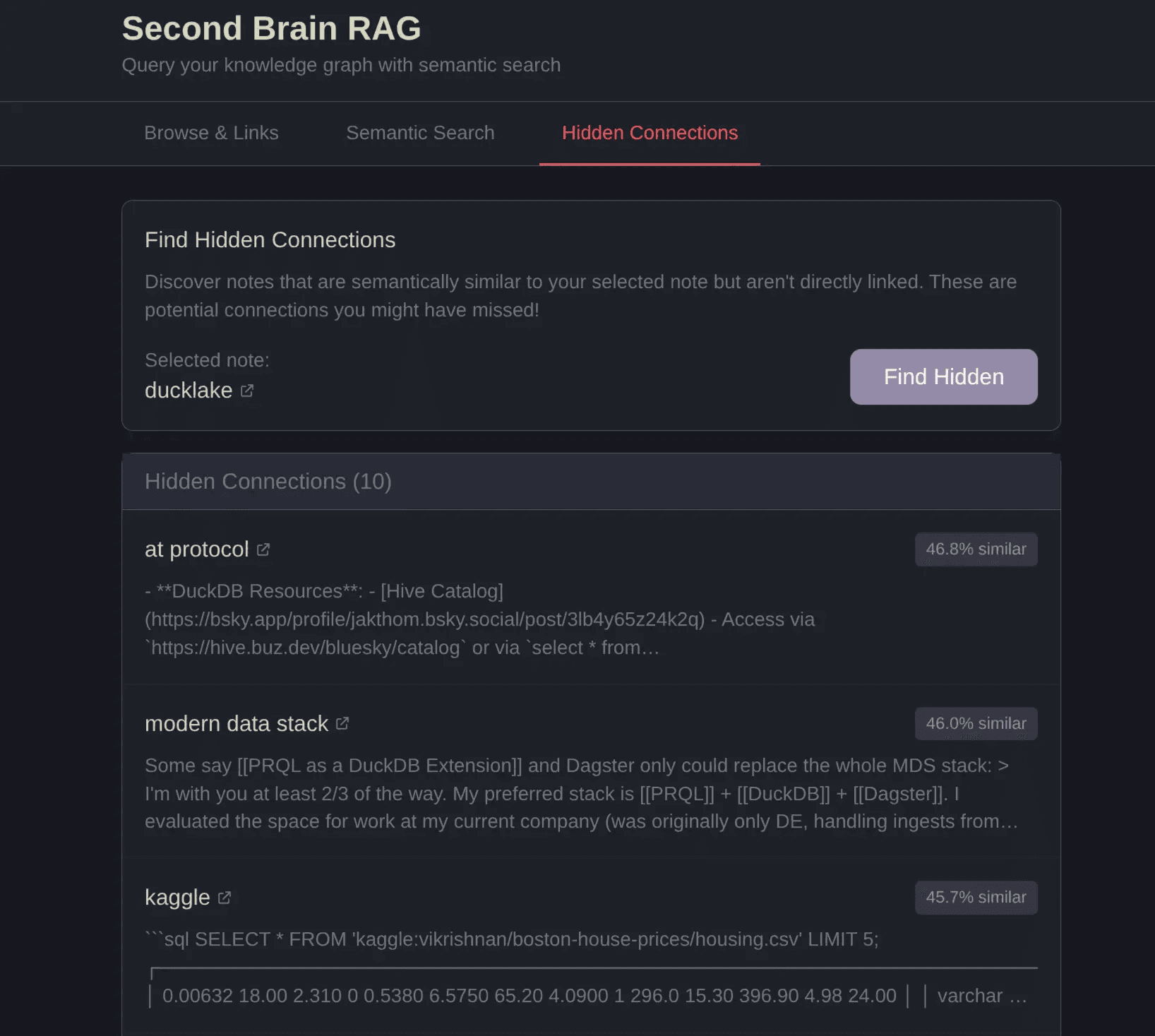
Find hidden connections. Here we see that AT Protocol, the protocol behind social media platform Bluesky and others, is connected to Ducklake. Something I wouldn't have associated myself:
Now we can compare notes, think why this could be, and what's the connection and insight we can gain from it. This is exactly why I built this, to get such insights.
INFO: Clickable Links Each note on explore.ssp.sh has a clickable link to my public brain atssp.sh/brain/[note-name].
Lessons Learned: AI Agents for Data Engineers
As you probably have noticed, since the Christmas break, the AI hype or enthusiasm around agents got very loud. One reason is that many got a good amount of time to actually test the latest. On the other hand, the models got better, and thirdly these AI companies provided new features such as Skills, cowork, and many more.
I myself also took some time and thought about how we can leverage agents for data engineering, especially Claude Code. But contradicting many who say the models got much better, I think the key to the boost of productivity is a different one. With nao, ChatGPT, Claude, and probably others, we have had AI agents and models already for a while, but most powerful at the current moment are the agents in plan mode. It's the key to build longer and have us more in the loop.
But what is "Plan Mode" you might ask? The definition:
Claude Plan Mode is a read-only state in Claude Code, an AI coding assistant, that lets it analyze a codebase, ask clarifying questions, and generate detailed implementation plans without making any actual file changes or executing commands, ensuring safety and structure before development begins. It's activated by cycling modes (often Shift+Tab) and is great for exploring, planning complex changes, and building context, allowing developers to approve the AI's strategy before actual coding starts. More on What Actually Is Claude Code's Plan Mode?
With that, it's amazing what you can build. All the open todos we add to our backlog, we can now quickly build and test or solve, and think through the problem by actually laying out the step-by-step instructions. After it's built we get a feel for it quickly and can give better feedback on whatever job we have at hand right now.
Still we need to be careful to not just jump into building every little thing, as we could, because spending hours on something that we don't need is still wasting precious time.
I have experienced it myself often. I get the perception of being super productive, but after a couple of hours, or sometimes days, we actually didn't achieve what we needed. The idea we thought was cool didn't go anywhere, and we are mentally more exhausted because we didn't really do the heavy lifting, meaning we don't really understand what was generated. And potentially also didn't learn anything new.
With that in mind, we need to be careful when to use the new tools, certainly not always, but there are many ways. So how else should we use agents and AI as data engineers and knowledge workers?
NOTE: Plan Mode Support Besides Claude, Plan Mode is widely adopted across AI coding assistants including Cursor (October 2025), Windsurf (June 2025), GitHub Copilot (VS Code, Visual Studio, JetBrains, Eclipse, Xcode), Lovable, Bolt.new, and Replit (September 2025). Everyone is following a similar pattern of letting AI analyze, ask clarifying questions, and propose structured implementation plans before writing any code.Plan Mode: And How We Work Best with AI Agents
This is how we humans work best as well. We make a plan, and then execute it and adjust along the way. But it's also a great way to work with juniors, and in that sense, AI agents.
Because we say what we want in an abstract manner, the agent says what it would do in a plan form (just a markdown file, markdown runs the world these days), and then we as the senior, or the designer or architect can see if it missed our interpretation (as language is not precise), and we work on a great plan with all the details. This way we know it does what we expect it to do. And then it goes off and does it autonomously with access to the terminal and all command line tools.
But there's one more factor, it's the human factor. Whatever it builds, it builds on trained data. So it will use what most people use. Which might be ok for most cases, but maybe not if you want to build something unique, innovative. That's why I think for most writers, it's not the right tool to let it write the stuff for us. Just for that fact, but even more so, the character and soul of the person gets stripped away. The quirky things someone does, which make them who they are, that takes away from the fun of writing.
Obviously in coding, this is not the same. Except if you are another programmer and need to read the code, no? Because any data engineer would love to read the code from a human rather than an AI, it's kind of boring. But maybe it just needs to do the job, and not all human code is beautiful too, right?
NOTE: See the Prompt for the Web App If you want to know how I built the web app without having experience in Next.js, I am sharing the initial prompt with plan mode that could be interesting. The summary of the full session (ca. 3-4 hours) is at build-summary.md.Where Are We Heading?
So what about data engineering? Where are we today?
As I have written extensively about at Self-serve BI thanks to AI or using it for data modeling along with semantics, speed, and stewardship, humans still need to be in the loop, and we need to be careful to not generate too much (ingestion logic, business logic, general code, or dashboards) that is unmaintainable or never needed in the first place.
On the other hand, there's no definitive answer right now, we are all just figuring it out. That's why some say it's the most exciting times, because everything is supposedly going to change. Andrej Karpathy said:
Clearly some powerful alien tool was handed around except it comes with no manual and everyone has to figure out how to hold it and operate it, while the resulting magnitude 9 earthquake is rocking the profession.
As a writer but also data engineer, I find it most useful when it suggests notes and ideas I have forgotten about that are relevant to my current task at hand. Or a snippet of code.
Repeating Code Snippets over and over
How many times have we written an ingestion pipeline that does the same thing just for a different source? Written an incremental update pipeline, or a full load, or implemented Slowly Changing Dimensions (Type 2).
Wouldn't it be great to have a tool that helps us remember and suggest code that worked for a problem at hand? No wonder Windows has a built-in Windows Recall feature that takes snapshots of everything we do, so we can see and remember what we did. Google traces where we went on Google Maps Timeline, and so on. Not saying all of these are good, but clearly there's a need for it.
Vibe Coding
Mostly these tasks are called vibe coding these days. I believe that vibe coding is best when you have an existing framework present and it can extend it. E.g. your website skeleton that already has a pre-existing structure is much better than starting from scratch, especially maintainability-wise.
Also, the more it has to predict in the future, the more likely it will introduce errors, compared to you providing a big skeleton with all the needed files and just extending on functionality.
This is the same for data engineering too. Declarative Data Stack, YAML Engineer is exactly that. A well-designed YAML that has a powerful system in the backend can go a long way with an agentic and vibe-coded approach.
It's similar to Spec Driven Development (SDD), which is when we write our instructions in claude.md and Claude or any AI agents implement this. Also what Esco Obong said about what they do at Airbnb: the hard part is coming up with the spec, talking to business, etc. The coding part is the small part.
And this is also where the human is still dearly needed in my opinion. Human in the seat and config-driven development is what it comes down to with AI agents. Plus, AI models have a context limit. Sure, we humans do too, but we can think more across domains and understand intuitive things that might not work for a statistical model.
This shows how that works, and why Markdown is in the middle of everything. Not only for the knowledge, but also to build and develop things.
TIP: Lifehack for Prompting Always keep it simple, because it's easy to make it complex. The true beauty lies in making it simple, which is something agents are not good at.Use MCP
A key was using MotherDuck MCP with a direct connection from Claude Code to the database while prompting the initial version. Claude could directly query the database and its columns to implement the actual web app (see the initial prompt here).
Meaning Claude (in my case) could just query the database, use SHOW TABLES, select them, and extract their data types. And more, learning about the content and graph relationships that I had built in the first part.
So Claude could easily build a first version based on my instructions and existing DuckDB database. I also shared the great docs to build Customer-Facing Analytics Guide in a (3-tier Architecture).
With that, I almost had my web app ready with a single plan mode prompt.
Conclusion
Building this tool reminded me again how powerful DuckDB and MotherDuck are. It's a Swiss Army knife database that can handle unique tasks and simplify my note-taking by providing a serverless database for querying my embeddings.
Now I have a powerful tool to search for related notes when I need to solve a problem, or to find relevant notes in my own second brain. The hidden connections this tool surfaces are valuable only because they're my connections, my thinking, not just crawled information on the internet. And not only that, I can even provide a minimal but useful web app for you to search my public notes, too.
As for the AI agents that helped build it: they got me there faster, but only because I stayed in the loop. Let them run without direction, and you'll get a thousand lines solving the wrong problem. To me, the "human" architect is still needed.
Other Implementations
I have collected over the years or came across while building this that might be helpful if you want to build something similar.
If you have many more files and embeddings that need to be created, follow the Using DuckDB for Embeddings and Vector Search article that runs on the GPU, creating embeddings for 2.85M Wikipedia articles. He used the Arrow/GPU acceleration and batch inserts via Arrow.
Some more links and repos I found interesting:
- Scalable Embeddings & Vector Search
- Using DuckDB for Embeddings and Vector Search: Tutorial on GPU-accelerated vector search that created embeddings for 2.85M Wikipedia articles using Arrow batch inserts and HNSW indexing.
- Local-First Search Tools for Markdown
- qmd: Tobias Lütke's CLI search engine combining BM25, vector search, and LLM re-ranking—all local via Ollama, works with plain markdown (no wikilinks needed).
- Obsidian AI Assistants
- Obsidian Copilot: A popular Obsidian AI plugin (6.1k+ stars) with vault chat, agent mode, and image/PDF/web processing—no index required for basic search.
- Chat with Your ENTIRE Obsidian Vault OFFLINE (YouTube): Video walkthrough of offline Obsidian vault chat with Claude 3 integration.
- RAG Frameworks & Libraries
- Quivr: YC-backed opinionated RAG framework (38.6k+ stars) supporting any LLM, any vectorstore, and any file type with YAML-configured workflows.
- LennyHub RAG: Complete RAG implementation on 297 podcast transcripts with knowledge graph extraction, Qdrant storage, and interactive network visualization.
- AI-Assisted Development in Production
- Esco Obong on AI Coding at Airbnb (LinkedIn): Airbnb engineer shares writing 99% of code with LLMs, noting that code is "only a small part of the actual work."
- My List of Obsidian Related RAGs: Second Brain Assistant with Obsidian
Footnotes
-
Just a Really Very Intelligent System from Iron Man ↩
-
Also check out Spicy Takes with lots of quotes from popular blogs, that get rated by their spiciness. ↩
Start using MotherDuck now!