More Control, Less Hassle: Self-Serve Recovery with Point-in-Time Restore
2026/02/04 - 7 min read
BYLife in 2026 moves fast, and it only seems like it's getting faster. As more users, agents, answering machines, and Moltbots are thrown into the mix, we face an ever-increasing volume of schema migrations, backfills, permission changes, and large rewrites as we work to deliver trusted answers.
But when something goes wrong, modern technical teams don't have the bandwidth to slow down, file a ticket, or wait on an opaque backup system…they need precise, self-serve recovery mechanisms backed by SQL.
Point-in-time restore is now available in MotherDuck, offering users more control over their data with less hassle. Our restore mechanism uses database snapshots and differential storage to enable users to restore databases independently.
Together, these capabilities enable MotherDuck users to manage their own backups in SQL to rewind without regret:
- Restore a database to a previous state from a historical snapshot
- Create long-lived, human-readable named snapshots as durable recovery points
- Use the
UNDROP databasecommand as a safety valve to recover from accidentally dropping a database - Validate restores in a new database before cutting back to production
A duck that never forgets
Your MotherDuck warehouse now has a time machine. Every time the database checkpoints, MotherDuck creates timestamped, automatic snapshots of attached databases in the background by default. Each snapshot captures the complete state of the database at a point in time and is retained for the duration of your database's retention_days, which determines its historical snapshot retention policy.
Users can create manual snapshots at any time that are subject to the database's snapshot retention window:
Copy code
CREATE SNAPSHOT OF analytics_prod;
Users may also choose to create named snapshots for easier retrieval:
Copy code
CREATE SNAPSHOT 'prod_backup_feb_2026' OF analytics_prod;
Named snapshots are durable, long-lived recovery points for your data. In MotherDuck, a named snapshot persists even if you delete the source database; a snapshot will not be garbage-collected or deleted unless you remove its name:
Copy code
ALTER snapshot 'prod_backup_feb_2026' SET snapshot_name = '';
Once deleted, the snapshot will move through the storage lifecycle according to the specified snapshot_retention_days set at the database level.
These details can be found in the databases information schema, md_information_schema.databases:
Copy code
FROM md_information_schema.databases
`ORDER BY created_ts DESC;
Running this command returns the following results:
Copy code
| name | uuid | created_ts | transient | historical_snapshot_retention | type |
|----------------------|--------------------------------------|-------------------------|-----------|-------------------------------|----------|
| prod_analytics | f0eb514d-2b6b-4ac3-a09d-400398195bb3 | 2026-02-01 14:46:00 -05 | false | 30 days | DEFAULT |
| prod_analytics_v2 | 7dcba482-15ac-4e46-80e4-239d9c7e3d71 | 2026-02-03 19:38:17 -05 | false | 60 days | DEFAULT |
| staging_analytics | 3b6c8d72-6652-4f51-a308-cf31bfbe2897 | 2026-02-01 17:07:14 -05 | true | 5 days | DEFAULT |
| staging_analytics_v2 | f369b586-cb44-46c8-b28d-c03160266b7d | 2026-02-03 17:07:52 -05 | true | 5 days | DEFAULT |
| lakehouse_prod | a07a0ed0-5fa6-45c6-9a7f-463e745aaf0c | 2025-07-31 05:17:57 -05 | false | 00:00:00 | DUCKLAKE |
Designed as intentional, long-lived backups, named snapshots can be directly referenced by name during point-in-time recovery or clone operations:
Copy code
ALTER DATABASE analytics_prod
SET SNAPSHOT TO (SNAPSHOT_NAME 'prod_backup_feb_2026');
Alternatively, users can apply the ALTER SNAPSHOT command to an existing snapshot to add a name:
Copy code
ALTER SNAPSHOT 'prod_backup_feb_2026'
SET snapshot_name = 'stable_before_schema_change_feb_2026';
While automatic snapshots serve as a rolling safety buffer, named snapshots function as explicit recovery contracts for future use to safeguard production deployments against accidental missteps.
A Realistic Recovery Story
It's 10:12 a.m. You're about to ship a schema migration to your production analytics database. It's been tested. It looks fine. It still makes you nervous.
So you do the responsible thing and take a named snapshot:
Copy code
CREATE SNAPSHOT 'stable_before_schema_change_feb_2026' OF analytics_prod;
You deploy.
Five minutes later, someone posts in Slack:
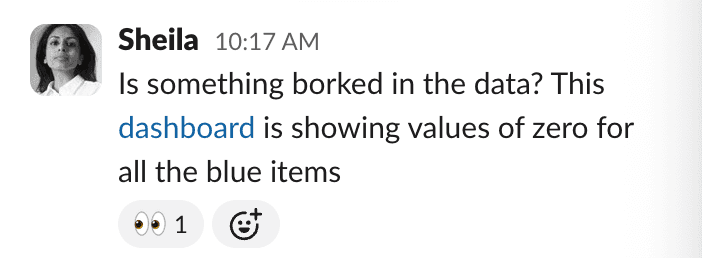
A migration half-applied. A backfill ran with the wrong join. Or, a simple accident–someone dropped the wrong table.
It doesn't really matter what happened when the outcome is the same: production data is now wrong, and it's a moment where heroics, or guesswork, or more vibe-coding don't pass muster.
Data stewards want to inspect, validate, and recover, calmly and deterministically, and without making things worse.
The Recovery Flow
Restoring data in MotherDuck is designed around the following operational loop:
Create → Change → Inspect → Restore → Validate → Promote
More concretely:

Let's walk through each step with real commands.
Step 1: You can only expect what you can inspect
First, we'll check what snapshots exist in the database snapshots information schema, md_information_schema.database_snapshots:
Copy code
FROM md_information_schema.database_snapshots
WHERE database_name = 'prod-analytics_US'
ORDER BY created_ts DESC;
If you know roughly when things broke, it's easy to filter by time.
Step 2: Safely restore to a new database
Instead of immediately rewinding production, restore it into a new database for validation to turn recovery into a predictable, testable workflow:
Copy code
CREATE DATABASE analytics_recovery
FROM analytics_prod (SNAPSHOT_NAME 'pre_schema_v4');
Alternatively, you can use a snapshot ID for a very specific restore operation:
Copy code
CREATE DATABASE analytics_recovery
FROM analytics_prod (SNAPSHOT_ID 'c204ce3b-f3fd-4677-8a05-e8680648cf27');
Restoring to a new database can help with validations and additional sense checks on row counts and schemas. As a final step, we can run critical queries and inspect result sets and summary statistics in the Column Explorer to confirm that our data looks correct.
Step 3: Promote the fix to production
Once you've confirmed the snapshot is the correct one, restore production in place:
Copy code
ALTER DATABASE analytics_prod
SET SNAPSHOT TO (SNAPSHOT_NAME 'pre_schema_v4');
Alternatively, you may use a snapshot ID for additional precision:
Copy code
ALTER DATABASE analytics_prod
SET SNAPSHOT TO (SNAPSHOT_ID 'c204ce3b-f3fd-4677-8a05-e8680648cf27');
Et voilà! Your database is now back to a known-good state without relying on external tools, support tickets, or guesswork.
What if someone drops a database?
Sometimes, mistakes are more dramatic - what happens when Claude drops Production?!
Copy code
DROP DATABASE analytics_prod;
Thankfully, we can rewind without regret and UNDROP our database:
Copy code
UNDROP DATABASE analytics_prod;
As long as the drop falls within your database's configured historical snapshot retention window, MotherDuck can restore the database and its snapshot history. Think of it as a safety net for your database that's fast, predictable, and self-serve.
In these scenarios, snapshots are especially useful for planned rollbacks and for recovering from accidental database deletions and automation errors, whether AI- or human-enabled.
Production-Grade CYA (in the best possible way)
Here are a few patterns we recommend as a set of guardrails to help you ship without turning every deploy into a high-stakes bet:
-
Create named snapshots before risky operations like migrations, backfills, and permission changes
-
Consider tuning your snapshot retention period based on how long it realistically takes your team to detect and respond to issues
-
Automate snapshot creation in your deployment and migration workflows
-
Restore into a new database first to validate your data before touching production
-
Don't use transient databases for critical data that you may need to recover
Though backups you never need to restore are theoretical, the workflows we have covered are designed to make restores routine, testable, boring, and dead simple, which is exactly what you want in production.
Point-in-time restore in MotherDuck is:
-
Inspectable and searchable due to system catalogs and information schemas
-
Safe thanks to validation-first restore workflows
-
Fast by using UNDROP DATABASE for error recovery
-
Precise through offering user-configurable control over your data's history
Take your ducks back in time
Point-in-time restore is now available in MotherDuck. Users can now access a configurable retention period of up to 90 days of historical retention for course-grained time travel and backup/recovery. We're so glad to bring this feature to MotherDuck users, and we hope it adds an extra layer of confidence to your queries, whether you're reverting a change you made on purpose or, well, you simply ducked up.
Start using MotherDuck now!
FAQS
How far back can I restore my database in MotherDuck?
You can restore your database to any point within your configured retention period, up to a maximum of 90 days. The retention window is set per-database via the retention_days setting and can be viewed in md_information_schema.databases. Automatic snapshots are created at each checkpoint and retained for this duration, while named snapshots persist until explicitly removed, even if the source database is deleted.
This addresses the most immediate practical question users would have when learning about the feature - the limits of what's possible.