Publicly-Shared Sheets
For Google Sheets that are shared with a public link, extracting the sheet data is as simple as using the read_csv function and passing the URL. There are two things to note here - you will want to make sure to set the format as ‘csv’ and the gid as the tab that you want to load.
FROM read_csv('https://docs.google.com/spreadsheets/d/{sheet_id}/export?format=csv&gid={tab_id}')
As a practical example, you can extract the sheet id and tab id from the URL, as seen in the screenshot below.
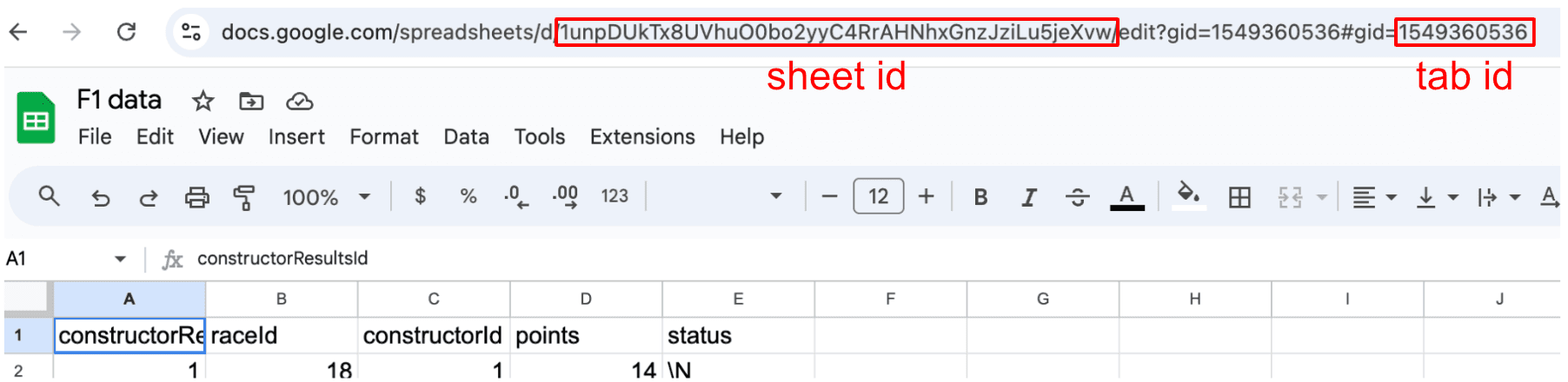
I have loaded some F1 data from kaggle into a Google Sheet and made the link public. This Google Sheet has id '1unpDUkTx8UVhuO0bo2yyC4RrAHNhxGnzJziLu5jeXvw' with the following tabs:
Depending on the use case, we can use either views or tables. If you want to keep things in sync with the spreadsheet, a view will work best. If you want to do more complex analysis, materializing as a table (or a temp table for this session) are great ideas for better performance.
The code example below creates the destination schema and then loads the data into MotherDuck:
CREATE SCHEMA IF NOT EXISTS f1;
CREATE OR REPLACE TABLE f1.races AS
FROM read_csv('https://docs.google.com/spreadsheets/d/1unpDUkTx8UVhuO0bo2yyC4RrAHNhxGnzJziLu5jeXvw/export?format=csv&gid=2031195234');
CREATE OR REPLACE TABLE f1.constructors AS
FROM read_csv('https://docs.google.com/spreadsheets/d/1unpDUkTx8UVhuO0bo2yyC4RrAHNhxGnzJziLu5jeXvw/export?format=csv&gid=0');
CREATE OR REPLACE TABLE f1.constructor_results AS
FROM read_csv('https://docs.google.com/spreadsheets/d/1unpDUkTx8UVhuO0bo2yyC4RrAHNhxGnzJziLu5jeXvw/export?format=csv&gid=1549360536');
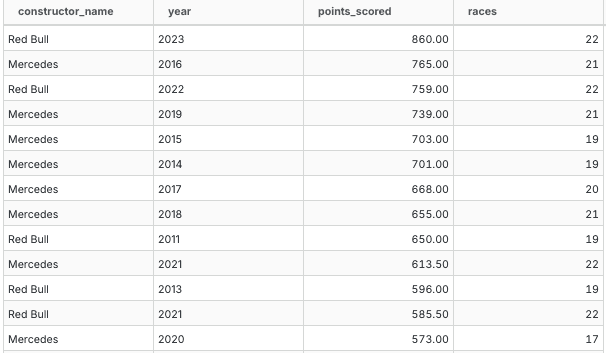
This allows easy subsequent analysis, for example, identifying the top scoring teams in the constructors championship each year.
SELECT
c."name" as constructor_name,
r.year::text as year,
sum(cr.points) as points_scored,
count(*) as races
FROM f1.constructor_results cr
LEFT JOIN f1.races r on r.raceid = cr.raceid
LEFT JOIN f1.constructors c on c.constructorid = cr.constructorid
GROUP BY ALL
HAVING points_scored > 0
ORDER BY points_scored desc