Based on our July 2026 webinar of the same name, presented by Alex Monahan. Watch the full recording on YouTube, and grab the free early-release chapters of DuckLake: The Definitive Guide.
Lakehouses made a promise: keep your data in an open format, on storage you control, at any scale, and query it like a warehouse. The first generation of table formats delivered on openness and scale, but compromised on two things that matter every single day: latency and simplicity.
DuckLake is a rethink of the lakehouse from a clean sheet of paper, and it rests on one deceptively simple design decision: store the catalog and the metadata together in a SQL database, instead of scattering metadata across object storage.
That one decision is where the simplicity comes from. And it pays off well past setup day: in query speed, in how many writers you can run at once, and in how little babysitting the system needs. In this post we'll go all the way to the bottom of the lake: the three-component architecture, how writes stay transactionally safe under many concurrent writers, why inlining solves the small-file problem, and where the tuning levers are.
What is DuckLake?
DuckLake is an open table lakehouse format. It stores large amounts of data (hundreds of terabytes and up into the petabyte range) in an open, portable format. DuckDB is the main engine for working with it, but Trino, Spark, and DataFusion can read DuckLake too. It's MIT-licensed, so you're not tied to any vendor.
The headline features:
- Partitioned for scale. Queries read exactly the data they need, so petabyte-scale datasets stay fast.
- Fast ingestion. Insert quickly (even tons of small inserts) and compact in the background.
- Bring your own blob storage. Data lives in standard Parquet on S3, Azure Blob, GCS, R2, Tigris, or wherever you like.
- Low-latency queries. Warehouse-level performance in a lakehouse.
The principle underneath all of it is simplicity. You don't hear that word much in the data space. Scale and speed, sure, but rarely simple. Here, simplicity means you get up to speed faster, your agents are likelier to get things right, and self-hosting is genuinely easy. This is a complete lakehouse on your laptop:
Copy code
-- Install DuckDB with curl, pip install duckdb, etc.
INSTALL ducklake;
ATTACH 'ducklake:metadata.ducklake' AS my_ducklake;
USE my_ducklake;
No Docker. No configuration. First a curl or pip install to install DuckDB, then three commands. It's hard to get simpler than that.
The core design decision: metadata belongs in a database
Here's the thing about the incumbent formats: Iceberg and Delta already use a database. Their catalogs are backed by one. But that database mostly tracks a single fact, one row per lakehouse table: what's the latest snapshot? The actual metadata lives in files on object storage.
Look at what a read requires in Iceberg:
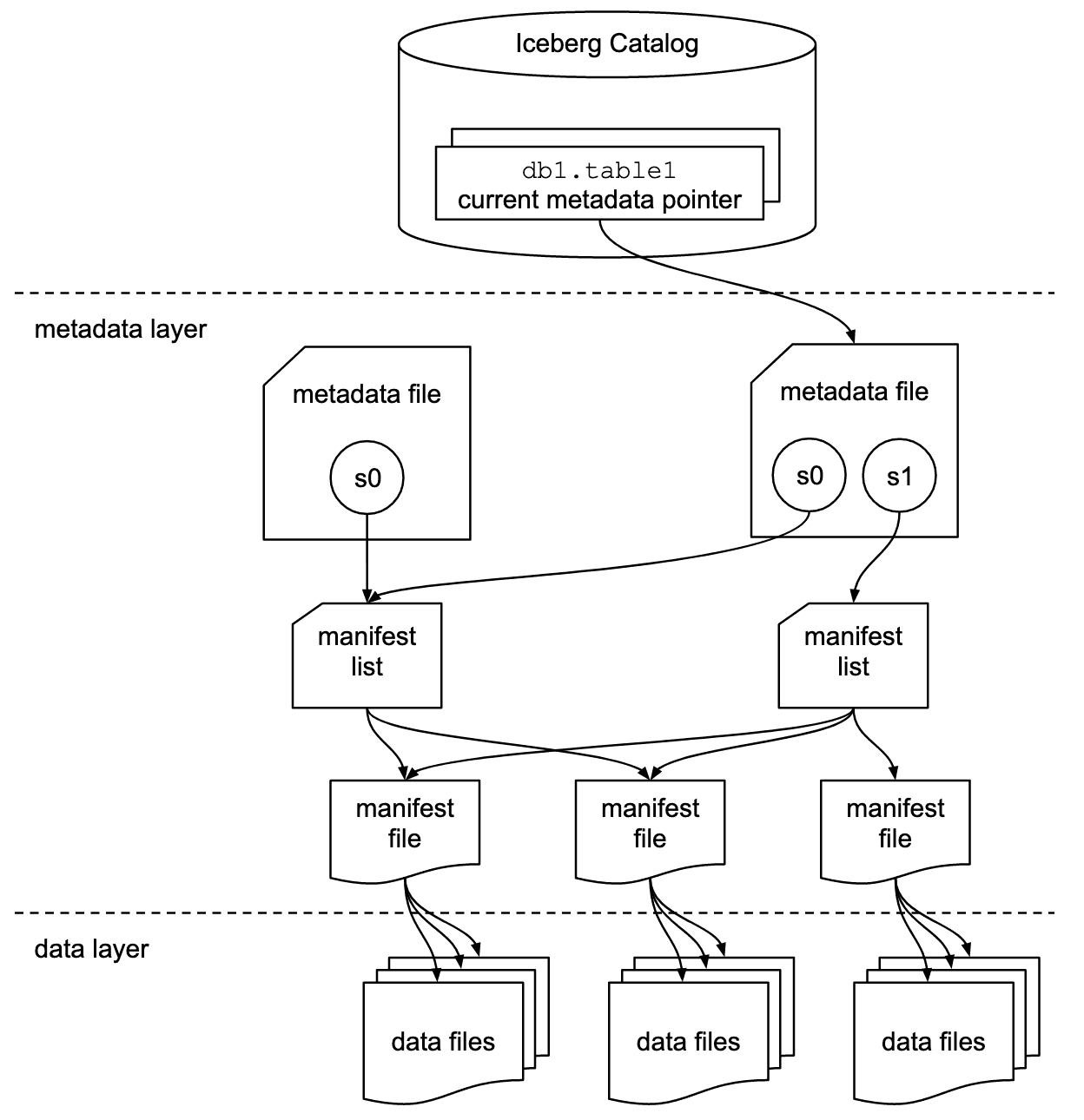
To answer any query, you first call a REST catalog service (which consults its database), then read three layers of metadata files on object storage: a metadata file, a manifest list, and a manifest file. Those reads are sequential, because each one tells you where the next one is. Object storage is bottomless, high-throughput, and cheap, but it is not low-latency: each request can cost around 100 milliseconds. Back to back, you're roughly half a second in before you've even figured out which data files to read.
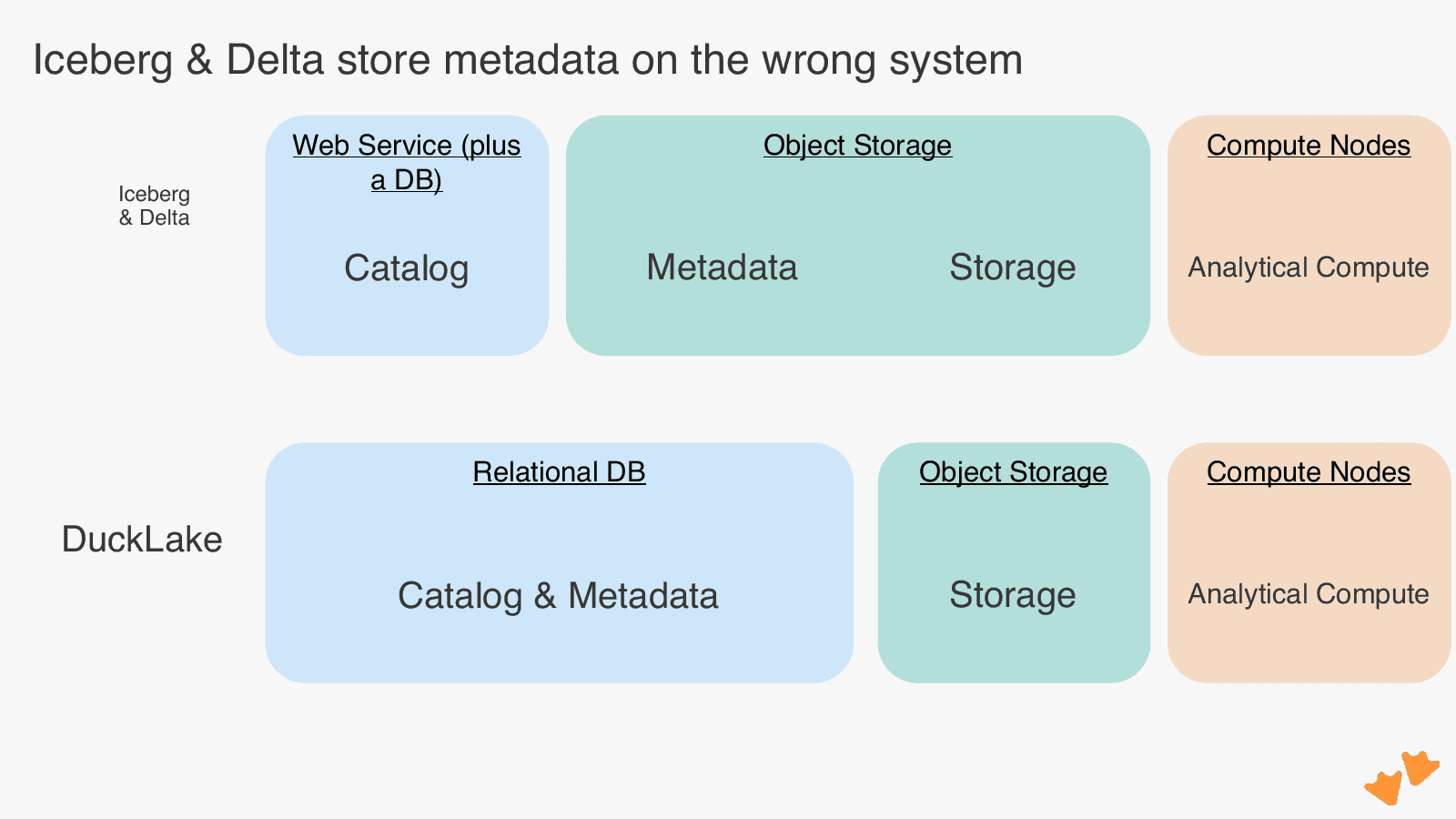
DuckLake collapses all of that into one component: a metadata database. Finding your files is a single query with a WHERE clause: one round trip, milliseconds. And the data layer? Identical. DuckLake uses the same Parquet files as Iceberg. It's fully forward-compatible, to the point that migrating from Iceberg is a single function call that folds all those Avro and JSON metadata files into database tables, without moving a single Parquet file.
DuckLake isn't reinventing the wheel where it doesn't have to. Parquet, object storage, Postgres, and DuckDB are all "boring tech" already (in the best way). It's using the right tool for the right job: object storage for bulk data, a database for metadata.
The three-component architecture
When you use DuckLake it looks and feels like a data warehouse, so you can think in tables, not files. Underneath, there are three components:
- Storage: where the Parquet files live
- Catalog: the SQL database holding catalog data and metadata
- Compute: the query engine that talks to both and does the actual SQL work
The nice part is that all three are pluggable, which gives you a smooth path from laptop to production:
| Storage | Catalog | Compute | |
|---|---|---|---|
| Local dev / testing / CI | Local SSD | Local DuckDB file | Local CPU (laptop, GitHub actions, etc.) |
| Self-hosted production | S3 / Azure Blob / GCS / R2 / Tigris | Postgres (or a Quack server, now in beta) | Self-hosted DuckDB on laptops or in the cloud |
| MotherDuck-managed | MotherDuck-operated bucket or bring your own | MotherDuck-hosted DuckDB catalog | Serverless, a few CPUs to hundreds |
A few notes from operating experience:
- The local setup needs no S3-compatible filesystem, just folders and files. It's perfect for CI/CD.
- For multi-user production you need a catalog that multiple machines can reach. In open source that's Postgres: battle-tested, plenty of hosting options, or run it yourself. The Quack protocol (a new DuckLabs project that makes DuckDB behave like a client-server database) is coming, but it just entered beta.
- One catalog can serve many compute instances of different sizes: a beefy node for the nightly batch job, tiny ones for dashboards, adjustable down to the individual connection.
- Keep compute and storage close together. Most analytical queries filter or aggregate, so there's no reason to ship raw, unaggregated data across regions or clouds to a faraway client. It's also why cloud compute has a real performance edge over a fleet of laptops.
Now let's take each component apart.
Storage: simple, scalable, and Iceberg-compatible
The storage layer is deliberately simple, in the best way:
- Bottomless object storage separates storage from compute, so your data can grow without your compute bill growing with it.
- Every change writes a new file. Inserts and deletes add files; updates are just a delete plus an insert. That's what makes time travel possible: to rewind to yesterday, DuckLake reads the set of files that were valid yesterday.
- The format is Iceberg-compatible, which makes migration from Iceberg a metadata-only copy. Migrating from other sources can be as easy as a SQL INSERT, though the data itself has to be rewritten.
Inlining solves the small-file problem
Parquet on object storage is terrible at lots of small inserts. You know what's great at it? A database. And DuckLake happens to have one.
With inlining, inserts below a configurable threshold (say, 1000 rows) land directly in a table in the catalog database. They accumulate there, and you flush them out to a properly sized Parquet file when it's worth doing.
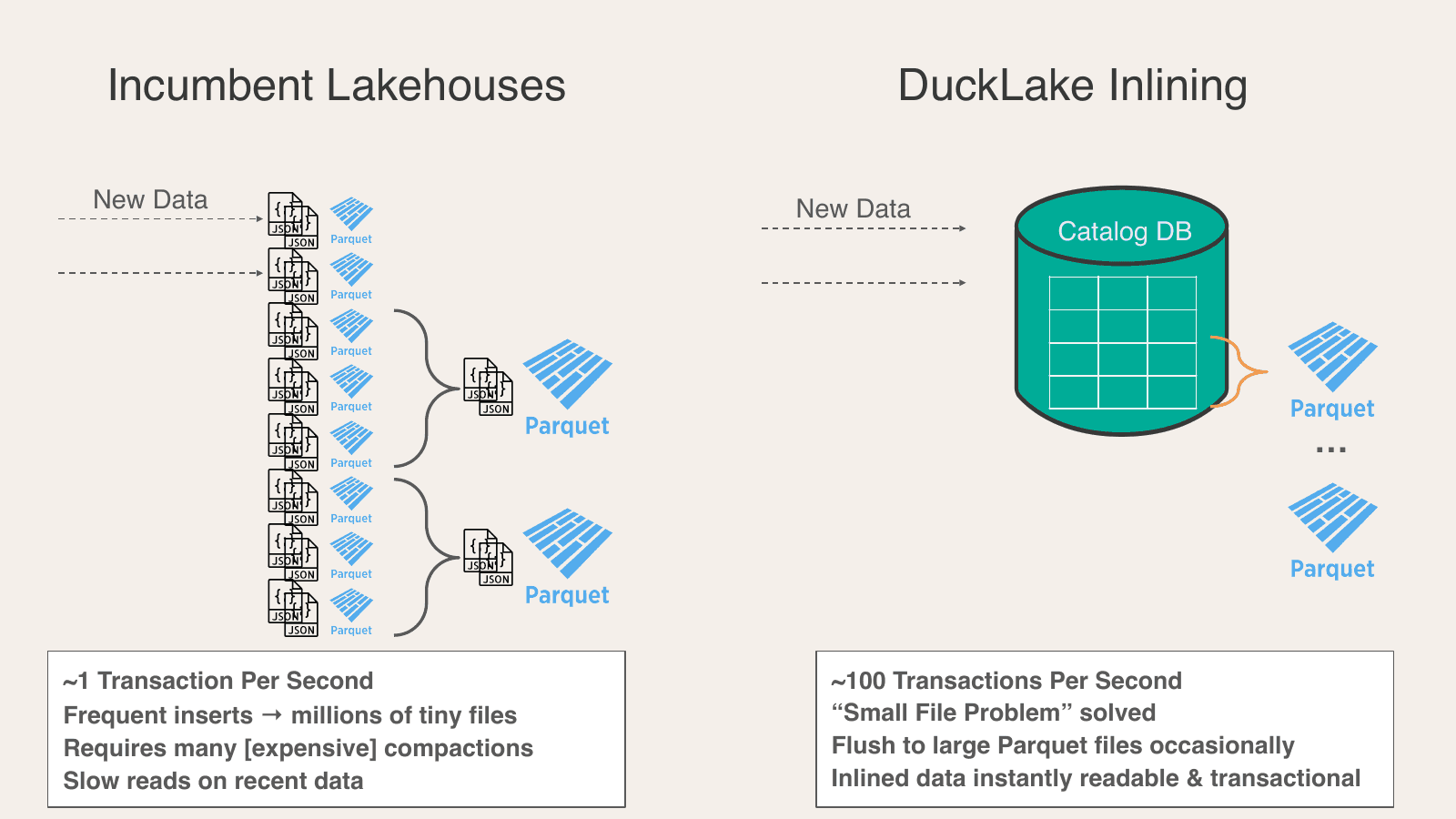
Compare that to the incumbents, where every insert produces three or four files (JSON + Avro + Parquet). Those pile up fast, slow every read down, and force frequent, expensive compaction. The practical ceiling lands around one transaction per second: state of the art, for 1985. A lakehouse like that can only be an archive, not the source of truth for your business workloads.
With inlining, DuckLake sustains around 100 transactions per second, which is enough to treat it as a real system of record rather than just an archive.
The key to understanding inlining is that it's a filter, not a buffer.
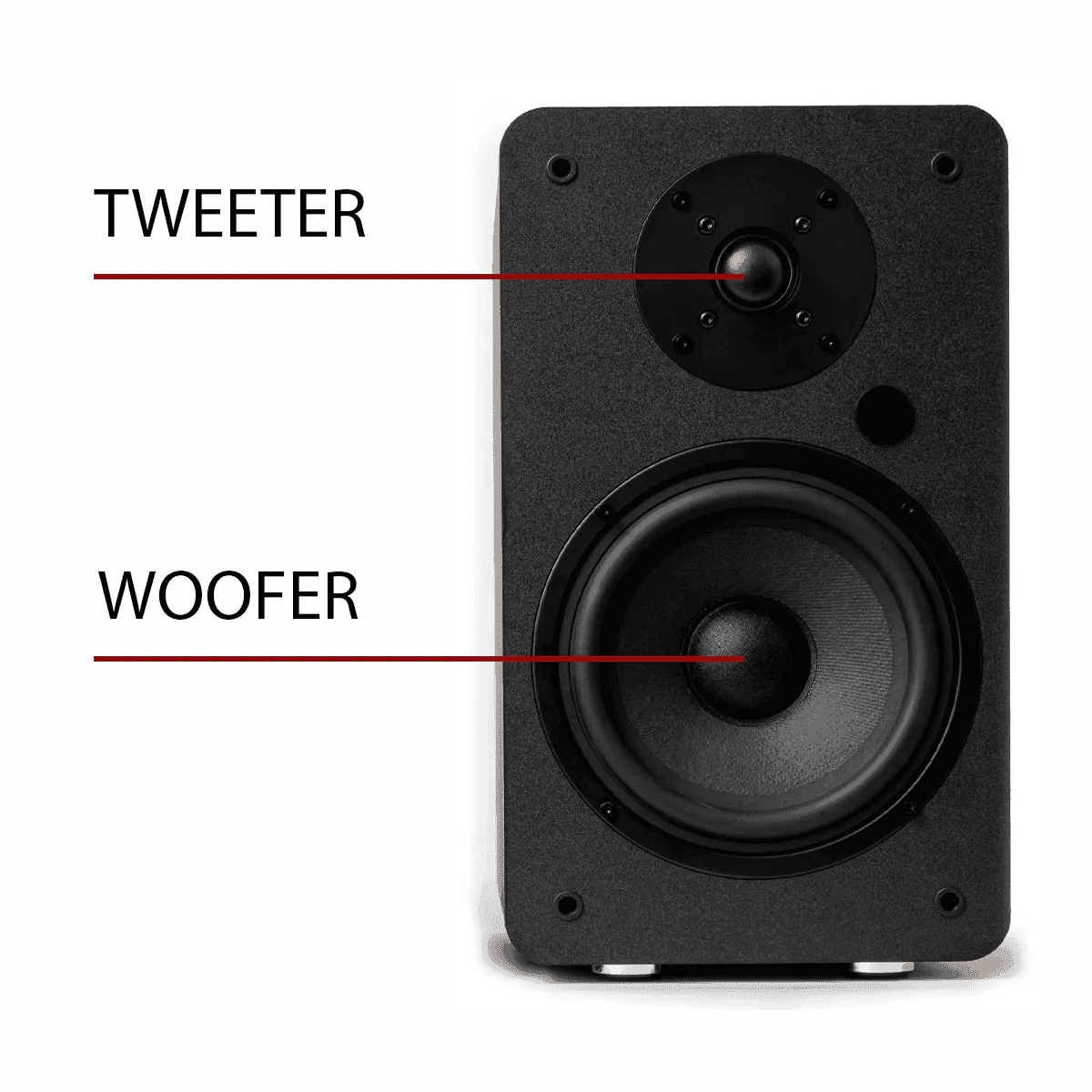
A speaker crossover splits one signal by frequency: cymbal crashes go to the tweeter, bass goes to the woofer. Inlining splits your writes by size: small changes go to the catalog database, large changes go straight to Parquet. They bypass the inlined data entirely rather than flushing it (you can flush on a schedule when convenient). And unlike data buffered in a streaming system, inlined rows are never "in flight": the moment they hit the catalog, any SELECT auto-combines them with your Parquet data. That keeps them transactionally consistent.
The catalog: it's just a database, and that's the point
The catalog has four jobs:
- Store metadata: which Parquet files hold which table's data, when each file was added (for time travel), your DuckLake configuration, and even business logic like views and functions, all kept centrally in the lakehouse.
- Manage concurrency: full multi-table ACID transactions. Move rows from an active table to an archive table in one atomic step, with no window where data is duplicated or lost.
- Decide which files to read: using stored statistics, the catalog answers "which files could contain customer A?" with a single SQL query.
- Store inlined data, as covered above. We have a database; may as well use it for what it's great at.
In the lakehouse world, "catalog" is usually a loaded word: open in name, proprietary in practice, and a pain to run. DuckLake's catalog is just a database, usually Postgres. It's simple to host, and you can actually see inside it:
Copy code
-- How many files in my lakehouse?
SELECT count(*) FROM ducklake_data_file;
-- Which ones are small?
SELECT * FROM ducklake_data_file WHERE file_size_bytes < 10_000_000;
No lakehouse-specific tooling, no proprietary APIs. Point your agent at it and let it introspect with plain SQL. Here's what's actually in there:
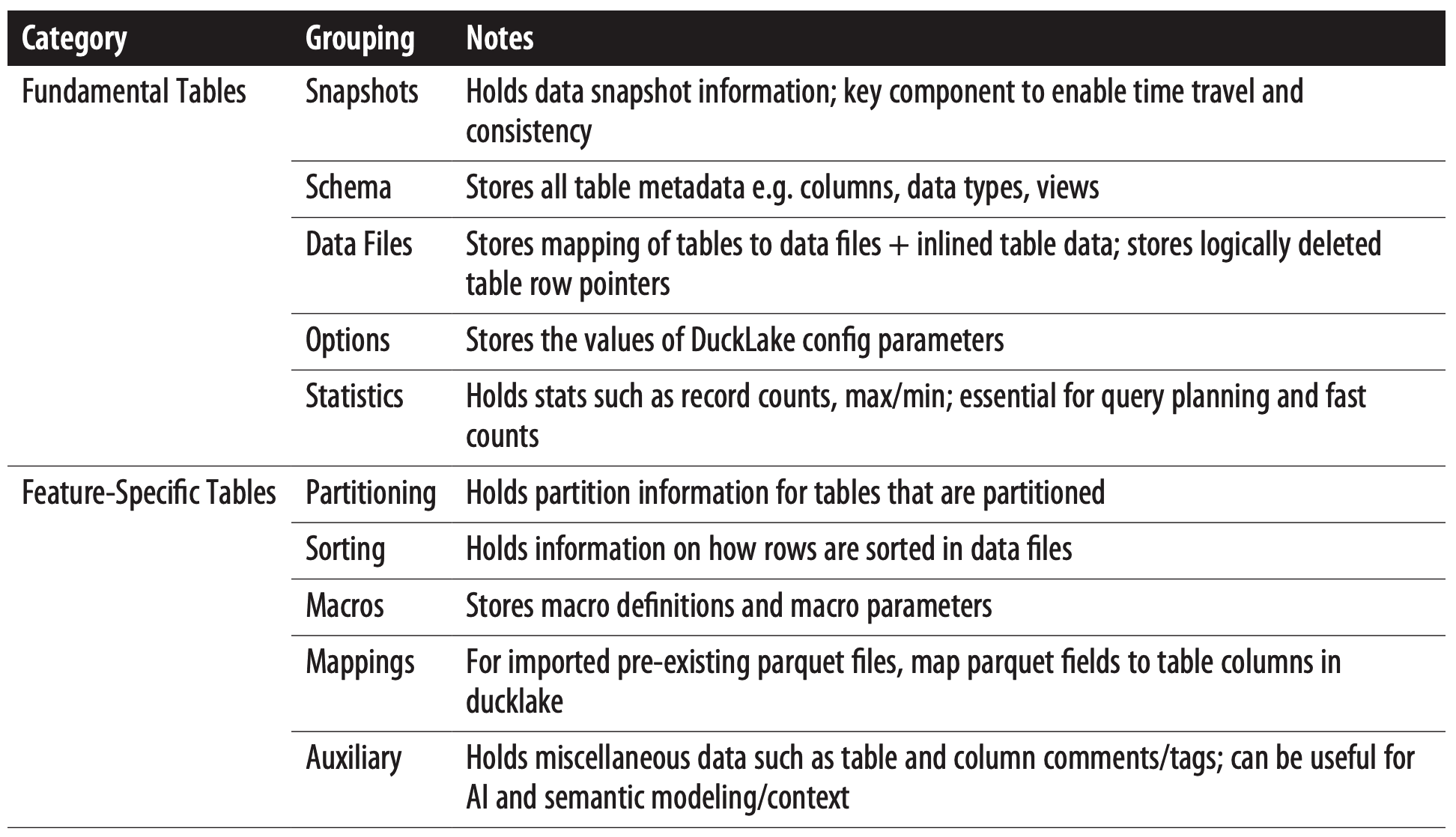
How concurrent writes actually work
DuckLake uses optimistic concurrency control: writers don't take locks up front; conflicting commits get rejected and retried automatically. Here's the flow:
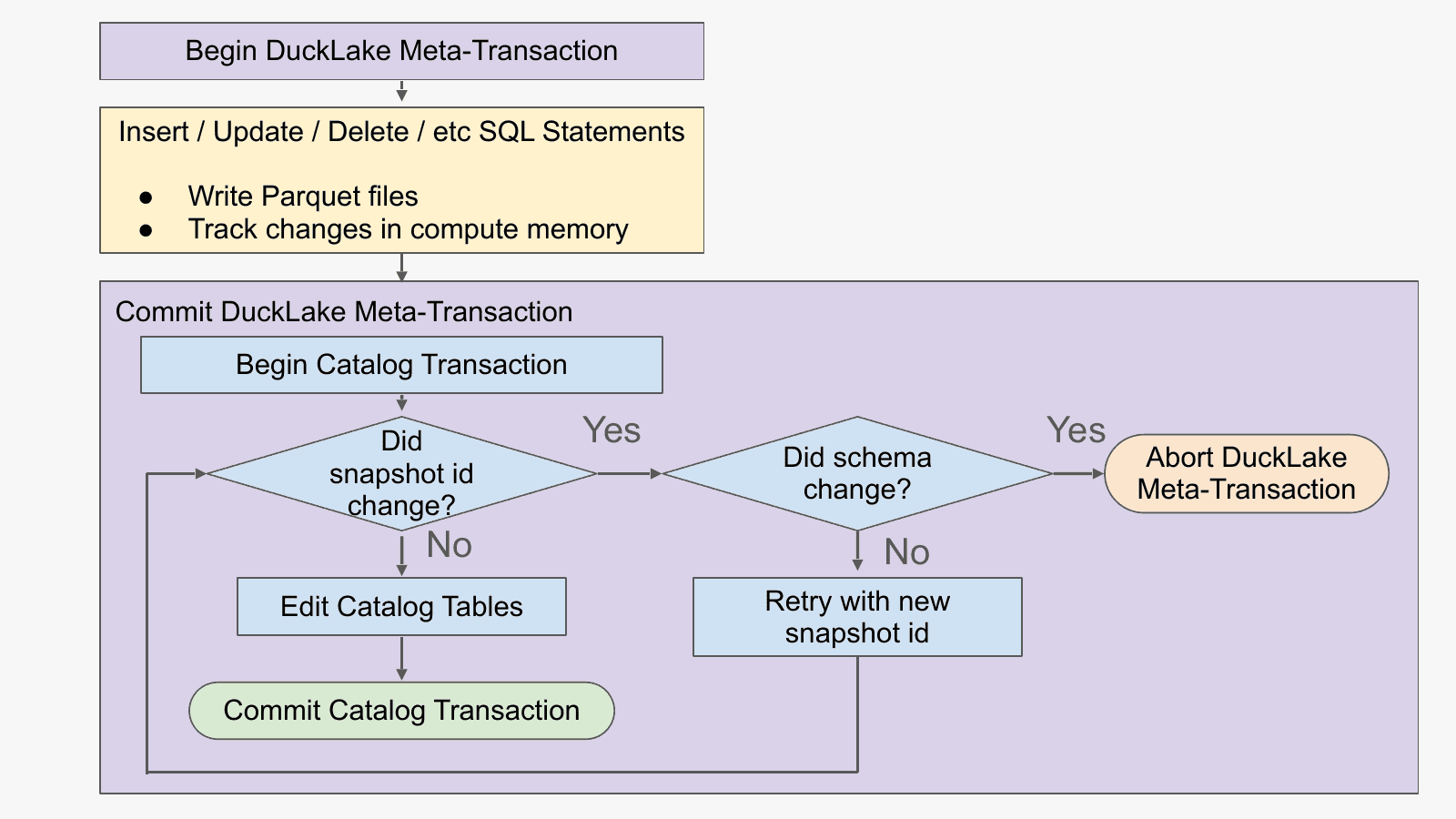
Step one is writing the entire Parquet file to object storage. Doesn't that expose half-finished data to other readers? No: nobody knows the file exists yet, because everyone reads through the catalog. Writers can do the slow part, writing gigabytes of Parquet, fully in parallel without coordinating at all. Think of it as working on a feature branch for two weeks and then doing an instant git commit at the end.
Only after the file is fully written to object storage does the catalog transaction begin: check whether the global snapshot ID moved (it's literally an auto-incrementing primary key in the catalog DB), and if not, register the file and commit. That makes for an extremely short transaction, which is exactly why the catalog can sustain around 100 TPS when other formats struggle.
If someone else did commit first, no problem. As long as they didn't change your table's schema, DuckLake retries automatically, gets back in line, and commits. You can configure the retry count, but with the default you'll usually never notice. Only if the schema itself changed underneath you (a column you're inserting into got dropped, say) does DuckLake abort with a clear error, because that's an application decision no format should silently make for you.
Compute: read as little as possible
The catalog hands compute a list of candidate files. Compute's job is to touch as few bytes of them as possible:
- Column pruning: Parquet's footer records where each column lives in the file, so only the columns your query needs get read.
- Row-group pruning: footer statistics let compute skip whole chunks of rows.
- In-memory caching: data you've already fetched from S3 stays in RAM, so repeated queries only go back for new data.
- SQL execution: the joins and GROUP BYs run here, once the data is in hand.
- Parquet writing: compute builds and compresses the Parquet files and sends them to storage.
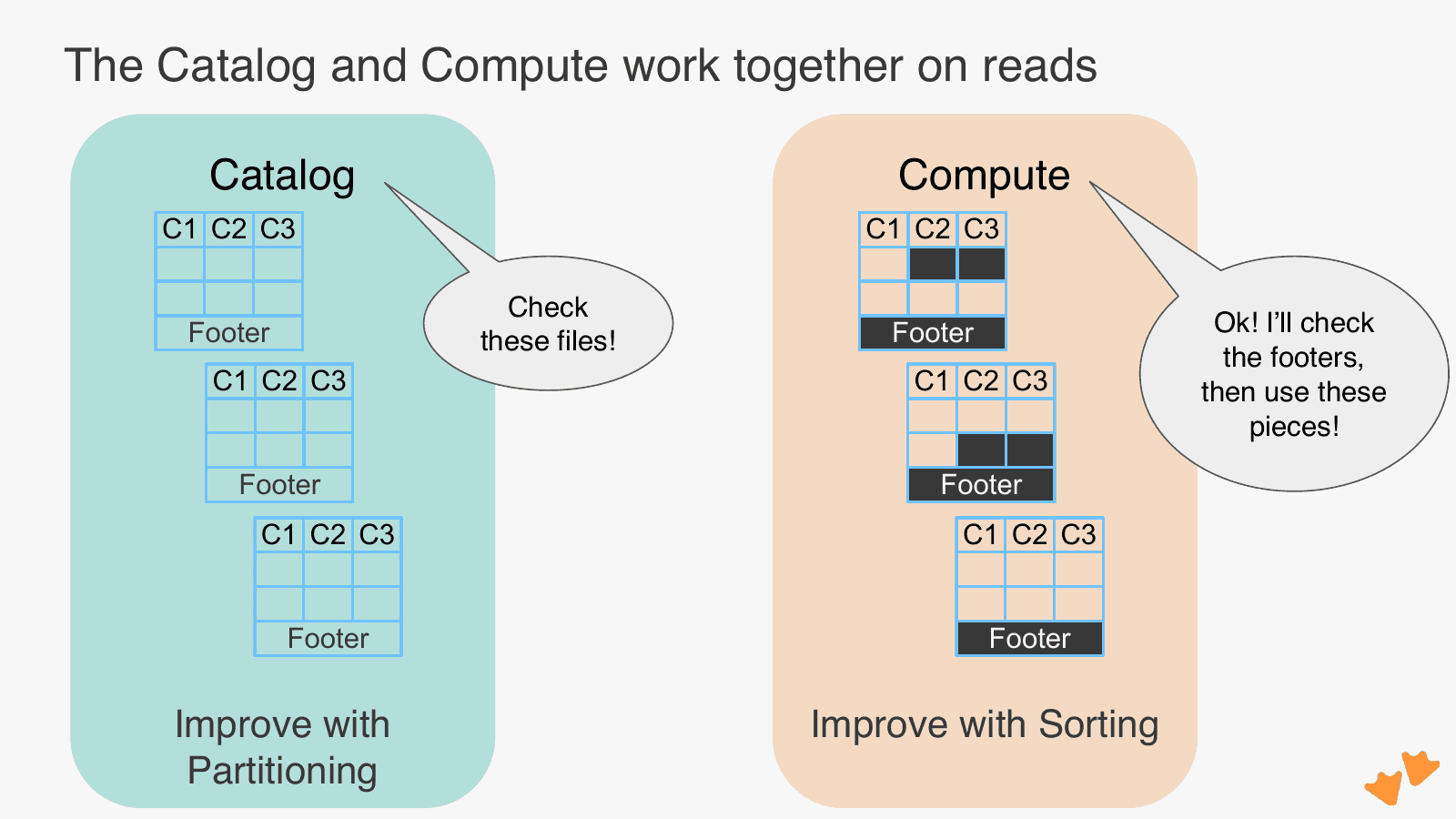
This division of labor is also your tuning cheat sheet, because each layer has one big lever:
- Catalog layer → partitioning. Partition by columns you commonly filter on (time, customer, region) and the catalog skips far more files before compute ever sees them.
- Compute layer → sorting. A randomly ordered file has to be read in its entirety; a sorted file lets compute read one contiguous piece.
Both are table-level settings you create up front but can change at any time.
And one operational lever to remember: like every lakehouse, DuckLake works best with periodic maintenance. Set your time-travel retention and file-size targets, then run a single CHECKPOINT command on a schedule. It flushes inlined data, compacts small files, and vacuums expired ones in one go.
Where MotherDuck fits
Everything above works fully open-source and self-hosted. MotherDuck's job is to make the production version effortless and highly performant. On MotherDuck, the only difference between a warehouse and a lakehouse is one parameter:
Copy code
CREATE DATABASE my_lake (TYPE DUCKLAKE);
You get a managed metadata catalog (backed by a MotherDuck-powered DuckDB, since it turns out metadata gets big and an analytical database is a great place for those catalog joins), managed or bring-your-own storage buckets, and serverless compute that cold-starts in about 100ms, scales from a couple of cores up to hundreds with over a terabyte of RAM, and disappears when you're done. If you've got a bursty fleet of agents asking questions, you're not paying for an idle Spark cluster between thoughts.
And because openness is the point: your bucket stays yours, and you can query it with Spark or Trino whenever you like.
Go deeper
This post covers the fundamentals, but the webinar went further, with live Q&A on catalog choices (Postgres vs. Quack), time-series workloads, upserts via MERGE, migration paths, and multi-tenancy.
- Watch the full webinar recording: The Database Inside Your Lakehouse: A DuckLake Architecture Deep Dive
- Get the book free: DuckLake: The Definitive Guide, early-release chapters in your inbox, a new chapter every month
- Try it in two commands on MotherDuck, or three commands on your laptop
Questions & Answers
The webinar drew far more good questions than we could get to on the call. Below are the answers, split into the ones we followed up on in writing afterward and the ones we answered live. Thank you to the community for jumping in with some answers as well!
Post-Webinar Answers
Would the pricing be based on a per-request basis for updates made to tables in the MotherDuck-managed DuckLake?
Hosting a DuckLake on MotherDuck uses the same compute that MotherDuck databases do. MotherDuck is priced primarily on compute usage with some smaller costs for storage. Have a look at motherduck.com/pricing!
Can DuckDB be deployed on a remote server to handle compute workloads, connecting from a laptop with Quack as the client interface? The full setup: a PostgreSQL metadata catalog + Azure Blob storage + a dedicated high-memory/high-CPU DuckDB compute server — can other teams connect to that compute server via the Quack remote protocol to query shared data without running heavy workloads on their laptops?
Since DuckLake is so composable, there are many ways to host it! At a high level, the architecture proposed here sounds very feasible. One weakness of it is just that it looks like your compute would be co-located into a single spot rather than split into independent nodes for horizontal scalability (this could be added, but with additional complexity). Also keep in mind the additional authentication considerations for using Quack and that it is still in beta.
DuckLake tables seem to perform as well as DuckDB tables. I thought I'd use DuckLake tables for data processing and then "publish" to a DuckDB table for fast analysis. What am I missing?
Using DuckDB or a MotherDuck database as a gold tier serving layer is a good practice, yes! That said, DuckLake is better at those type of use cases than other lakehouses, so it may already be good enough. Especially if you are running queries on similar data multiple times, then DuckLake can cache that data for you and it will be nearly the same as a DuckDB query on cached data.
How does schema evolution work in DuckLake — does it re-write Parquet files? And will primary key / watermarking support ever come?
In DuckLake, schema evolution only occurs with new data that arrives. This is desirable because you don't re-write your whole dataset if you want to add or remove a column! You can apply a default that will be used in the case of blank past data though.
Primary key support is prohibitively compute intensive in a lakehouse environment given how the files are stored individually. So it is not in the DuckLake roadmap. Advisory primary keys (unenforced ones) could potentially be added though.
Snowflake open-sourced pg_lake earlier this year (basically DuckDB server + pg_duckdb + Postgres). Can you compare it with DuckLake?
pg_lake relies on Iceberg under the hood so it inherits all of its challenges like low transaction throughput, slow queries, and complex setup and maintenance.
Wouldn't inlining still suffer from transaction locks?
Yes, inlining does involve the concurrency control of the underlying database catalog as well, but since the insert sizes are deliberately small it is unlikely to be a constraint. A catalog DB can handle many small transactions quite well!
Does DuckLake support data partitioning for a multi-tenancy setup — separate files per tenant and per-tenant limited DuckLake access?
DuckLake does support partitioning, which does split partitions into separate files (and by default separate folders as well). The access control for this does require setup in S3 and/or the DuckLake catalog database.
How does the push of small (inlined) changes from the catalog to Parquet files work in a concurrent environment with multiple writers/readers?
They can proceed concurrently (I just benchmarked this and they proceed fully concurrently!).
For big catalogs maintenance is super expensive — when you rewrite files DuckLake seems to materialize everything in memory. How do we handle ~80GB RAM requirements for big tables with a lot of partitions?
DuckLake can spill intermediate calculations to disk, so it can handle rewriting files that are larger than memory. Just make sure that your temporary directory is configured in your compute instance and it should spill to disk automatically.
How do table relationships work in DuckLake?
There is not a way to explicitly define table relationships in DuckLake. However, you can add comments in DuckLake (which help agents correctly deduce relationships) and you can create views that also can explicitly join data together.
Is the flush mechanism all or nothing?
The flush mechanism is all or nothing, correct.
Can DuckLake handle high-concurrency point queries on large datasets — OLTP-style read-only queries that usually benefit from indexes?
The primary use case for DuckLake is not high concurrency point queries, but it can be tuned to handle that use case at lower latency than other lakehouses. Avoiding all the round trips to object storage for metadata sets us up for success here, but it is important to use partitioning and sorting effectively for this use case (those are your index equivalents in DuckLake!).
Is there self-hosted (especially on-premise) DuckLake enterprise support from the "DuckDB family" (DuckDB Labs, MotherDuck)? Many companies in my country prefer on-prem over cloud-managed.
Feel free to reach out to DuckLabs (formerly known as DuckDB Labs!) for enterprise support.
Can I confirm the licensing model? I.e. DuckDB is free to use commercially (when we bring our own storage/compute), and your product is essentially managed MotherDuck?
DuckDB and DuckLake are open source and MIT licensed, so they can be used for just about anything including commercial purposes. MotherDuck is a commercial database as a service product (or lakehouse as a service!).
How does interoperability in DuckLake work with other open lakehouse format tables?
DuckLake data files are Iceberg-compatible, Iceberg migration is a one-command metadata copy with files left in place, and Delta migration requires moving data.
Could you share the flight for maintenance?
Here is the DuckLake maintenance Flight.
Live Answers
Does it work with all cloud providers? Specifically Azure Blob Storage?
Yes. Azure support wasn't there during the beta but has since been added — DuckLake now supports reads and writes to Azure Blob Storage.
Why not SQL Server yet (as a catalog database)?
Alex didn't have the inside scoop on SQL Server specifically, but said it's a reasonable thought and the catalog options will continue to grow.
Can DuckLake read DuckDB files (not just Parquet) stored in object storage?
Not today — Parquet was chosen deliberately because it's readable by more systems (Spark, Trino, DataFusion) and well optimized for object storage. DuckLake is modular/extensible, so it's feasible in the future; Alex invited interested users to reach out.
How should I think about deployment boundaries on AWS — especially RAM, local disk, and network limits?
Very flexible: multiple compute instances can talk to the same catalog, so you can size instances per workload (even per query). Compute nodes don't need local disk; a solid amount of RAM helps. Keep compute co-located with storage (same region/cloud) for latency and cost.
How do we know when we need DuckLake and when DuckDB might be enough for now?
Two key reasons to move to DuckLake: (1) multiplayer — multiple people/machines reading and writing concurrently with transactional safety via the catalog; (2) data scale — around 10GB a single DuckDB file on S3 works OK, but at hundreds of GB DuckLake has real advantages. Attendee Nick vB also added that DuckLake makes tables/views and Parquet storage more transparent, e.g. registering existing Parquet as a table.
Can a Parquet file written through DuckDB and DuckLake be read without DuckDB and without DuckLake?
Yes — they're just regular Parquet files, fully compatible with any engine, and you can bring your own bucket. Caveat: without the catalog you may not know which Parquet files are current, so the more common pattern is to keep the DuckLake catalog but use a different engine. Attendee Brandon Rich also pointed to the DELTA_EXPORT community package that generates Delta logs from DuckLake metadata.
Delta has metadata bloat optimization techniques like OPTIMIZE & VACUUM — how does DuckLake deal with metadata bloat, especially for ingestion of small files over time? And beyond expanding the time-travel window, are there other maintenance/design issues to know about?
DuckLake has equivalent maintenance: set your time-travel window (e.g. 7 days) and expired files are removed from both the catalog and object storage, and small files can be compacted into larger ones for faster S3 reads. Use those retention settings plus the checkpoint command (flush, compact, vacuum), scheduleable via MotherDuck Flights if on MotherDuck.
Is an upsert operation costly on performance in DuckLake?
An upsert is a selective read (to detect existing rows) plus deletes and inserts. Plain inserts are always fastest, but upsert performance is manageable and scalable because DuckLake reads selectively.
Are there relevant performance benefits of using a cloud VM SSD instead of S3 with local caching (small data)? Is there a migration path from disk to S3?
If your compute node has local storage you can use it for caching via extensions, but out of the box DuckDB caches DuckLake data in RAM, so SSD isn't necessary today. There's no single-function migration from disk to S3, but since the catalog is a database you can move the files and update the catalog directly with SQL (power-user mode).
Does it make a difference whether the metadata catalog is column- or row-based (DuckDB vs Postgres) for single-client use?
Catalog operations involve large joins/scans that are a good analytical fit, so a columnar catalog (MotherDuck DuckDB) helps at scale; Postgres prefers index lookups and is still the recommended solid choice today.
Could you elaborate a little more on the compute split between cloud and local/laptop?
With MotherDuck dual execution, you can run parts of queries on your laptop for very low latency while heavier work runs serverless in the cloud (up to hundreds of cores and over 1TB of RAM). Just create a temp table and your data is moved locally!
Why is the DuckDB catalog able to handle multi-user while normal DuckDB is not?
MotherDuck enhanced DuckDB to be cloud-native and accept multiple connections. Open-source DuckLake with a plain DuckDB file catalog is NOT multi-user — for multi-user you need MotherDuck, Postgres, or the Quack protocol (beta).
The PGSQL-based catalog came before the Quack protocol. Which is better for concurrent-access deployment in the long term?
While Quack is in beta, use Postgres (or MotherDuck) — you want a rock-solid foundation. Long term, a MotherDuck- or Quack-backed catalog has advantages because catalog operations are analytical (millions-of-row joins/scans) that Postgres would rather not do. In a year-plus horizon Quack should be a very solid option.
Is it easy to convert existing open-table catalogs to DuckLake — can you create a DuckLake catalog without moving/handling all the Parquet files (e.g. migrating from a Microsoft Fabric lakehouse)?
From Iceberg: yes — a one-statement metadata-only copy, and the Parquet files stay where they are (forward compatible). From Delta the migration would likely mean inserting/moving your data over. Fabric lakehouses are Delta-based so the Delta answer applies.
Can DuckDB/DuckLake be plugged into a Looker dashboard? And how do you plug in analytics on the actual data (not just the metadata)?
Looker is supported on MotherDuck-backed DuckLakes using the Postgres endpoint (where MotherDuck can impersonate Postgres). Details are in the Looker integration docs.
With concurrent DML on the same table, does DuckLake offer ways to prevent significant locking issues? We also frequently see CHECKPOINT/maintenance snapshot drift and orphaned files — is there a recommended approach to stabilize a heavy-data-manipulation environment?
DuckLake does sometimes request that the client retry if the schema changes "underneath" a commit. This allows you to customize the behavior in that case. There are lots of ways to tune maintenance — more details are coming in future book chapters, and feel free to reach out!
Before fully committing to MotherDuck I want to prototype locally with DuckDB. Is it easier to convert PGSQL or Quack to MotherDuck?
Brandon Rich: MotherDuck has a generous free tier and demoing on MD is as easy as local. Nick vB: either catalog works locally — the transition to MotherDuck is easy because you just re-point your interfaces.
Any obvious reasons not to use DuckLake for time-series (sensor) data that is mostly column-based, with some filtering and aggregation/window functions?
No — it's an amazing use case. Time-series data builds up fast and goes stale fast; lakehouse partitioning compartmentalizes it, Parquet compresses it very well, and the variant data type is recommended for semi-structured logs (much faster reads than text blobs).
What do you think about open-source tools' support for reading and writing DuckLake tables (Spark, Trino, pandas, Polars, etc.)?
It's already moving: Spark and Trino can read DuckLake, DataFusion too; writing support is being worked on.
Will there ever be UPSERT support? Is this even possible?
Jose Matos: yes, UPSERT is already supported in DuckLake via the MERGE statement.
How do we handle PostgreSQL long-running transactions for big inserts?
They're not long-running: the Postgres transaction only starts after the Parquet file is completely written to object storage, so it's extremely short — that's why DuckLake can hit ~100 transactions/second.
When you say the catalog has figured out what files need to be read, isn't the figuring-out part of the engine (compute) too?
Yes, the very first step (extracting the filter from the user query) is compute, but the hard filtering work is pushed into SQL WHERE clauses on the catalog database itself — which is also why an analytical database as catalog helps (it's an analytical question).
Can we currently tune the incremental-update (inlining) threshold in the catalog DB and the write-to-Parquet cycle on MotherDuck DuckLake? Is it handled through SQL statements?
Yes, full control on MotherDuck: one statement sets the row-count threshold for inlining (e.g. 100–1000 rows), flushing is another SQL statement (a flush procedure), and MotherDuck's scheduler ("flights") can run it on a schedule with Python/SQL — fully customizable.
What's the theoretical limit of DuckLake with a PSQL catalog, in RPM/RPS?
No exact theoretical limit given, but Alex cited ~100 transactions/second on DuckLake (vs ~1 TPS for incumbent lakehouse formats) thanks to short catalog commits.
If the setup is serverless at MotherDuck, wouldn't a constant stream of users updating tables from an application spike cost and delays? Does MotherDuck provide dedicated servers for frequent small-change interactions?
MotherDuck instances spin up in ~100ms and stay warm — small instances for about a second, larger ones for a minute (and you can voluntarily extend that time with a setting if you want to invest in keeping your data hot) — so consecutive requests don't cold-start. You get serverless benefits without per-request restart costs; effectively the best of both.
Does DuckLake cache the Parquet files it accesses from S3?
Yes, but in RAM today, not on disk. Extensions are in the works for disk caching.
Following up on long-running Postgres transactions: does your answer apply to S3 as storage as well? We do face issues with big inserts.
Yes — the target_file_size setting means a billion-row insert or backfill is split into multiple files at your chosen size and written in parallel, which alleviates big-insert issues.
Any quick tips on maintaining the lake files over time — similar to VACUUM, etc.?
Configure retention settings (time-travel window, grace period before hard delete, target file sizes, inlining) and run the single checkpoint command — it flushes, compacts, and vacuums old files in a series of steps. On MotherDuck you can schedule it with the maintenance flight.
Would the DuckDB adapter for dbt work with DuckLake?
Brandon Rich: yes — he has tested both dbt and SQLMesh with DuckLake.
Quack on!
Table of contents