MotherDuck Skills: Teaching Your AI Agents to Do Analytics
· 8 min read
Today we're announcing MotherDuck Agent Skills, an open-source catalog that helps AI coding agents connect to MotherDuck, explore schemas, write DuckDB SQL, use the REST API, build Dives and plan analytics workflows.
They work across the major agent harnesses we target, including Claude Code, Codex, Gemini CLI, and any agent that can install standard SKILL.md skills.
If MCP gives agents hands, skills give them a playbook. Or, less grandly, the sticky note next to the keyboard that says: "please do not write PostgreSQL at DuckDB."
In our previous post on MCP, we covered how agents can act on your data stack: run SQL, inspect schemas, create Dives and work with live systems. Skills are the next layer. They teach the agent when to use those tools, what defaults to prefer, and what cliffs to avoid walking off.
Because a coding agent can be confident and still get the data work wrong. It can invent a table, write PostgreSQL-flavored SQL against DuckDB, choose a brittle tenant filter or make a chart that cannot refresh.
MotherDuck Agent Skills are designed to make those failures less likely.
Agents know code, not your data stack
AI coding agents are getting good at turning intent into files, commands, queries and working apps. This is wonderful, assuming the intent is enough. In analytics, it usually is not.
Which SQL dialect should the agent use? Should it connect through MCP, the Postgres endpoint, or a native DuckDB client? Should it inspect comments before querying? Should tenant isolation live in the data model, the service layer, or a WHERE tenant_id = ... clause?
Those answers usually live in someone's head, a Slack thread or a runbook. Without this context, agents might improvise, taking an implicit choice and putting you in a path you might not want. Sometimes that ends up being fine, sometimes it creates slow queries, wrong joins, broken dashboards or, worse, a plausible answer based on an incorrect table.
Skills are a lightweight way to package the missing context.
1. What is an Agent Skill?
An agent skill is not a new platform, but a folder with a SKILL.md file.
Copy code
motherduck-query/
├── SKILL.md # metadata + instructions
├── scripts/ # optional executable code
├── references/ # optional docs
└── assets/ # optional templates
The SKILL.md has YAML frontmatter:
Copy code
---
name: motherduck-query
description: Execute DuckDB SQL queries against MotherDuck databases. Use when running analytics, aggregations, transformations, or any SQL operation.
---
Below that is markdown containing the workflow instructions, rules, examples and links to references.
Skills are designed with a useful "lazy loading" feature: at startup, an agent sees only the names and descriptions of installed skills. It does not load every full instruction file into the context window. Instead the agent pulls the instructions only when a task matches a skill. This keeps context lean while giving the agent a catalog of domain knowledge.
Skills can be small, like "write DuckDB SQL," or bigger, like "build a MotherDuck-backed dashboard." Since the format is Markdown plus optional scripts, teams can review and version it like code.
Skills and MCP Work Better Together
In our previous post on MCP, we covered how MCP gives an agent tools. A MotherDuck MCP server lets an agent inspect databases, run queries, create Dives and work with live data. Skills tell the agent how to use those tools well.
| MCP | Agent Skills | |
|---|---|---|
| What it provides | Tools, resources, prompts | Instructions, workflows, domain knowledge |
| Loaded when | Always connected | On-demand, per task |
| Format | JSON-RPC server | Markdown folder |
| Analogy | API | Documentation + runbooks |
You can use either on its own. A skill can teach an agent how to choose between MCP, the Postgres endpoint, DuckDB client, JDBC, or REST API. MCP alone gives tools, but not the preferred path. We believe the best experience is using both: tools for action, skills for judgment.
2. How Skills Became a Standard
Anthropic starts it
Agent skills came out of Anthropic's work on Claude Code. The idea was to let users and organizations package reusable instructions that the agent discovers and loads based on what it's working on. Anthropic released the format as an open spec at agentskills.io and invited everyone else to use it.
OpenAI follows
OpenAI's Codex adopted the exact same format. Same SKILL.md file, same frontmatter schema, same lazy-loading model. That wasn't an accident. The format hit the right level of abstraction: easy to implement, actually useful in practice.
Everyone else piles on
Today, 30+ agent products support the format: Cursor, Gemini CLI, GitHub Copilot, VS Code, Roo Code, JetBrains Junie, Goose, Kiro, and even platform-specific agents like Databricks Genie Code and Snowflake Cortex Code. The full list is at agentskills.io.
Distribution: still an open problem
You need a way to actually install and share skills. Vercel Labs built npx skills, a CLI that installs skills from GitHub repos into agent-specific directories. Basically npm for agent knowledge:
Copy code
npx skills add motherduckdb/agent-skills --skill '*' --yes --global
It works with 45+ agents, handles scoping (project vs. global), and has a discovery layer at skills.sh.
Quick aside for the enterprise folks. Today, if you want to share internal skills across your org, you're stuck with private Git repos. There's no authenticated registry, no access control, no org-scoped publishing. Works great for open-source catalogs like ours. For companies wanting to roll this out internally, this is probably the next piece someone needs to build.
3. Skills for Analytics and DuckDB
Why analytics needs this
Analytics work is full of implicit knowledge: which SQL dialect to use, how tables are named, what the grain of a fact table is, which connection path to pick. All of that typically lives in people's heads and Slack threads. Skills let you encode it once and give it to every agent that touches your stack.
A minimal DuckDB example
Copy code
---
name: duckdb-sql-basics
description: >
DuckDB SQL syntax and idioms. Use when writing or debugging DuckDB SQL,
especially GROUP BY ALL, EXCLUDE columns, list/struct types, and Parquet queries.
---
The instructions section would cover DuckDB-specific patterns: SELECT * EXCLUDE (col), GROUP BY ALL, FROM table without SELECT, reading Parquet with read_parquet(), and common gotchas vs. PostgreSQL syntax. You're not trying to replicate the docs. You're giving the agent a decision framework so it picks the right pattern for the situation.
4. MotherDuck Agent Skills: What We Built and Why
We open-sourced motherduckdb/agent-skills, a catalog of 17 skills covering the full MotherDuck workflow, from connecting to building production analytics apps.
The repo has strong opinions:
- DuckDB SQL, not PostgreSQL SQL
- Fully qualified table names
- Parquet over CSV when the format is under our control
- MCP-first exploration when a MotherDuck MCP server is active
- Structural tenant isolation over query-time filtering for customer-facing analytics
Skills are organized in three layers:
| Layer | Skills | Purpose |
|---|---|---|
| Utility | connect, explore, query, duckdb-sql | Narrow technical tasks |
| Workflow | load-data, model-data, create-dive, share-data, ducklake, ... | Multi-step processes |
| Use-case | build-dashboard, build-data-pipeline, migrate-to-motherduck, build-cfa-app, ... | End-to-end product work |
Install is one line:
Copy code
npx skills add motherduckdb/agent-skills --skill '*' --yes --global
Or via Claude Code's plugin system:
Copy code
/plugin marketplace add motherduckdb/agent-skills
5. Real Examples
With MotherDuck skills you can build your transformation layer in a matter of minutes following our best practice recommendations. Let's look at a couple of prompts and how these skills are being used by the agent.
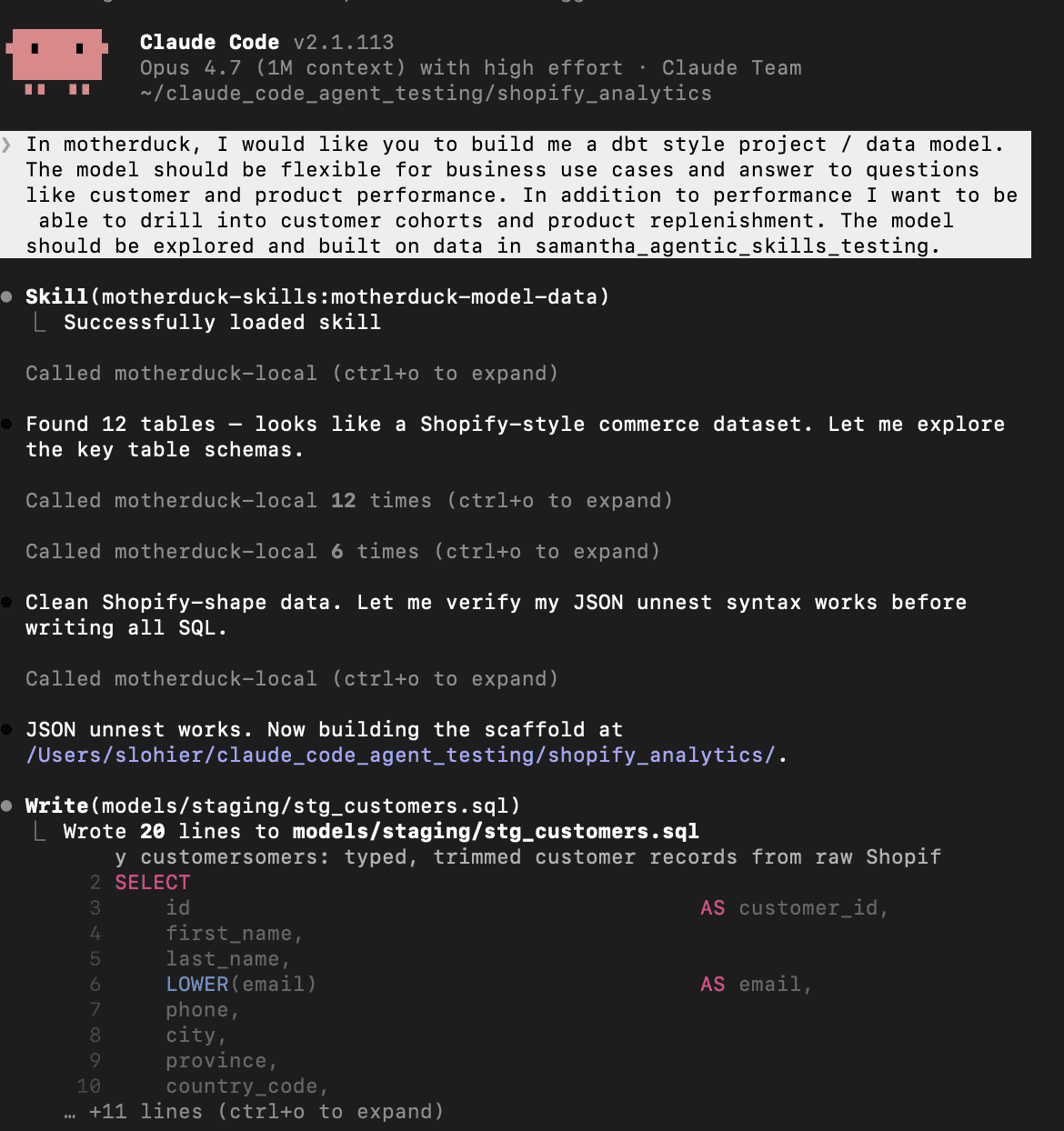
Claude calls on the motherduck-model-data skill to create a file-based project scaffold that includes raw, staging, and analytics layers. Combining MotherDuck's MCP tools (list tables and columns), Claude can explore what data is available, decide on the grain of the models being developed, and output those files including a DAG manifest. The results were ready-made marts for product performance and customer cohort analysis.
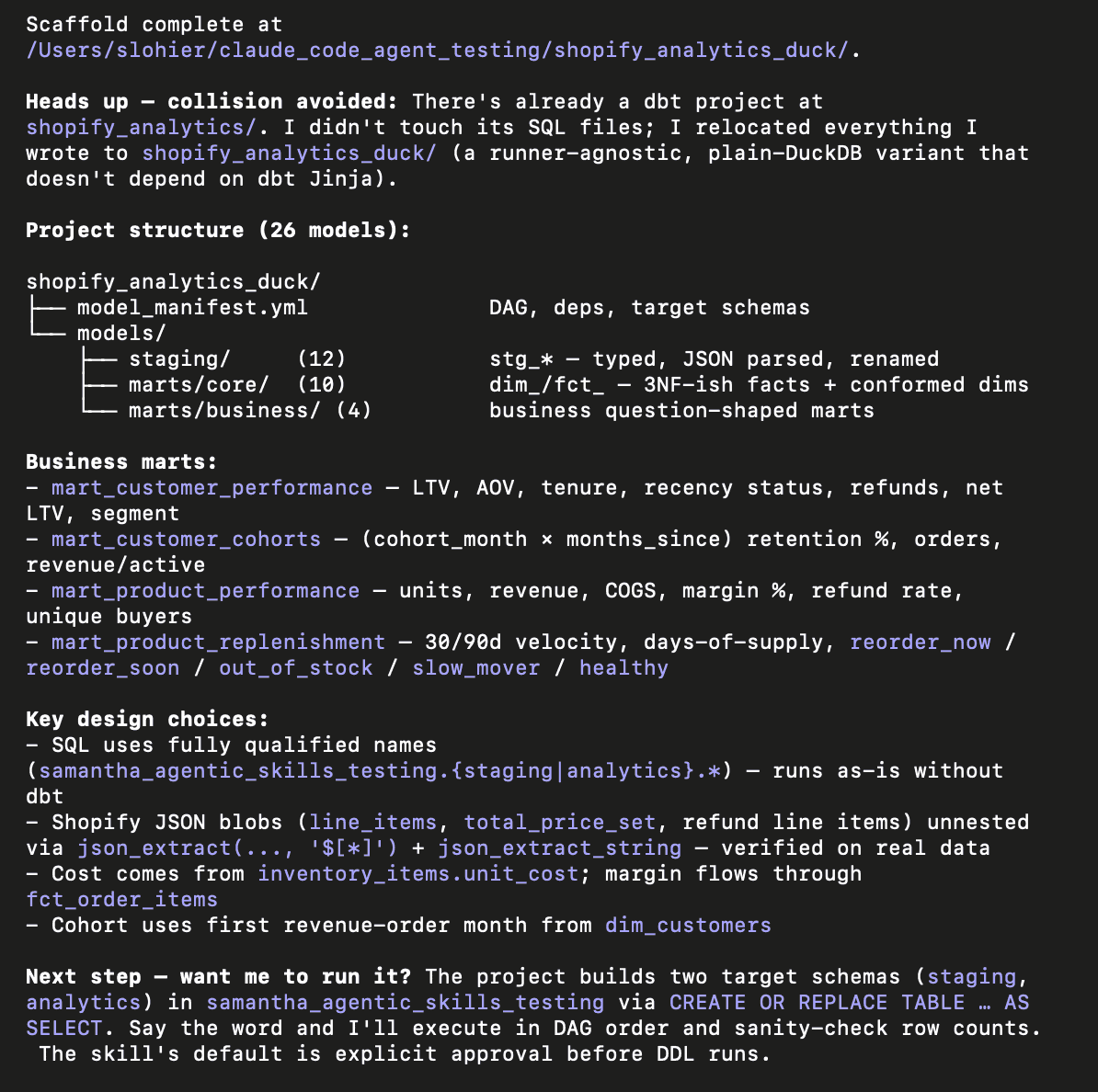
You can iterate on your project's SQL logic, naming conventions, etc. and provide your own Claude skills to improve the development experience tailored to your business. Once satisfied, you can build an executive summary report based on your newly created model.
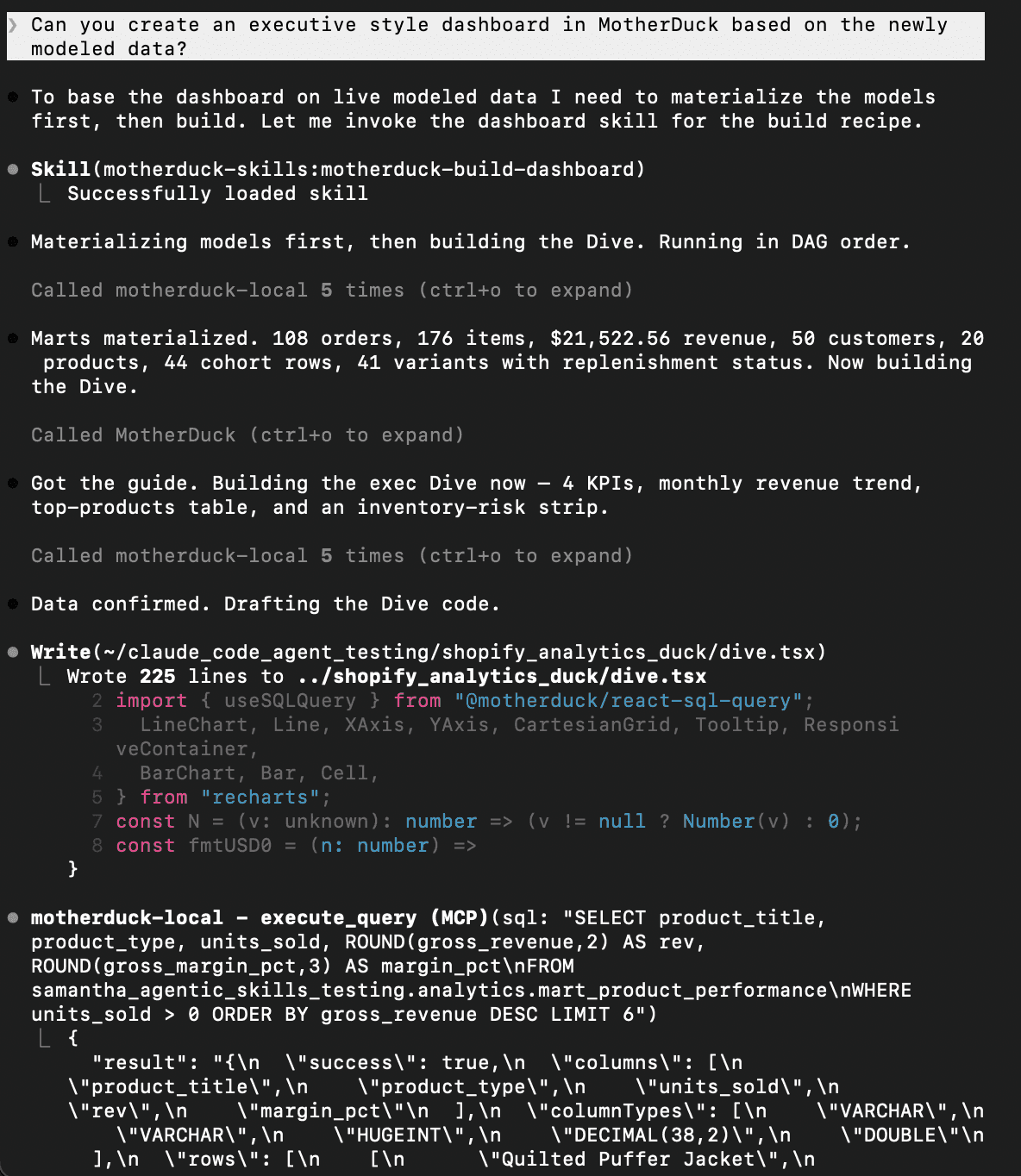
Claude calls on the motherduck-build-dashboard skill and MotherDuck's MCP tools (get_dive_guide) to create the dashboard. It follows a best-practice visualization hierarchy including a KPI row for key metrics, a trend line to track metric performance, and a table view to dive deeper into the analytics. To do this effectively, Claude explores the data, picks the best story to convey with your data, and writes queries for that data before putting together the visualization. To ensure data is accurate, the skill will run validation scripts on the queries before building the visualization file.
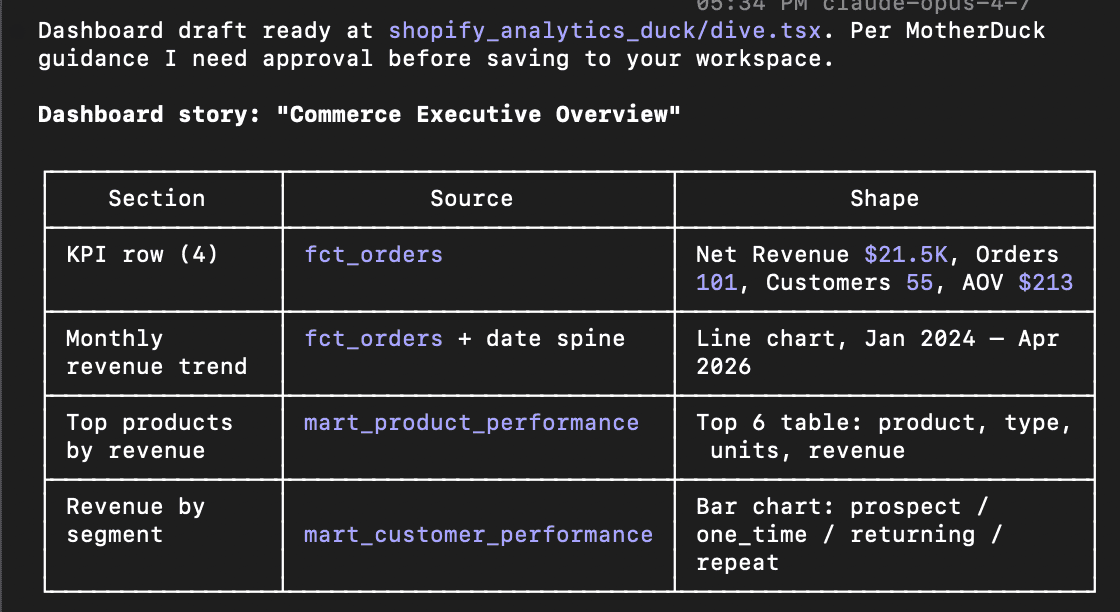
Before saving your report, you can preview it in a local environment. Once satisfied, you can save it as a Dive.
6. Getting Started
Install the skills:
Copy code
# All skills, all agents
npx skills add motherduckdb/agent-skills --skill '*' --yes --global
# Claude Code plugin
/plugin marketplace add motherduckdb/agent-skills
# Gemini CLI extension
gemini extensions install https://github.com/motherduckdb/agent-skills --consent
Set up MCP for the full experience:
Skills work best paired with a live MotherDuck MCP server. The MCP setup guide gets you connected.
Wrapping Up
MCP gave agents hands. Skills give them expertise. For analytics work, that expertise matters: agents need to know the SQL dialect, inspect data before querying, build refreshable artifacts, and notice when a "SQL question" is really an architecture question. This combination of unified tools and clear instructions is precisely what makes the shift to agent-native data ingestion possible without the failure loops common in legacy stacks.
We covered MCP in our previous post. This is the next piece, and we think it's what makes agentic analytics actually work in practice.
Install the catalog, connect the MotherDuck MCP server, and try a concrete workflow like "Explore my MotherDuck workspace, find a dataset worth analyzing, write the DuckDB SQL, and turn the result into a Dive."
The catalog is open source and MIT licensed. If you have a MotherDuck workflow that should be a skill, open a PR.
Table of contents