Announcing DuckLake 1.0 on MotherDuck
· 10 min read
If you've used DuckDB, you know the feeling: SQL that just works, locally, with zero setup. MotherDuck extends that feeling to the cloud and well into the terabytes. Combining MotherDuck and DuckLake carries that experience all the way to petabyte-scale lakehouses.
DuckLake is an open table format built on a simple idea: your lakehouse metadata belongs in a database, not in thousands of JSON files. The result is a format where you or your agents can spin up a lakehouse in seconds and query billions of rows in milliseconds.
Today we are launching preview support for DuckLake 1.0 in MotherDuck managed DuckLake databases! This is a landmark: the first major release of the nearly one year old project from DuckDB Labs. Version 1.0 brings a stable specification with backwards compatibility that is ready for your production workloads.
This post is focused on version 1.0 of the DuckLake open source specification. Today MotherDuck supports DuckLake 1.0! Our managed DuckLake offering is in public preview and will become generally available soon.
DuckLake is the Simplest Lakehouse
Creating a fully managed data lakehouse on MotherDuck takes 1 SQL command:
Copy code
CREATE DATABASE my_lakehouse (TYPE ducklake);
That's it!
With that single command, you get the best of the innovations pioneered by Apache Iceberg and Delta Lake, plus features delivered by catalogs like Apache Polaris or Unity Catalog.
Capabilities like:
- Schema Evolution (Go ahead, change that column name)
- Time Travel (Yikes, that upstream source borked today's data… Undo!)
- Open Source Apache Parquet Storage (Free the data!)
- Multi-Table ACID Compliance (Stress free concurrency)
- Partitioning (Only read exactly the right data)
- Petabyte Scalability (Store as much as you need)
DuckDB Labs created DuckLake to bring an elegant, common sense rethinking to the lakehouse architecture. SQL databases are the best way to manage many small, concurrent operations on structured data. They are a perfect fit for both lakehouse catalogs and metadata!
Not only are databases performant for this workload, they are also easy to use! They are a great abstraction over the complexities of concurrency management.
Thanks to the extreme portability of DuckDB, DuckLake can also run locally in just a few commands. It makes local development on the lakehouse easier than ever before.
Speed Through an Elegant Architecture
However, DuckLake is not just the easiest to use lakehouse. Incumbent lakehouses have fundamental performance barriers that DuckLake shatters: they can only insert data a few times per second, and reads can take multiple seconds.
Iceberg and Delta lakehouses store both their raw data and their metadata on cloud object storage. At first glance, that may sound fine. Object storage is inexpensive and bottomless. However, every request to object storage is slow and this metadata is stored in thousands of tiny JSON or Avro files. Plus, every query has to traverse back and forth multiple times - this can't be done in parallel! Not only that, catalog information is stored separately, behind a catalog web service that just happens to use a SQL database behind the scenes…
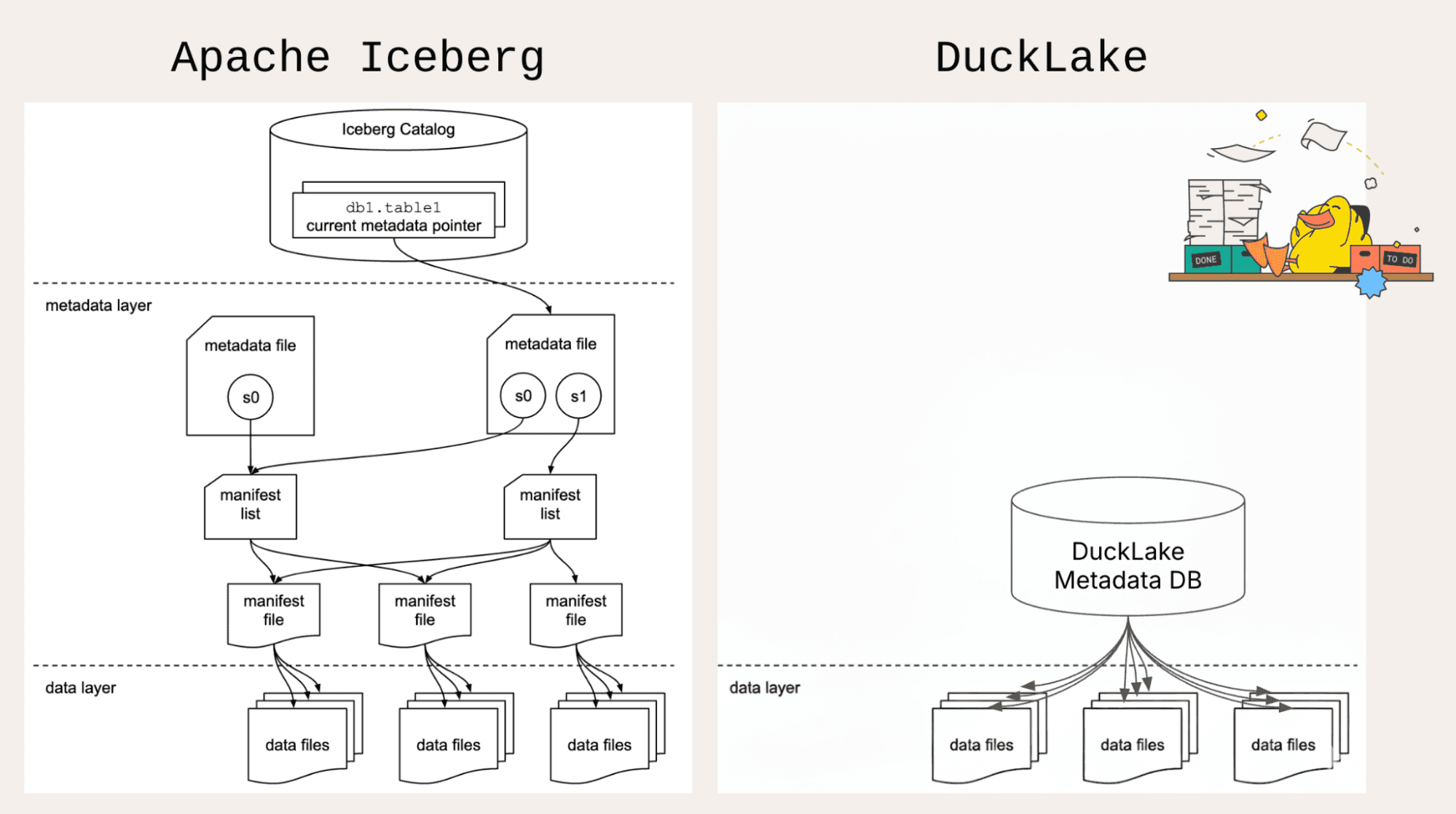
DuckLake completely rethinks the lakehouse. All metadata and the entire catalog lives in a SQL database, technology tuned for decades for low latency and high concurrency. Raw data still lives in Parquet files on object storage, ideal for scalability and throughput.
The result? Our internal benchmarks frequently show over 10x faster queries and over 10x more transactions per second (TPS) vs. the incumbents. In streaming workloads, DuckDB Labs even showed 900x faster reads and 100x faster writes than Apache Iceberg.
Key New Features in 1.0
Fundamental features like schema evolution and time travel have been present in the DuckLake spec since launch. The latest release adds even more capabilities.
We have borrowed extensively from the DuckLake 1.0 blog from the DuckDB Labs team for the code examples below!
Stable Specification
Data lakehouses last a long time. DuckLake 1.0 brings stability to the specification and backwards compatibility moving forward. As an open specification with open storage formats, you can move your data in or out of DuckLake at any time.
The foundational architecture of DuckLake is already rock solid: DuckLake is a novel integration of tried and true technology! Parquet files on object storage are industry standard. SQL databases like DuckDB and Postgres are very mature as well.
Taken together, DuckLake 1.0 is a much easier choice than when it was in beta!
Multi-Engine Support
Your lakehouse should be your single source of truth, with the ability to use multiple engines according to the workload. Query DuckLake with DuckDB locally, in the cloud with MotherDuck, using Apache DataFusion, or with a distributed system like Trino or Spark (if you need it).
That's the power of a stable and open specification - version 1.0 makes it even easier for additional engines to support DuckLake.
Data Inlining
This unique feature of DuckLake receives a significant upgrade in version 1.0. Data inlining is designed to solve the "small file problem" that can happen if data is frequently added to existing lakehouses.
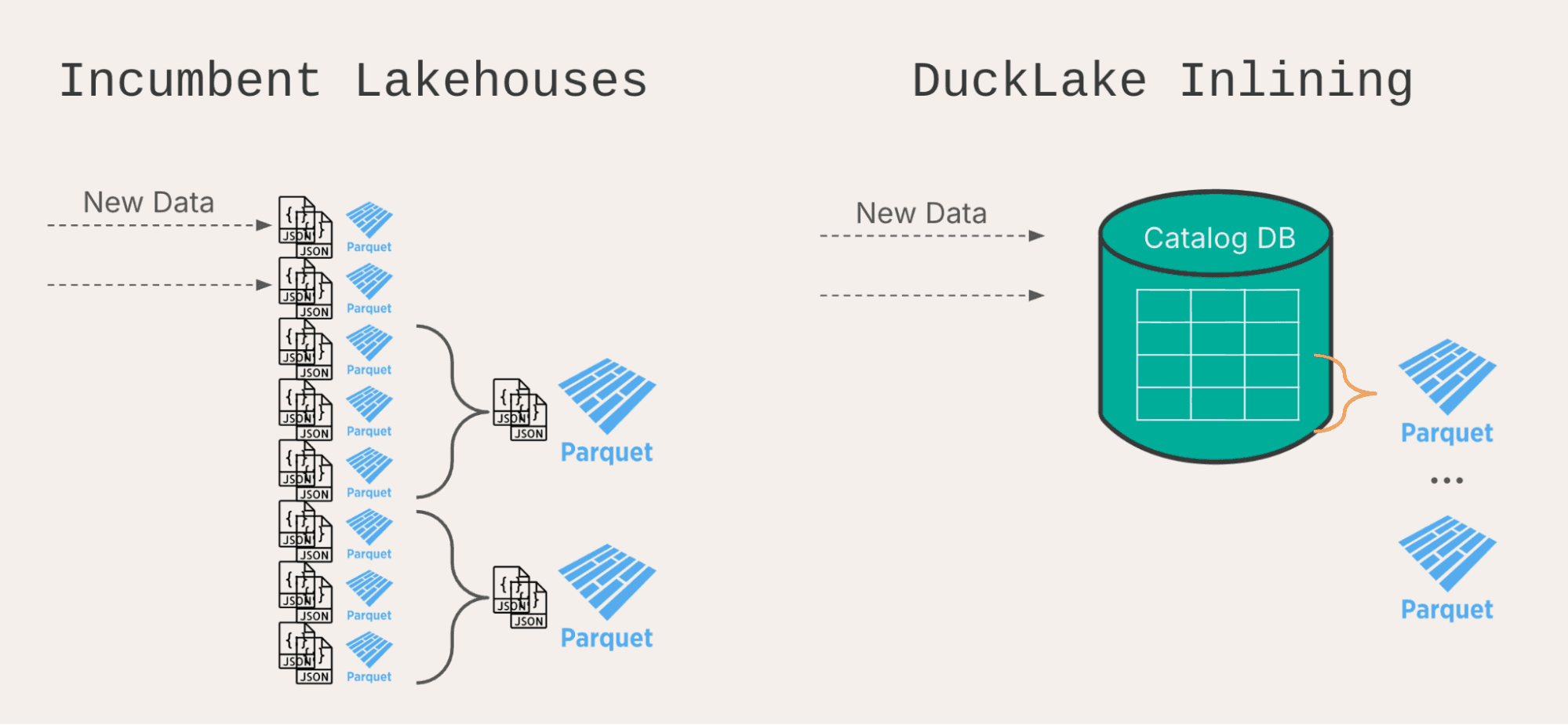
Iceberg and Delta will create multiple files for each insert, no matter how small. Adding a few rows still requires creating a separate set of metadata files and Parquet files. This makes small insertions very slow on a per-row basis, and after a short while, the high volume of metadata files slows down read queries also. Every query needs to check thousands of files.
Practically, this limits how often data can be added to a traditional lakehouse. However, slowing down source systems is not usually possible, so instead, data platforms need to add buffers using streaming systems like Apache Kafka and Apache Flink. This can add a lot of complexity. Frequent compaction can be necessary as well, which can require substantial compute too.
With DuckLake's data inlining, small inserts can be sent to the catalog database instead of creating separate files. Separate rows in a low-latency database are much more efficient than separate files on high-latency object storage! Once enough rows have accumulated, the inlined catalog database can be flushed out to appropriately large Parquet files.
Data Inlining solves the small files problem before it even occurs!
In version 1.0, data inlining can be used not only for inserts, but also for updates and deletes as well. This expands the number of use cases where it can apply. Any small modification is eligible! It is common to perform a deduplication step during ingestion using a merge, so updates frequently come in handy for data pipelines.
Inlining is enabled by default on all new tables in DuckLake 1.0 and can be adjusted like this:
Copy code
ALTER TABLE my_lakehouse.my_table
SET (data_inlining_row_limit = 100);
When enough rows have accumulated, flush to Parquet with:
Copy code
CALL ducklake_flush_inlined_data(
'my_lakehouse',
table_name => 'my_table'
);
Data Clustering
When running selective queries, like reading data from a certain category or within a specific set of customers, it is important to be able to read only the data that meets the filter criteria. In database lingo, this is called predicate pushdown (a predicate is a set of filters from a where clause). DuckLake does this in 2 levels: at the file level, and then within the Parquet file (at the rowgroup level).
To filter well at the file level, choosing a good partitioning strategy will allow DuckLake to only read from partitions with data that matches the where clause. DuckLake also uses file-level statistics to perform "hidden partitioning", so you don't need to have the exact partition column in your where clause.
Data clustering allows the second level of filtering to work more efficiently. It does this by sorting data within each file when inserting, compacting, or flushing inlined data. If data is sorted on the same column or expression that queries filter on, queries can read a small fraction of each file instead of all rows.
When sorting and query patterns are aligned, this can enable 10x faster read queries!
I am a big fan of this feature, but I'm exceedingly biased - this was my first contribution to DuckLake! -Alex
Enable sorting with this command:
Copy code
ALTER TABLE my_lakehouse.events
SET SORTED BY (event_type DESC);
If you only want to sort "behind the scenes" during compaction or inline flush to keep insertions lightweight, disable sorting on insert:
Copy code
CALL my_ducklake.set_option(
'sort_on_insert', false,
table_name => 'events'
);
Bucket Partitioning
Partitioning is an excellent strategy for segmenting data into smaller categories, but there is a practical limit to how many partitions are helpful. Many tiny partitions could trigger the small files problem (slowing read queries significantly) if any query were to need to access multiple partitions.
As a middle ground, bucket partitioning can create a fixed number of buckets and then use a hash to assign individual values into those buckets.
For example, for a dataset with 1 million customer ids, bucketing into only 1000 partitions could be a good balance between selective queries on a single customer and ones that read the entire dataset. Implement that in DuckLake with this SQL:
Copy code
ALTER TABLE my_lakehouse.events
SET PARTITIONED BY (bucket(1000, customer_id));
Geometry Types
Now that the GEOMETRY data type is in DuckDB core, DuckLake is able to support faster read queries on geospatial data by using more advanced predicate pushdown. Geospatial filters like "show me all the places that overlap this polygon region" can run substantially faster by filtering out files that are guaranteed not to overlap using file level statistics.
Variant Types
 This duck can shred JSON.
Think of the VARIANT type like a supercharged JSON data type. It stores data in a binary format instead of a string, and it is possible to automatically split a single logical variant column into multiple physical columns. This process is called shredding.
Shredding can make some operations significantly faster, like filtering down to keys with a specific value. There are many use cases for selective filtering when working with JSON data, like logs or observability metrics.
Copy code
CREATE TABLE my_lakehouse.events (id INT, payload VARIANT);
INSERT INTO my_lakehouse.events VALUES
(1, {'user': 'alice', 'ts': TIMESTAMP '2024-01-01'});
-- One billion rows later ...
-- This will run much more quickly than with JSON!
SELECT *
FROM my_lakehouse.events
WHERE payload.user = 'alice';
The DuckLake Community
The reception of DuckLake by the community has been phenomenal. Approximately ¼ of PRs to DuckLake came from the community - thank you!
Dozens of companies are using DuckLake in their businesses. Last week alone, the DuckLake DuckDB extension was downloaded over 500,000 times.
Check out the Awesome DuckLake list to see the variety of tools and libraries that already integrate with DuckLake.
DuckLake on MotherDuck
The easiest way to enjoy the benefits of DuckLake is to use MotherDuck's hosted DuckLake service.
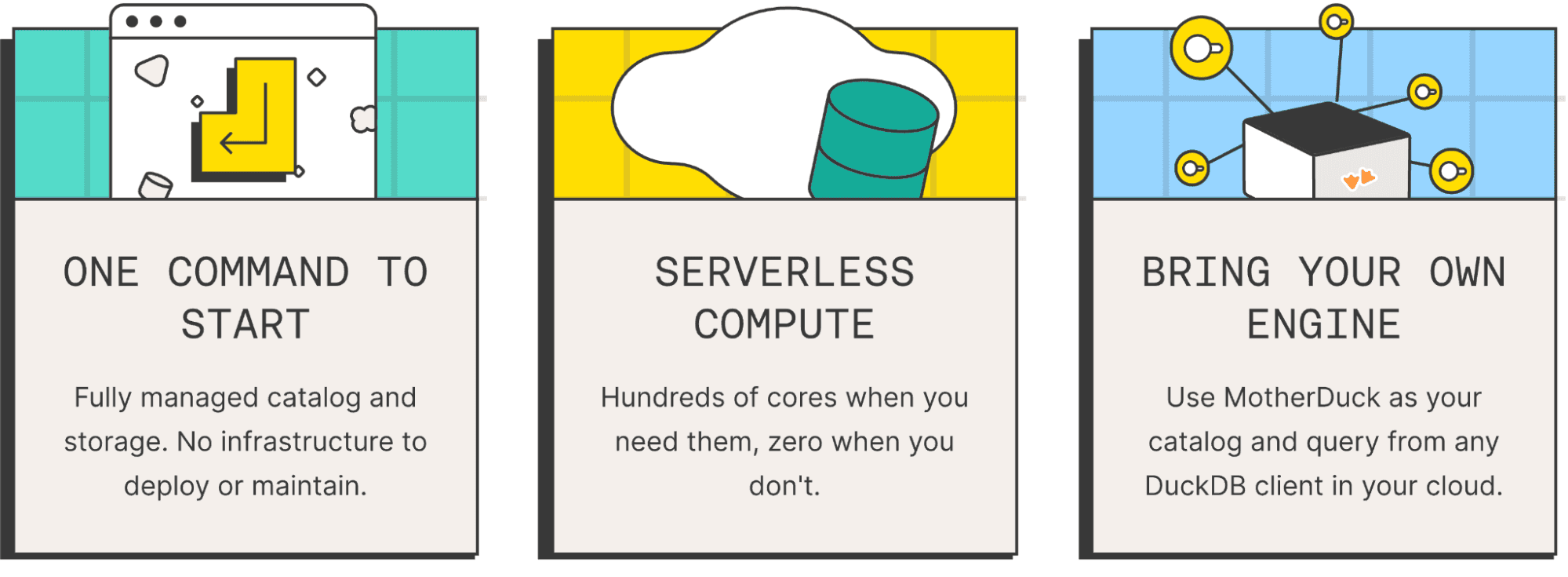
When you create a DuckLake type database on MotherDuck, you still get to use the same serverless compute as when querying MotherDuck Native Storage. Use a lightweight Pulse for answering questions on your lakehouse or a powerful Giga for infrequent bulk maintenance. If you want to use an external engine in addition, feel free!
Every MotherDuck user gets their own compute sandbox - perfect for agents! Gone are the days when a rogue agent would monopolize your entire cluster… Let agents loose on your lakehouse without fear!
MotherDuck's access control makes it easy to manage permissions on your DuckLake. Grant privileges in the MotherDuck UI or through SQL.
MotherDuck has multiple options for managing your DuckLake that simplify your deployment while keeping you in full control. Use a Fully Managed DuckLake to use a MotherDuck catalog, serverless MotherDuck compute, with storage managed by MotherDuck. Want to store your data in your own S3 account? Bring-your-own-bucket! Interested in using other compute engines? Bring-your-own-compute!
| DuckLake Hosting Option | Catalog | Storage | Compute | Use When |
|---|---|---|---|---|
| Fully Managed | MotherDuck | MotherDuck | MotherDuck | You want a simple serverless option |
| Bring-Your-Own-Bucket | MotherDuck | Self-hosted | MotherDuck | You want to own your own data |
| Bring-Your-Own-Compute | MotherDuck | Self-hosted | Self-hosted | You want to use multiple compute engines |
Get Started!
DuckLake is just a few commands away - give it a try locally or on MotherDuck!
Join us for a livestream April 28th to get your DuckLake questions answered and hear performance tuning best practices.
If you want to keep learning about DuckLake, we'll give you the O'Reilly book "DuckLake - The Definitive Guide" for free! Subscribe here to receive the chapters as they are written.
Table of contents
Read Next