Announcing Pg_duckdb Version 1.0
· 6 min read
We're excited to share the 1.0 release of pg_duckdb, an open-source PostgreSQL extension that brings DuckDB's vectorized analytical engine directly inside PostgreSQL. You can think of it as adding a turbo engine to your PostgreSQL database–ready to run efficient, ad hoc queries while PostgreSQL continues doing what it does best: transactional workloads for your production app.
Pg_duckdb embeds a DuckDB instance directly into your existing PostgreSQL process. While pg_duckdb won’t turn your PostgreSQL database into a full-fledged data warehouse, it offers PostgreSQL users a path for speedy analytical queries.
Version 1.0 brings enhanced MotherDuck integration, support for more data types, greater stability, and performance improvements including parallel table scanning–read the full pg_duckdb release notes for all of the details.
Let’s dive into the performance use cases.
DuckDB speed in elephant mode
First, let’s look at pg_duckdb’s performance. As always, performance depends greatly on your workload. In short, the queries that will benefit the most from pg_duckdb are cases where indexes cannot be used efficiently. Certain queries that time out with PostgreSQL alone now become possible with pg_duckdb!
We ran a TPCH-like benchmark suite to test pg_duckdb in two ways: with all PostgreSQL indexes created, and compared to PostgreSQL with only primary keys. Against PostgreSQL with all indexes, speed-ups are nice but not astounding–up to ~4x faster. But against the PostgreSQL engine with only primary keys, pg_duckdb is much faster. Queries that time out within the 10 minute window on PostgreSQL alone now complete in less than 10 seconds with pg_duckdb!
For more details on the benchmark setup, head over to the pg_duckdb repo.
Analytics on PostgreSQL with ducks
Traditionally, scaling analytics workloads in PostgreSQL means maintaining a fleet of replicas. Each replica receives data from the primary instance WAL and applies changes while staying available for analytical queries. Adding indexes to your replicas will improve performance for analytical queries, but here’s the problem: the indexes must be maintained on the primary in order to read on the replicas. Updating indexes leads to a constant negotiation between the team maintaining the primary database and the team using replicas for analytical workloads.
Thankfully, the pg_duckdb extension adds DuckDB to the mix which can read directly from PostgreSQL storage format and quickly return datasets without having to replicate it into yet another storage format or add indexes. When used appropriately, this can massively accelerate queries, up to 1000x in some cases (less if indexes already exist).
It's important to note that when querying PostgreSQL tables directly with pg_duckdb, you're still working with PostgreSQL's row-oriented storage—you don't get DuckDB's columnar storage benefits or compression advantages. The performance gains come from DuckDB's vectorized execution engine, which is optimized for analytical workloads even when operating on row-oriented data.
Already a PostgreSQL expert? You can run pg_duckdb directly by using a Docker image:
Copy code
docker run -d -e POSTGRES_PASSWORD=duckdb pgduckdb/pgduckdb:16-main
Then, query a PostgreSQL table directly–or, query an external Parquet file like our open dataset containing Netflix top 10 program data:
Copy code
-- Use DuckDB engine to query a Postgres table directly
SET duckdb.force_execution = true; SELECT count(*) FROM your_pg_table WHERE status = 'active';
-- Use DuckDB engine to query an external Parquet file accessible from the PG server
SELECT COUNT(*) FROM read_parquet('s3://us-prd-motherduck-open-datasets/netflix/netflix_daily_top_10.parquet');
Keep in mind: PostgreSQL requires that extensions on primary and replicas are identical, so the pg_duckdb extension must also be installed on the primary. Since DuckDB can be very resource-hungry, you’ll want controls in place to prevent use on the primary. Additionally, each connection to PostgreSQL gets its own DuckDB instance–DuckDB should be appropriately configured with resource limits that match the size of the replica.
PostgreSQL as a data lake engine
Since DuckDB has a great abstraction for Data Lakes–a unified SQL interface that works across cloud providers and file formats–we can also extend that to PostgreSQL with pg_duckdb. This extension brings powerful capabilities to PostgreSQL: secure access to cloud storage (S3, GCP, Azure), the ability to directly query remote files in various formats (CSV, JSON, Parquet, Iceberg, Delta), and an analytics engine that serves BI tools and applications using familiar PostgreSQL SQL.
The result is 'in-database ETL'–you can now handle data transformations that traditionally required external tools directly within SQL queries.
This architecture enables something particularly powerful: joining PostgreSQL data with remote data lake files in a single query. For example, you could enrich a local customers table with user behavior data from a 10-billion-row Parquet file stored on S3–all in one SQL query.
Copy code
-- enrich customers table with event data from S3
SELECT
date_trunc('month', c.signup_date) as signup_month,
avg(b['page_views']) as avg_page_views,
avg(b['session_duration']) as avg_session_duration,
count(*) as customer_count
FROM customers c
JOIN read_parquet('s3://data-lake/user_behavior_10b_rows.parquet') b ON c.customer_id = b['customer_id']
WHERE b['last_active'] >= '2024-01-01'
GROUP BY date_trunc('month', c.signup_date)
ORDER BY signup_month;
Serverless analytics power with MotherDuck
While PostgreSQL can benefit from DuckDB's analytical horsepower with pg_duckdb, it wasn't architected to handle the spiky workloads from large analytical queries, often a tipping point for selecting a dedicated OLAP solution. The pg_duckdb extension offers a MotherDuck integration that solves this by offloading demanding analytics to serverless cloud compute, allowing users to ship PostgreSQL data to MotherDuck using familiar SQL operations like CREATE TABLE AS statements or incremental inserts.
This hybrid approach provides several advantages. MotherDuck can leverage connections to cloud storage for faster data lake reads, and users gain flexibility in how they interact with their data—they can connect directly to MotherDuck for complex DuckDB analytics or stick with PostgreSQL for familiar operational queries.
Your analytical queries on data in MotherDuck will also be much faster than if the data is stored in regular PostgreSQL tables, because the DuckDB engine benefits greatly from the columnar storage that MotherDuck uses. Lastly, the architecture supports scaling through read replicas that automatically scale out to a fleet of Ducklings—MotherDuck compute instances—meaning your small, always-on PostgreSQL replica can instantly access massive serverless compute power when analytical workloads spike.
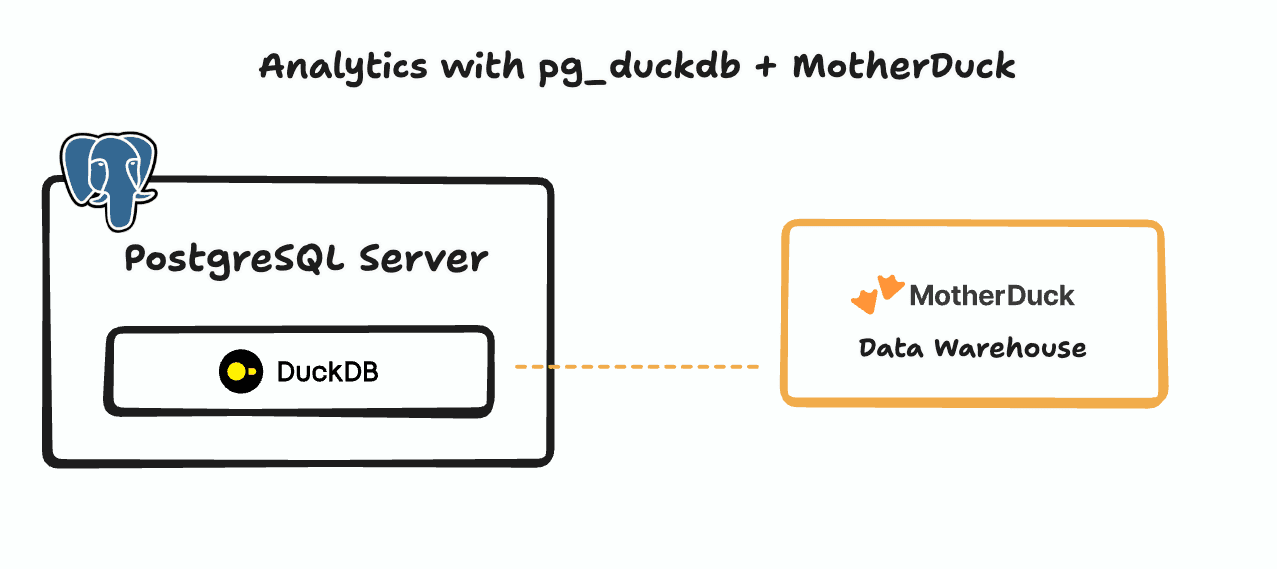
The tradeoff is network latency versus processing power. While storing data only in PostgreSQL minimizes data movement, replicating frequently accessed data to MotherDuck reduces the network bottleneck for analytical queries by keeping compute and storage co-located in the cloud.
Getting started with pg_duckdb
Ready to add DuckDB-powered analytics to your PostgreSQL workflow? Visit the pg_duckdb GitHub repo to get started, and check out these helpful resources along the way:
Table of contents