From large raw datasets to interactive data app in minutes
In this post, we'll explore how to leverage MotherDuck and Preswald's interactive data apps to more easily and quickly analyze large public health datasets, specifically cholesterol measurements at a population scale.
In this post you’ll learn
- How MotherDuck extends DuckDB to handle multi-table queries in the cloud.
- The importance of the read-scaling token for 4x faster data loading, especially when wrangling multiple tables.
- How Preswald helps you build live, Python-based data apps that go beyond static dashboards.
Challenges researchers face
Public health datasets come in all shapes and sizes, from CSV dumps to relational systems. Linking cholesterol levels to age groups, race/ethnicity, and comorbidities isn’t a single-step process. But existing solutions often require big clusters or fancy ETL pipelines just to run a few multi-join queries. And don’t even get us started on non-interactive dashboards or spreadsheets—they leave scientists clicking “refresh” and crossing their fingers.
Common Pain points
- Multiple, fragmented tables: e.g., demographics, lab results, comorbidities.
- Slow ingest and overhead: “Scaling up” typically means big clusters or advanced ETL.
- One-dimensional dashboards: Spreadsheets and static BI can’t handle evolving questions in real time.
MotherDuck to the Rescue
MotherDuck is powered by the DuckDB engine you know and love, but supercharged in the cloud:
- Write standard SQL queries (no new query language to learn)
- Lightning-fast aggregations. DuckDB’s columnar engine plus in-memory operations.
- Automatically offload. If your dataset doesn’t fit on your laptop, MotherDuck picks up the slack.
Preswald: interactive data apps in Python
Preswald gives you a near-instant route to interactive data apps, without forcing you to wade through a sea of JavaScript frameworks or pricey BI licenses.
- Lightweight. Build dynamic dashboards with nothing but Python.
- Charts refresh as soon as data changes.
- No complicated front-end code or vendor lock-ins.
- Anyone with the app link can start exploring data.
Preswald is especially handy for public health folks who want to query large data one minute and spin up a live interactive chart the next. You don’t need to become a web developer to let your colleagues filter cholesterol ranges by age group or compare comorbidity severity across different ethnicities.
Bringing It All Together: A Quick Demo
- Install Dependencies
- Connect to MotherDuck
- Query the Cholesterol Table
- Build a Preswald Dashboard (line chart, bar chart, scatter plot)
- Run & View Your Interactive App
Step 1: Install Dependencies
Make sure you have duckdb, pandas, plotly, and preswald installed in your Python environment.
Copy code
pip install duckdb pandas plotly preswald
Step 2: Connect to MotherDuck
You can connect to MotherDuck using your MotherDuck token. By default, duckdb.connect("md:my_db") will look for an environment variable called MOTHERDUCK_TOKEN. If you’d like read-scaling for faster queries, append ?read_scaling_token=YOUR_TOKEN_HERE to the connection string.
Copy code
import duckdb
# Example with environment variable:
# export MOTHERDUCK_TOKEN=<your_token_here>
con = duckdb.connect("md:my_db")
# OR with read scaling explicitly:
# con = duckdb.connect("md:my_db?read_scaling_token=<your_token_here>")
Step 3: Query the Cholesterol Table
In this example, we’ll pull data from a table named DQS_Cholesterol_in_adults_age_20. Once connected, run a standard SQL query to bring your data into a Pandas DataFrame.
Copy code
# 1. Query your table
df = con.execute("SELECT * FROM DQS_Cholesterol_in_adults_age_20").df()
# 2. Take a quick peek
print(df.head())
This shows you the first few rows, confirming you have the data you expect.
Step 4: Build a Preswald Dashboard
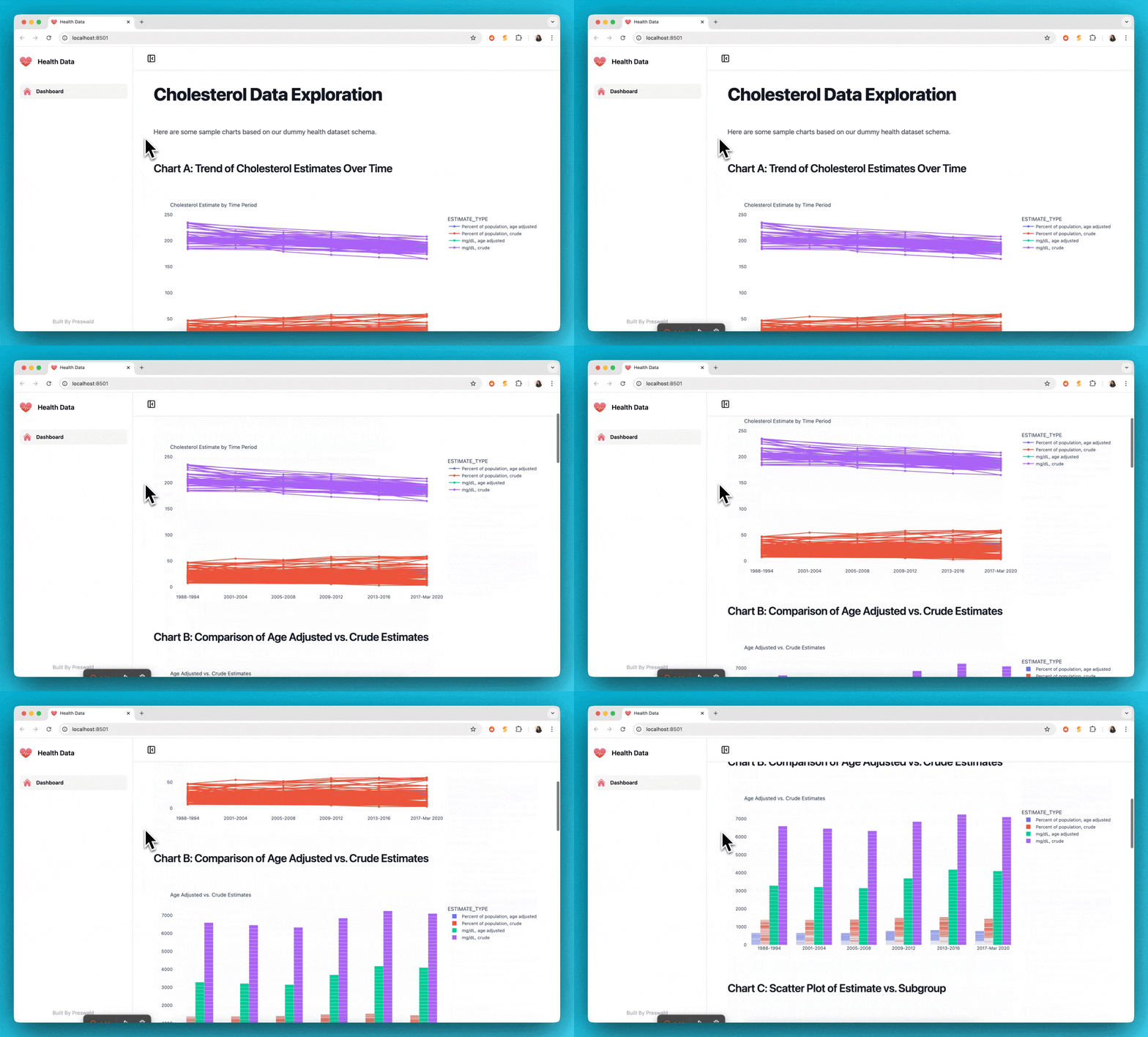
We’ll build three Plotly charts and present them with Preswald:
- A line chart showing cholesterol estimates over time
- A bar chart comparing age-adjusted vs. crude estimates
- A scatter plot to visualize estimates across different subgroups
Here’s the full code with comments explaining each part:
Copy code
import pandas as pd
import duckdb
import plotly.express as px
from preswald import text, plotly, view
# ----------------------------------------------------------------------------
# STEP A: Connect to MotherDuck
# ----------------------------------------------------------------------------
con = duckdb.connect("md:my_db")
df = con.execute("SELECT * FROM DQS_Cholesterol_in_adults_age_20").df()
# ----------------------------------------------------------------------------
# STEP B: Add descriptive text for Preswald
# ----------------------------------------------------------------------------
text("# Cholesterol Data Exploration")
text("Below are several charts that help us visualize cholesterol estimates.")
# ----------------------------------------------------------------------------
# STEP C: Create a line chart of ESTIMATE over TIME_PERIOD
# ----------------------------------------------------------------------------
text("## Chart A: Trend of Cholesterol Estimates Over Time")
# Filter out rows that don’t have an actual ESTIMATE
df_line = df.dropna(subset=["ESTIMATE"]).copy()
fig_a = px.line(
df_line,
x="TIME_PERIOD",
y="ESTIMATE",
color="ESTIMATE_TYPE", # e.g., "Percent of population, age adjusted" vs "crude"
markers=True,
title="Cholesterol Estimate by Time Period"
)
plotly(fig_a)
# ----------------------------------------------------------------------------
# STEP D: Create a grouped bar chart comparing ESTIMATE_TYPE
# ----------------------------------------------------------------------------
text("## Chart B: Comparison of Age Adjusted vs. Crude Estimates")
fig_b = px.bar(
df_line,
x="TIME_PERIOD",
y="ESTIMATE",
color="ESTIMATE_TYPE",
barmode="group",
title="Age Adjusted vs. Crude Estimates"
)
plotly(fig_b)
# ----------------------------------------------------------------------------
# STEP E: Create a scatter plot of ESTIMATE vs. SUBGROUP
# ----------------------------------------------------------------------------
text("## Chart C: Scatter Plot of Estimate vs. Subgroup")
fig_c = px.scatter(
df_line,
x="SUBGROUP_ID",
y="ESTIMATE",
color="GROUP", # e.g. "Total" vs. "Race and Hispanic origin"
size="ESTIMATE",
hover_data=["TIME_PERIOD", "ESTIMATE_TYPE"],
title="Cholesterol Estimate by Subgroup"
)
plotly(fig_c)
# ----------------------------------------------------------------------------
# STEP F: Render the final output in Preswald
# ----------------------------------------------------------------------------
# We'll also show a table preview at the bottom.
view(df)
# Close the DuckDB connection if you like
con.close()
What’s Happening in Each Section
- Connect to MotherDuck: We use
duckdb.connect("md:my_db")to establish a connection. - Fetch Data: A simple SQL query to pull all rows from the
DQS_Cholesterol_in_adults_age_20table into a DataFrame. - Preswald Text: We insert headings and descriptions (
text()) so people viewing the dashboard know what they’re looking at. - Line Chart: Shows cholesterol estimates vs. time, separated by
ESTIMATE_TYPE. - Bar Chart: Compares different
ESTIMATE_TYPEcategories within each time period (grouped bars). - Scatter Plot: Visualizes how
ESTIMATEvaries bySUBGROUP_ID(e.g., an age or demographic marker), coloring byGROUP. - View: Finally, we call
view(df)to render everything as an interactive web app.
Step 5: Run & View Your Interactive App
With everything in place, run the script using Preswald:
preswald run my_script.py
This launches a local server. Open the provided URL in your web browser, and you’ll see your line chart, bar chart, scatter plot, plus a data table preview. From here, you can:
- Filter or pivot your data (if you add user inputs)
- Refresh the script for near-instant updates
- Share the app link with colleagues for real-time collaboration
Bottom Line
Preswald is the quick, straightforward way to turn your data queries into interactive dashboards for broader consumption. Coupled with MotherDuck, you get speed and scalability for large datasets plus an easy path to real-time exploration (without spinning up a separate BI tool or writing tons of custom front-end code).
Ready to get quacking? If you have any questions or want to share how you’re using MotherDuck with Preswald, drop us a line in the community Slack. Here’s the code from the example
Table of contents