Your Obsidian Vault Can Now Run SQL (and Your Agent Can Read It)
· 6 min read
Obsidian has been having a moment lately, and a big chunk of it comes from one design decision: file over app. There is no proprietary format, no cloud lock-in. Your notes are markdown files sitting on disk, and Obsidian is just a viewer on top of them. Close the app, open the folder in Neovim or VS Code, everything is still there.
That decision is also why Obsidian quietly became one of the best playgrounds for AI agents.
If you prefer watching over reading, there's a full demo walkthrough on YouTube covering everything in this post.
Why Obsidian and AI fit together
Three things happened.
First, Karpathy shared his "LLM knowledge base" setup back in April: he points his agents at a local folder of markdown, they build and maintain a wiki, and he browses it through Obsidian. There are many ways to pair Obsidian with AI, but this one stuck with a lot of people because it needs zero infrastructure. It's just files.
Second, agents love markdown. The skills framework is markdown. Agent instructions are markdown. It turned out to be a really good middleware between humans and agents, and that's been Obsidian's native format since day one.
Third, the plugin ecosystem exploded. Obsidian has thousands of community plugins (you can run a full Excalidraw canvas inside it), and with AI making plugin development accessible to anyone, submissions went through the roof. The team was getting a new plugin PR roughly every 6 hours. Their answer, detailed in their future of plugins post: a developer dashboard with automated review. Submit your plugin, automated checks run (warnings, errors), and your published plugin gets a public health score. The one we're about to talk about sits at 97%.
So we built one: a DuckDB + MotherDuck plugin for Obsidian.
What it does
You write a SQL block in any note, run it, and freeze the result as a plain markdown table right under the query. The note becomes a self-contained document: query and result, readable in any editor, by any human, by any agent.
DuckDB runs locally via WASM (no install, no server), and if you add a MotherDuck token you can query your cloud data from the same note.
Wait, isn't that Dataview?
Fair question, Dataview is the go-to plugin for querying your vault. But it solves the opposite problem: Dataview queries the notes themselves (frontmatter, tags, links), while this plugin pulls external data into your notes via SQL.
- Use Dataview for "list every note tagged #project, sorted by created date"
- Use this for "the latest revenue numbers from my warehouse, joined with a local expenses CSV"
And yes, you can join across sources: a local CSV sitting in your data folder with a cloud table in MotherDuck, in one query.
Quick start
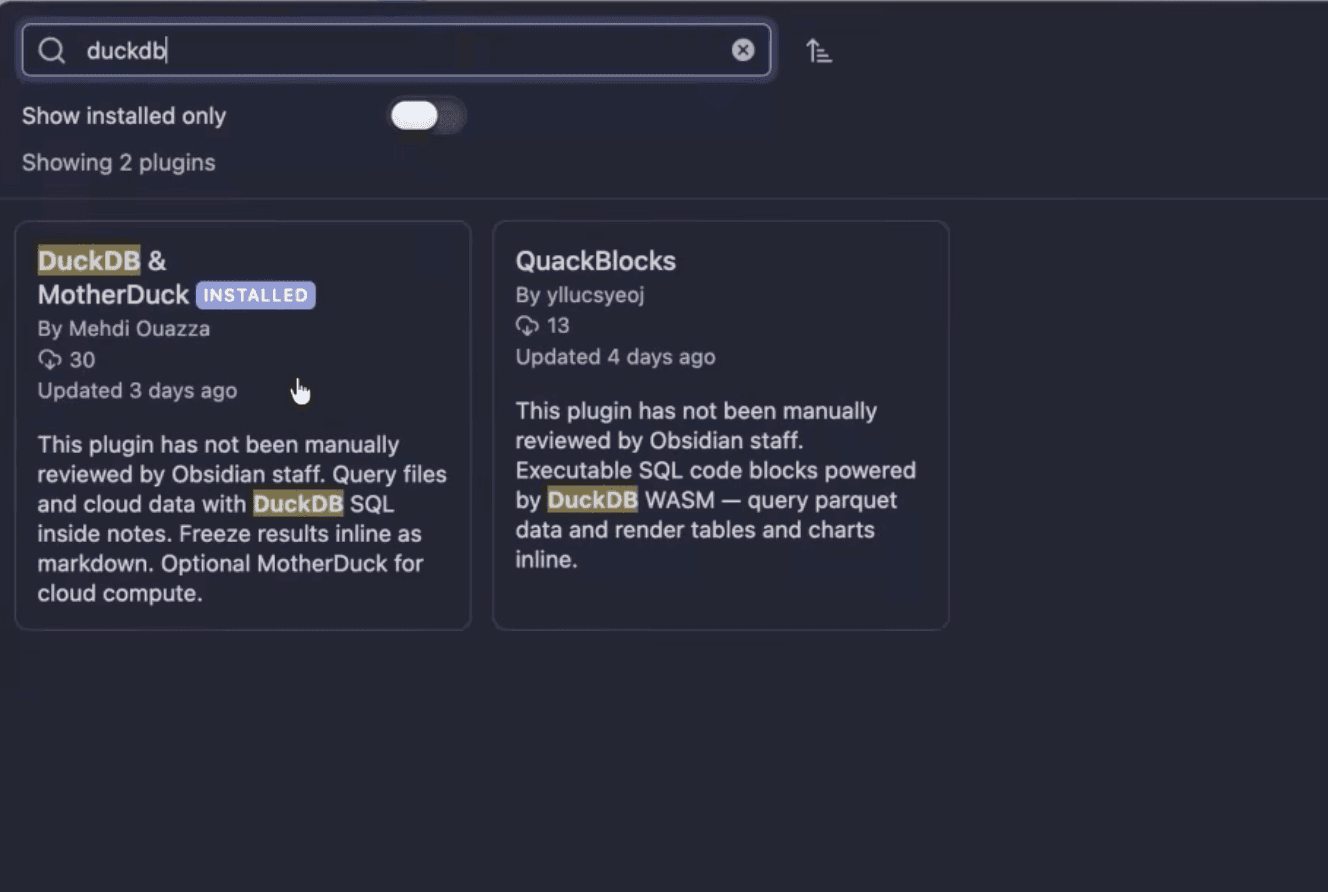
Install from Settings > Community plugins, search for "DuckDB and MotherDuck".
Then paste this into any note:
Copy code
```duckdb
SELECT
o_orderpriority AS priority,
count(*) AS orders,
round(sum(o_totalprice), 2) AS revenue
FROM read_parquet('https://shell.duckdb.org/data/tpch/0_01/parquet/orders.parquet')
GROUP BY 1
ORDER BY revenue DESC
```
In reading mode the block renders as a SQL panel with Run, Freeze, and Clear freeze buttons. DuckDB WASM range-reads the parquet over HTTP, no token needed. It works with anything DuckDB reads: Parquet, CSV, JSON, Excel, Iceberg, Delta, geospatial files.
Hit Freeze and the result drops in as a markdown table, bracketed by sentinel comments so the next refresh knows what to replace:
Copy code
<!-- md:cache hash=b54c0ac2 conn=local ts=2026-05-15T09:27:08Z rows=5 --> | priority | orders | revenue | | --- | --- | --- | | 2-HIGH | 3065 | 434187711.87 | | 4-NOT SPECIFIED | 3024 | 428175171.06 | | 1-URGENT | 3020 | 426348805.57 | <!-- md:cache-end -->
The sentinel carries a query hash, connection, timestamp, and row count. In raw mode it's still just markdown: it diffs cleanly in git and renders everywhere, including mobile previews.

For cloud data, swap the fence to motherduck. Every MotherDuck account has the shared sample_data database attached, so this works out of the box:
Copy code
```motherduck
SELECT
type,
count(*) AS items,
round(avg(score), 1) AS avg_score
FROM sample_data.hn.hacker_news
WHERE type IS NOT NULL
GROUP BY 1
ORDER BY items DESC
```

Both connections can live side by side in the same note. Local DuckDB for files on disk, MotherDuck when you need cloud tables or want to push heavy SQL off your laptop. If you don't have an account yet, you can start with MotherDuck for free.
Scheduled refresh
Frozen tables go stale, so the plugin has scheduling built in. Pick daily or weekly in the dropdown above any block, and the plugin writes a property to the note's frontmatter:
Copy code
---
duckdb-motherduck-refresh: daily
duckdb-motherduck-refresh-last: 2026-05-04T10:30:00Z
---
Again: just markdown. No hidden database tracking which notes refresh when. While Obsidian is open, the plugin sweeps once an hour and re-materializes any note past its cadence. The settings page has a "Refresh now" button to force-sweep every note in the vault, an "Unschedule all" to strip the frontmatter everywhere, and an activity log of the last 100 refresh attempts.
Let your agent refresh notes
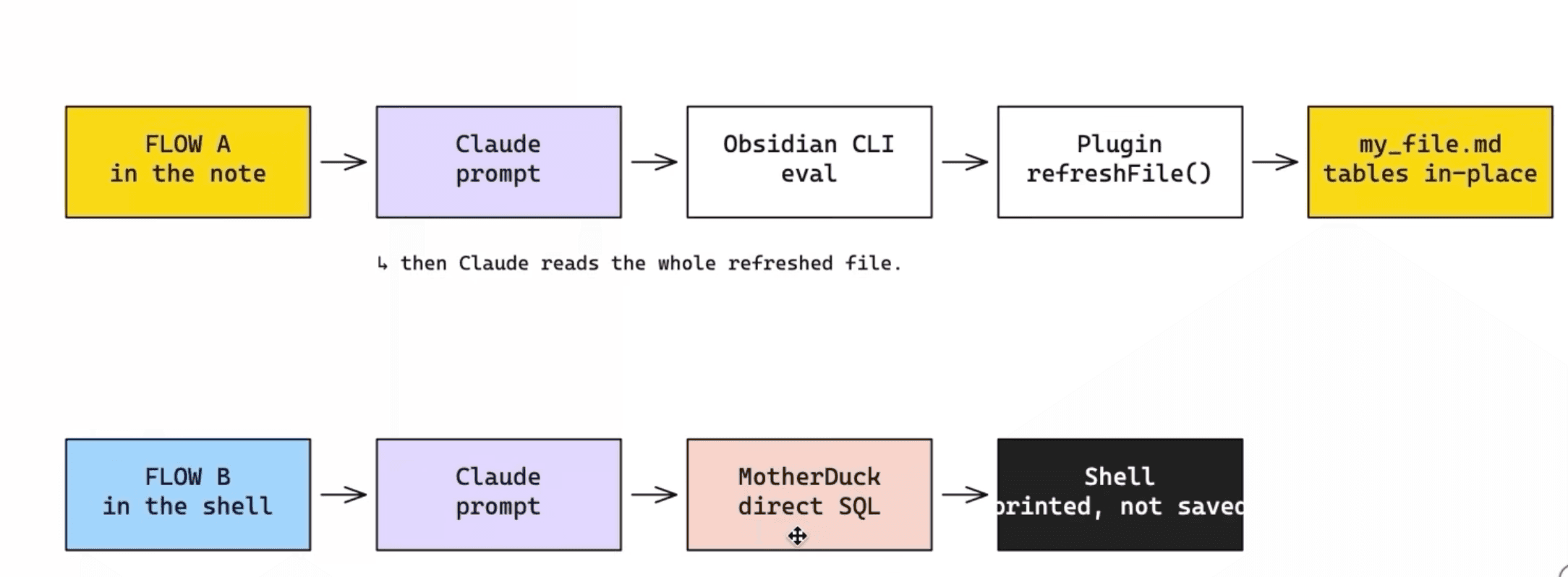
Here is where it gets interesting. The same code path the Refresh button uses is exposed as a plugin API, and Obsidian now ships an official CLI (turn it on under Settings > General > Command line interface). Which means Claude Code, Codex, or any agent with shell access can refresh your notes:
Copy code
obsidian eval code="app.plugins.getPlugin('duckdb-motherduck').api.refreshFile('path/to/note.md')"
In the video demo I just prompted: "refresh the data using the duckdb-motherduck Obsidian plugin eval API on the note obsidian-md-demo". The agent called the CLI, the API returned the refresh count, and all five blocks in the note got a fresh timestamp. There's also api.runQuery(sql, connection) for ad-hoc SQL if your agent needs to go further.
Drop that one-liner into a cron job or a Claude Code skill and your notes keep themselves up to date.
Why this matters: cache vs query
Today, most people wire their AI agent to a database through an MCP server or a CLI client. Agent gets a question, queries the warehouse, result lands in your shell, and it's gone.
The strategy here is different. Your vault becomes a local knowledge base with data inlined in the markdown. When you ask "what's the average score of a Hacker News story?", the agent reads the note. No query, no MCP round-trip, no tokens spent re-fetching data that was already computed. In my demo that answer came back in 6 seconds, because the number was already sitting in the file.
And when the data does need to be fresh, the agent refreshes it through the plugin, on your rules. Cached by default, live when it matters.
Bonus: it runs on your phone
DuckDB compiles to WASM, which means it runs in any Electron app, and Obsidian ships on mobile. Enable the community plugin there and the same blocks run on your phone, local queries and MotherDuck queries alike. Since the notes sync as files, your mobile coding agent can read the inlined results too, without ever touching the network.

Try it
The plugin is on the community store, the code is on GitHub (stars appreciated), and there's a demo markdown file you can paste into your vault to play with.
In the meantime, take care of your markdown.
Table of contents
Read Next