Self-hosting DuckDB: the road to production
· 13 min read
I have been talking with the DuckDB community for 3+ years now, and at MotherDuck we talk to a lot of DuckDB users daily. The same thing keeps coming up: hosting DuckDB has a graduation path, and a handful of common gotchas that trip people up at each step. You start at one level, you climb to the next, and most of the pain comes from not knowing which rung you are actually on.
This post maps that pattern level by level, so you can see what self-hosting DuckDB actually takes at each stage, and where the honest build-versus-buy line is for you. It is not a "single-node is plenty, relax" post, and it is not a "you need a cluster" post. It is a map, and the whole point is to help you find where you sit on it, and how far you actually need to climb.
A quick word on the benchmarks before we start: there are a few in here, and you should not trust them. Really. Do not make a decision based on someone else's benchmark, mine included. They are here to illustrate a pattern or a trade-off, not to hand you a number. Run your own on your own data.
Where are you on the road?
DuckDB is an in-process, single-node analytical database. That single-node part scares people the moment you put it next to the word "production." I get it, but it is a feature, not a bug (more on that later).
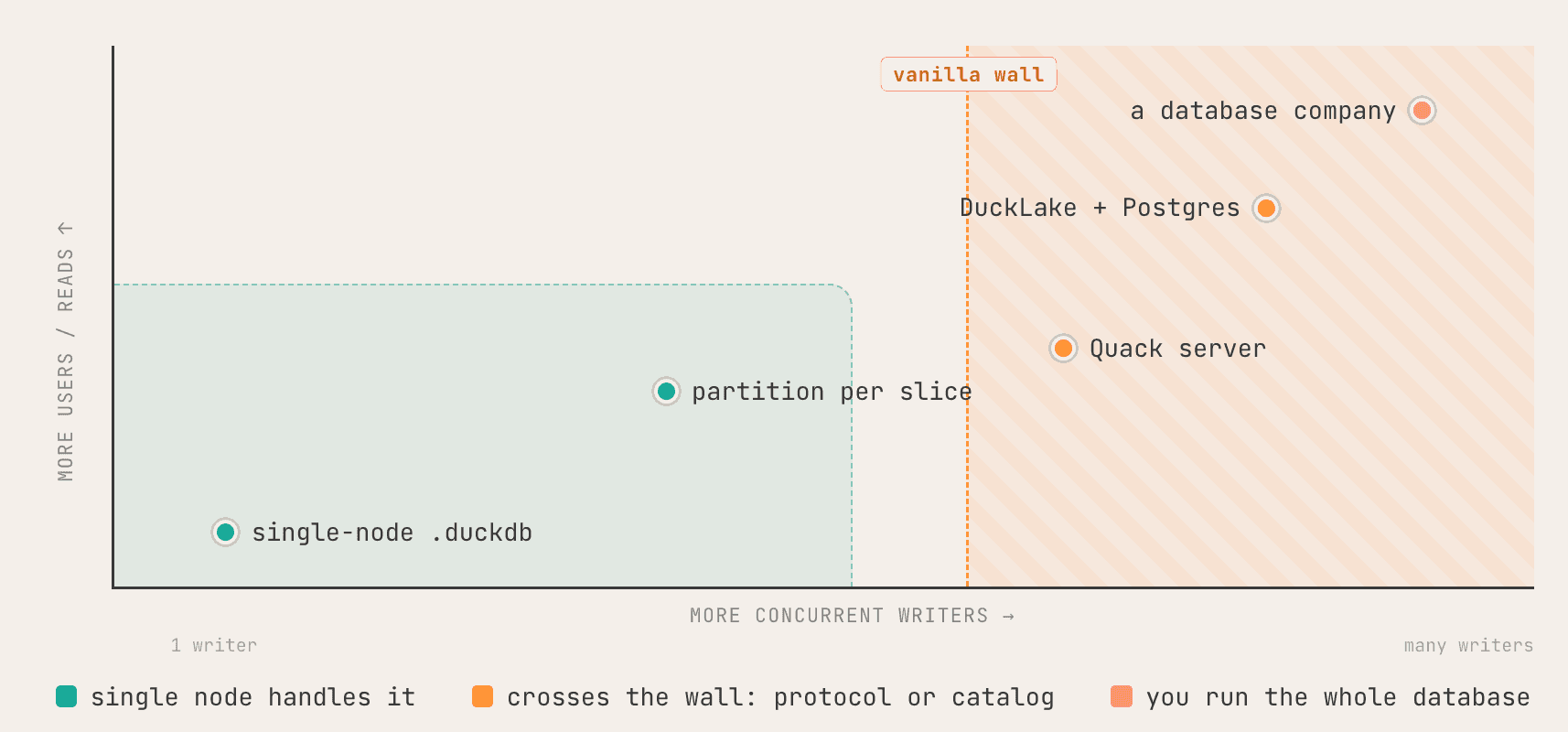
Two things push you along this map. More concurrent writers push you right. More users and readers push you up. The green corner, bottom-left, is one writer testing DuckDB locally. Climb up and you get many readers. Climb right and you get many writers. And if you end up in the top-right, running all of it for lots of users, congratulations: you are now a database company, like MotherDuck.
The other dimension of course to consider is the size of your data, but then I needed a 3D graph for that.
Build versus buy, in the age of AI
Before tackling the various architectures and level of self-hosting DuckDB, the old boring decision that sits underneath is build vs buy. This isn't specific to DuckDB, it is true for any tech you would self-host, but people forget it constantly.
Self-hosting cost is not the license (DuckDB is free anyway). It is your rate, or your team's rate, times the time you spend building plus maintaining.
Self-host cost = your rate x (time building + maintaining)
Buy cost = managed price + the value you lose to its limits

I want to insist on the maintaining part, because AI changed the first half. Building is genuinely easy now. You can generate most of this infrastructure in an afternoon.
Maintaining is, if anything, harder than before, because we review less of the code we ship. When something breaks at 3am, you are opening a black box you did not actually write line by line. Building got cheap. Maintenance did not.
And the "buy" side isn't just the sticker price per seat. Every managed product has limits. MotherDuck has limits inherited or not from DuckDB that we keep chipping away at. If one of those limits is a must-have for you, that is a real cost of buying, and you should weigh it.
So there is a break-even point. You can absolutely start by building, if, and only if, you are technical enough. If you are a software or platform engineer comfortable with infrastructure, go for it. If you are not, I would not push you there. Either way the honest skill, and the hardest one, is knowing when to stop building and switch to a managed service. There is a migration cost lurking too, which never shows up on the nice break-even chart. Factor it in.
Now the levels. On each one I will mark the boxes you would take on: this icon means a box you build and/or maintain.
Level 1: the laptop, and nothing to operate
This is what most people do, and it is great. You install DuckDB, open the CLI or a Python process, and query local files.
Copy code
import duckdb
con = duckdb.connect("analytics.duckdb")
con.sql("""
SELECT l_returnflag, l_linestatus,
sum(l_quantity) AS qty,
avg(l_discount) AS avg_disc,
count(*) AS cnt
FROM lineitem
WHERE l_shipdate <= DATE '1998-09-02' -- ~98% of rows: a real full scan
GROUP BY 1, 2 ORDER BY 1, 2
""")
That is TPC-H Q1 over a 21 GB dataset (810M-row lineitem). Here it is on a MacBook, native .duckdb file versus raw Parquet on the same SSD. The .duckdb file is a bit bigger because it carries metadata and indexes, and it is also a bit faster:
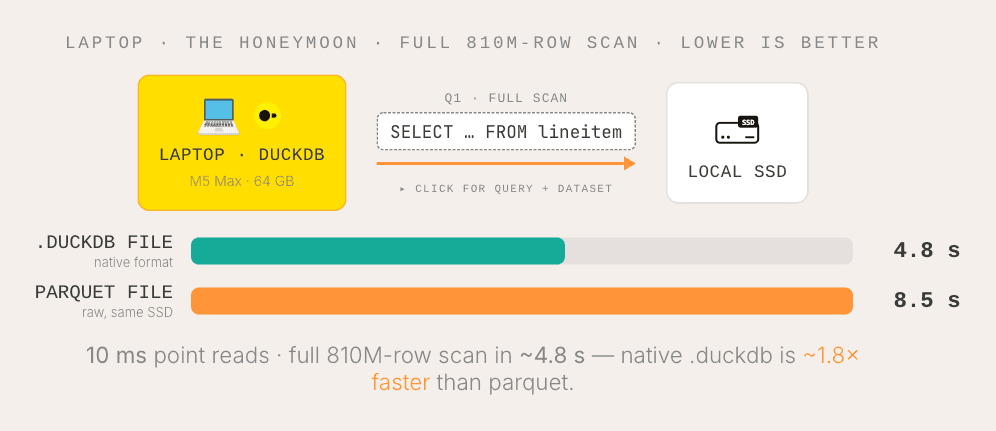
This is the best setup you will ever have. Compute sits right next to storage, both are heavily optimized, both are local NVMe. Point reads in 10 ms, a full 810M-row scan in about 5 seconds.
Level 2, first move: the data goes to the cloud
You need to share the data with other people, so you move it typically to an object storage like AWS S3, as Parquet or a .duckdb file, and keep the compute local for now. DuckDB reads straight from object storage:
Copy code
-- compute stays on your laptop, data now lives on S3
CREATE SECRET (TYPE s3, PROVIDER credential_chain);
SELECT count(*)
FROM read_parquet('s3://my-bucket/lineitem/*.parquet');
The moment you do this, you have added a box: authorization. Someone has to set up the IAM roles so your teammates, whatever DuckDB client they use, can reach that data. (Same story on GCS or Azure, DuckDB supports them all, the reasoning doesn't change.)
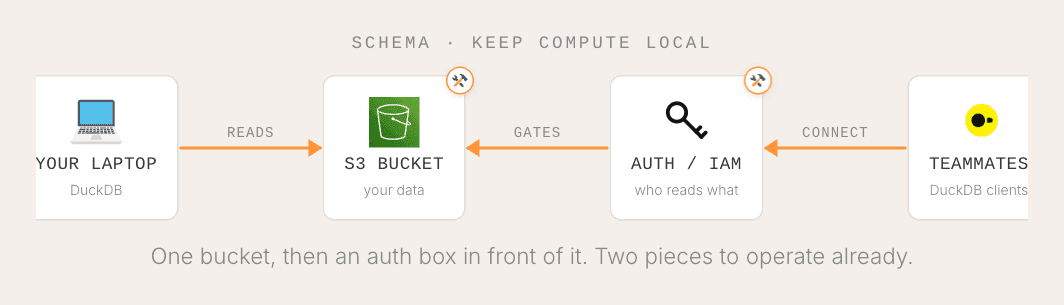
There is also a dimension the matrix doesn't show: data size. Keeping the compute on your laptop while the data sits in the cloud is fine as long as the data is small to medium, because now you are bottlenecked on your own internet bandwidth from laptop to cloud.
Small data, no problem. Big data, that link becomes the bottleneck, and that is exactly what pushes you to move the compute to the cloud too.
But first, what happens to that query once the data leaves the SSD:
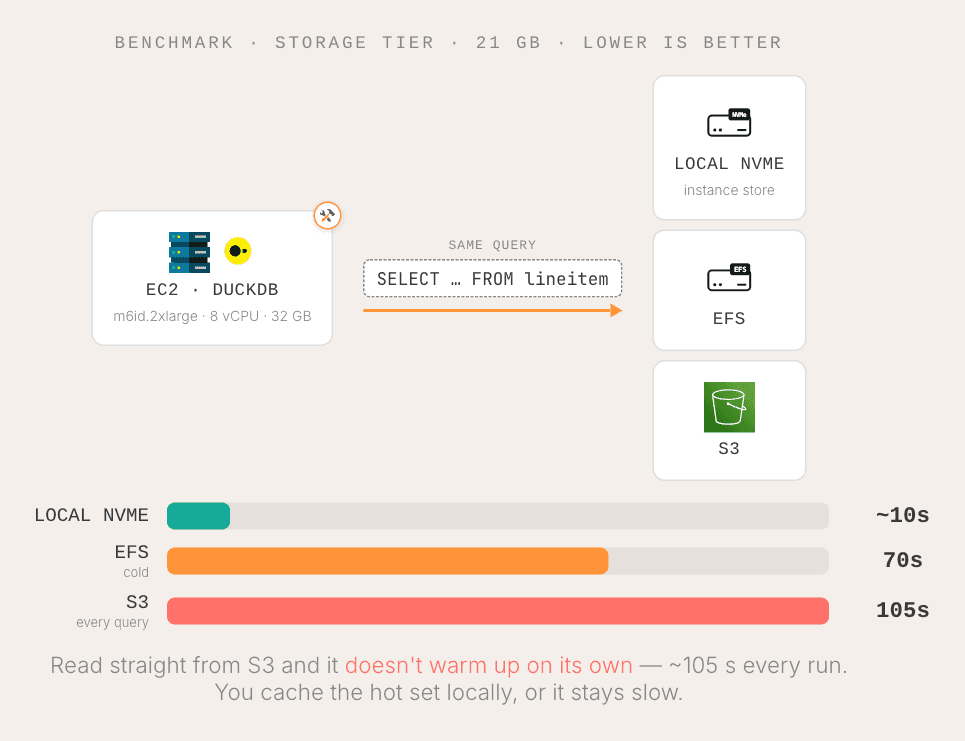
Same query, three storage classes. Local NVMe is fast. EFS is slow cold, then warms up. S3 stays slow on every query. The reason we forget: in the cloud, not everything runs on optimized NVMe on purpose, because that would be too expensive. There are different storage classes for different jobs, and picking one is now a decision you own. RAM hides the difference until your data outgrows it.
Level 2, second move: the compute goes to the cloud
When the data gets big, you move the compute next to it. Now you are operating a server. That means a second authorization box (people connect to a server, run compute there, and still need the right permissions on storage), and it also means an interface.

The interface is a bigger deal than it sounds. If you want people (and their tools) to reach your compute cleanly, you often end up building a DuckDB extension. That is how a lot of things, including MotherDuck, talk to DuckDB. Extensions are built in C++, where it works best. You can write them in Rust or other languages the DuckDB team has been opening up, but C++ is the well-trodden path.
Now the same query on an EC2 box (8 vCPU, 32 GB RAM), across storage tiers, and then the question of how you scale it:
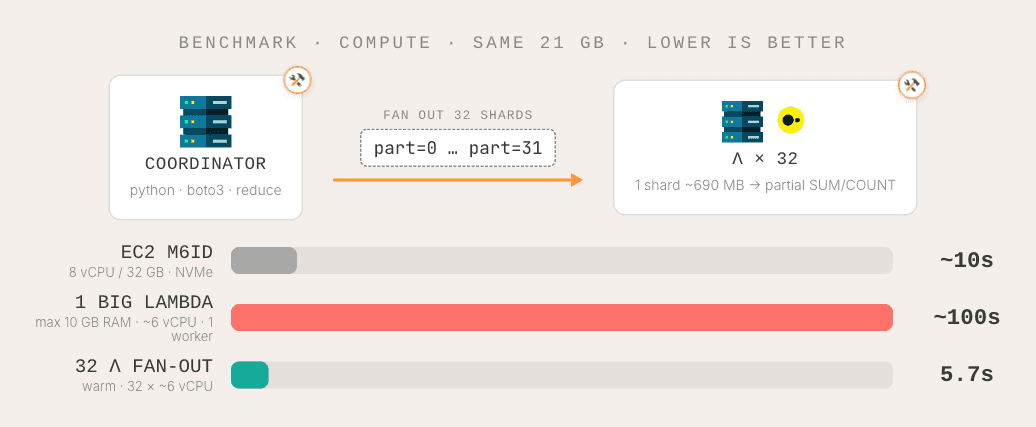
People get scared of DuckDB here because it is single-node: "what if my data doesn't fit in memory?" One classic answer, and I have seen this architecture many times (Okta, the authorization company, runs a version of it): fan out. You put one coordinator box in front, split the 21 GB dataset into ~700 MB shards, run one small Lambda per shard doing a partial GROUP BY + SUM/COUNT, and the coordinator stitches the partial results back together. Classic map-reduce. The result is as fast or faster than the single box, and you did not need a giant machine. You just needed to know how to slice and dice.
The cost moved, though. It moved into the coordinator, the sharding, and the reduce step you now build and operate. There is also smallpond from DeepSeek, an open-source distributed layer over DuckDB, if you want to go further, but it is honestly pretty challenging to run for the average team. The easy, boring, works-today option is a Lambda or any edge function your cloud provider already has.
Level 3: scale up, or scale out
That was scale out: many small workers plus a coordinator. The other direction is scale up: take a bigger box, and typically run it on Kubernetes so you can allocate resources and, ideally, spawn one pod per user. Per-user pods are great for hypertenancy, so users don't fight over each other's resources, but now you have to actually manage that scaling.
One caution on Kubernetes, from experience. Every cloud provider offers managed Kubernetes, and it looks easy: start a cluster, run some DuckDB pods, done. If you already have a team running k8s, go for it. But if this is new for you and you are betting "it can't be that hard," I want to gently push back. I have been there, running k8s clusters, and it is not that easy when you are a newcomer.
Level 4: many readers
The first kind of real load most people hit is reads: lots of users querying the same data at once. This is the axis that pushes you up the matrix, and the question shifts from "can it answer one query fast" to "what happens to the tail latency when 128 people hit it at the same time." Same query, one box versus MotherDuck scaling out, at 128 concurrent readers:
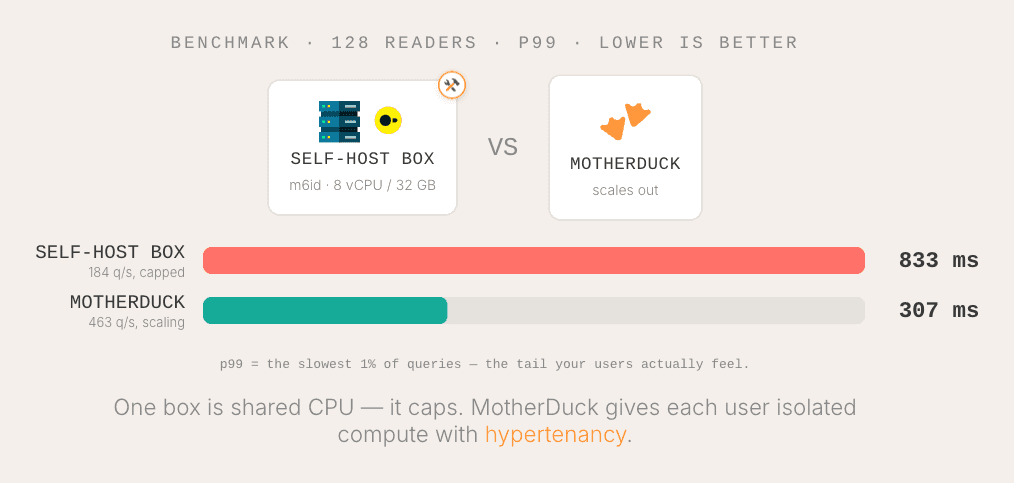
One box is shared CPU, so its tail latency blows up under load. MotherDuck spawns small isolated boxes per user, so each reader gets its own compute and the tail stays flat. That isolation is the multi-tenancy box, and building it yourself is real work on top of your k8s cluster.
There is a bonus route for readers: push the compute into the browser with DuckDB-WASM. Each reader runs the engine on their own laptop, so hot, small data feels instant and costs you nothing in the cloud.
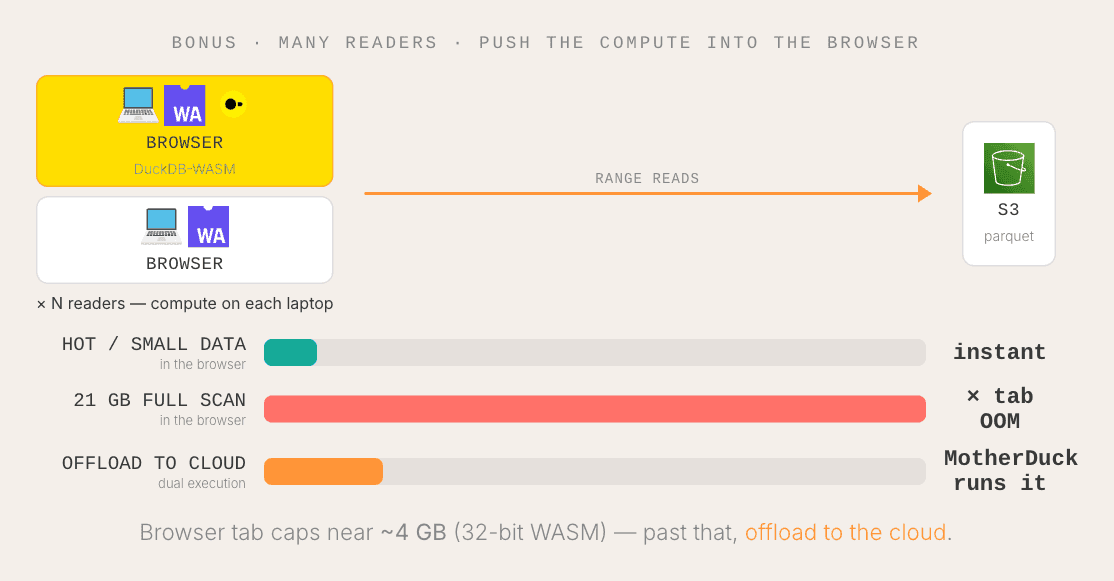
The catch is the 32-bit WASM heap: a browser tab caps near 4 GB, and honestly you want to stay well under that, say 2 GB to be safe. Past that you have to offload to the cloud, and now you own the "when do I offload" logic. (MotherDuck does this as dual execution, moving a workload between the client and the cloud seamlessly, in the browser or in Python.)
Level 5: many writers
Reads you scale by throwing more compute at them. Writes are the real wall. Two DuckDB processes cannot write to the same file: open it twice and the second one just gets a lock error. One writer with many readers is fine.
Many writers is where it breaks, and there are two ways through it.
Quack. A client-server protocol for DuckDB, released a few weeks ago, still very early. You run a server, and clients connect over quack://. Writes get serialized server-side, so you get real concurrency instead of a lock:
Copy code
-- server: one DuckDB process holds the write lock
CALL quack_serve('quack://0.0.0.0:4200', token := '...');
-- client: many of these can write at once
CALL quack_query('quack://host:4200',
'INSERT INTO events VALUES (...)', token := '...');
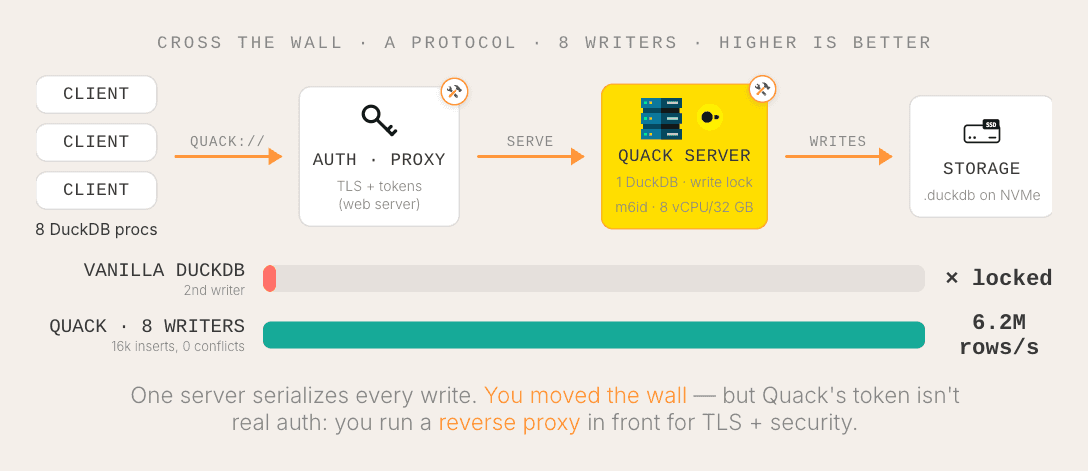
Where vanilla DuckDB locks the second writer, Quack takes 8 concurrent writers with zero lock conflicts and pushes serious bandwidth. But note the box it adds: Quack is a protocol, not a platform. The token is not real auth, so you build an authorization proxy in front for TLS and security. You run and scale that server. (And to be clear, MotherDuck does not use Quack, we built our own protocol.)
DuckLake plus a Postgres catalog. The other way to get many writers is a table format with a real catalog. With DuckLake you attach a Postgres catalog and a storage path:
Copy code
ATTACH 'ducklake:postgres:dbname=catalog host=...' AS lake
(DATA_PATH 's3://my-bucket/lake/');
USE lake;
-- now many DuckDB processes commit to the same tables with ACID,
-- because Postgres arbitrates the transactions
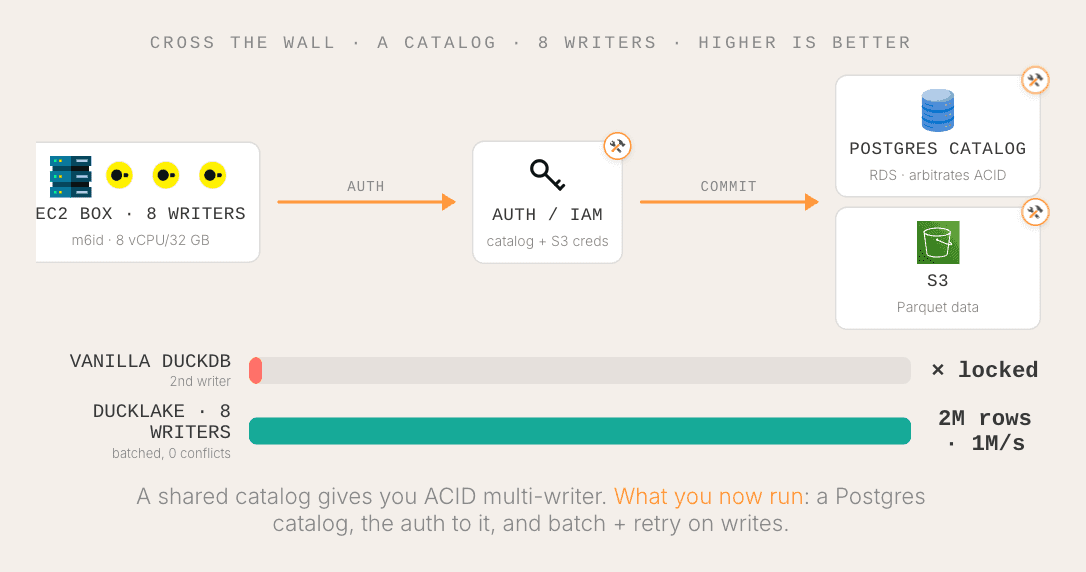
DuckLake is a Parquet-based table format, but unlike Iceberg or Delta, the metadata and transactions don't live as files in S3, they live in the Postgres database, which is fast. Batch your writes and 8 writers commit 2 million rows with zero conflicts. Fire tiny uncoordinated commits and they fight, so you add retry. That is typically the production pattern: batch plus retry.
Be fair about the cost, though. You now run and back up that Postgres catalog. Even if you already have Postgres, it is a schema to manage and a dependency on the critical path.
And a nuance people like about lakehouses: your data is portable, you can point other engines (Spark, Polars, whatever) at the same files. That is true, the Parquet in S3 is standard and never locked. But the catalog is the sticky part. Iceberg is tied to a catalog, with varying support depending on where you run it. The data is open; you still need a compatible catalog to actually use it.
So which storage should the lake sit on? A benchmark (don't trust it, illustration only): one box, 32 GB RAM, same 21 GB query.
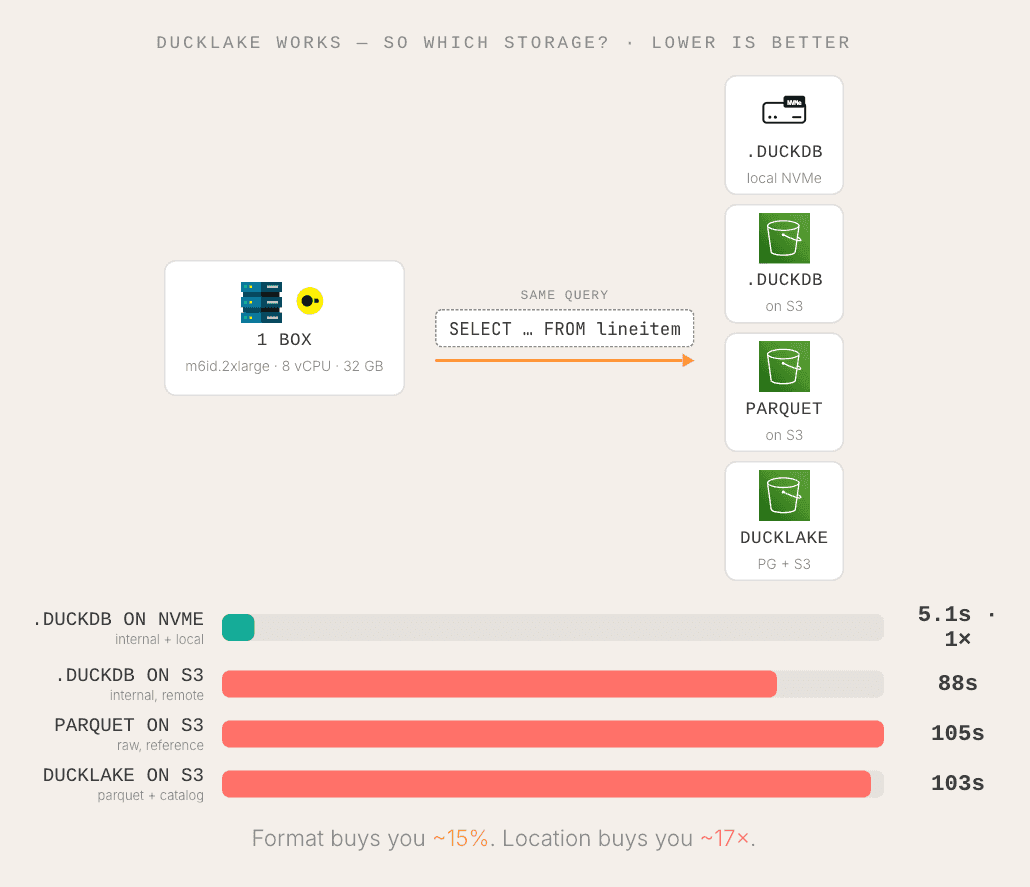
NVMe is super fast. A .duckdb file on S3 is faster than raw Parquet on S3. Parquet and DuckLake on S3 are roughly the same. But the headline is location: a file local on NVMe is drastically faster than anything on S3. So if you scale a self-hosted stack, you probably want both: hot local storage for fast interactive analytics, and lakehouse storage for the batch and overnight jobs where you care less about latency and more about the table-format features.
Have you noticed? The boxes keep coming
Every level quietly added another box you build and maintain. And there are a few we haven't even drawn yet, the ones that show up the second real people depend on you:
- Interface. Not just a DuckDB client, but an API, and increasingly an MCP endpoint so agents can reach your compute.
- Observability. Logs on query usage, dashboards to see what is about to go wrong.
- Reliability. Once you host compute and storage, even internally, you need a clear story on snapshots, backups, and point-in-time recovery. Transient storage has to be made durable, cheaply and fast.
Self-host, but don't accidentally build a database company
The sneaky part is that you never take these on all at once. They show up one at a time, level by level, and quietly add up to your real build-and-maintain bill.
So, should you self-host DuckDB? For plenty of cases, yes, and I genuinely encourage it to experience and realize the cost of these boxes. Be honest about your own skills and the time you actually have.
Because the hardest decision here is not how to build any single box. It is spotting the moment the maintenance stops being worth it, and switching then. That is true for anything you self-host, not just DuckDB. Hopefully this map, and the gotchas at each level, help you get as far as you want to go, and see that moment coming.
And if you have trouble with your boxes, we are happy to talk, here are the ones MotherDuck have for you, fully managed.
In the meantime, take care of your ducks!
Table of contents